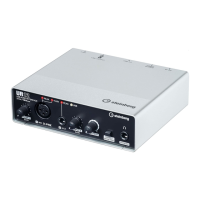
The UR12 is a compact USB audio interface designed for basic music production, offering high-quality audio in a portable and robust package. It supports Windows, Mac, and iPad environments, making it versatile for various recording setups.
Function Description:
The UR12 serves as a bridge between microphones, instruments, and a computer or iPad, converting analog audio signals into digital data for recording and playback. It features a single D-PRE microphone preamp and a single HI-Z input jack, optimized for sound quality. The device also includes direct monitoring capabilities, allowing users to hear their input signal without latency. It can be bus-powered via USB 2.0 or externally powered via a 5V DC port, which is particularly useful when connecting to an iPad or when a stable power supply is needed. The interface is designed to be user-friendly, with straightforward controls for input gain, output volume, and direct monitoring.
Important Technical Specifications:
- Audio Interface Type: USB Audio Interface
- Resolution: 24-bit/192kHz
- Inputs:
- 1 MIC D-PRE input (XLR) with +48V phantom power. Nominal Input: -50.0dBu to -6.0dBu.
- 1 HI-Z input (1/4" phone type, unbalanced) for instruments like electric guitars and basses. Nominal Input: -35.0dBV to +4.5dBV.
- Outputs:
- LINE OUTPUT (RCA, unbalanced) for connecting monitor speakers. Output level: +0dBV.
- PHONES jack (1/4" stereo phone type) for headphones. Output: 1.3mW into 40 ohms.
- Power:
- USB 2.0 bus-powered.
- 5V DC port for external power supply (USB power adapter or USB mobile battery). Output voltage: 4.8 V to 5.2 V, Output current: 0.5 A or greater.
- Indicators:
- PEAK indicators for both inputs (lights up when signal is 3dB below clipping).
- +48V indicator (lights up when phantom power is on).
- USB indicator (lights up when power is on; flashes if device is not recognized by computer/iPad).
- Controls:
- INPUT 1 GAIN knob (for MIC input).
- INPUT 2 GAIN knob (for HI-Z input).
- OUTPUT knob (adjusts PHONES and LINE OUTPUT levels simultaneously).
- DIRECT MONITOR switch (toggles direct monitoring on/off).
- POWER SOURCE switch (selects between USB 2.0 bus power and 5V DC external power).
- +48V switch (rear panel, turns phantom power on/off).
- Compatibility: Windows, Mac, iPad (requires Apple iPad Camera Connection Kit or Lightning to USB Camera Adapter).
- Driver: Yamaha Steinberg USB Driver.
Usage Features:
- Easy Setup: Connects to a computer or iPad via USB. The Yamaha Steinberg USB Driver facilitates communication and configuration.
- Direct Monitoring: A dedicated switch allows for zero-latency monitoring of input signals, essential for comfortable recording, especially when software latency is an issue.
- Loopback Function: A convenient feature for broadcasting over the internet, mixing input audio signals (microphone, guitar) with software playback into two channels and sending them back to the computer. Users are cautioned to turn off DAW monitor functions when using loopback to avoid loud noise.
- Flexible Power Options: Can be powered by the USB bus from a computer or via an external 5V DC power supply, offering flexibility for mobile setups with an iPad or when a more stable power source is desired.
- Optimized Recording Levels: PEAK indicators help users set optimal input gain by flashing when the signal is 3dB below clipping, preventing distortion.
- Phantom Power: The +48V switch on the rear panel enables phantom power for condenser microphones, with clear precautions to prevent noise and damage to equipment.
- ASIO Driver Settings (Windows): Allows configuration of buffer size, which directly impacts audio latency. Lower buffer sizes reduce latency but require more processing power.
- CoreAudio Device Settings (Mac): Provides options for buffer size and sample rate selection, similar to Windows.
- DAW Integration: Designed to work seamlessly with Cubase series programs and other DAW software, with clear instructions for configuring audio driver settings and input routing.
Maintenance Features:
- Troubleshooting Guide: The manual includes a comprehensive troubleshooting section addressing common issues such as power failure, no sound, unusual sound (noise, interruption, distortion), and sound overlapping.
- Driver Updates: Users are directed to the Steinberg Website for the latest support information and driver updates, ensuring ongoing compatibility and performance.
- USB Cable Precautions: Specific guidelines are provided for USB cable usage, including using AB type USB cables, avoiding USB 3.0 cables, waking the computer from sleep before connecting, quitting software applications before connecting/disconnecting, and waiting at least six seconds between connections/disconnections to prevent data corruption or device freezing.
- Phantom Power Safety: Detailed warnings are given regarding the use of phantom power, advising users to always turn it off when not needed, set the output knob to minimum before toggling, and avoid connecting/disconnecting devices while it is active.

 Need help?
 General

 To Next Page