Setting up the power supply
14 UR24C Startup Guide
Setting up the power
supply
Connecting the USB cable
(bus-powered)
When using the device by bus power,
connect the included USB cable to the
USB 3.0 jack on a computer. When
connecting the device to a USB 3.1 Type-C
port, you will need a commercially available
USB 3.1 Type-C to Type-C cable (optional).
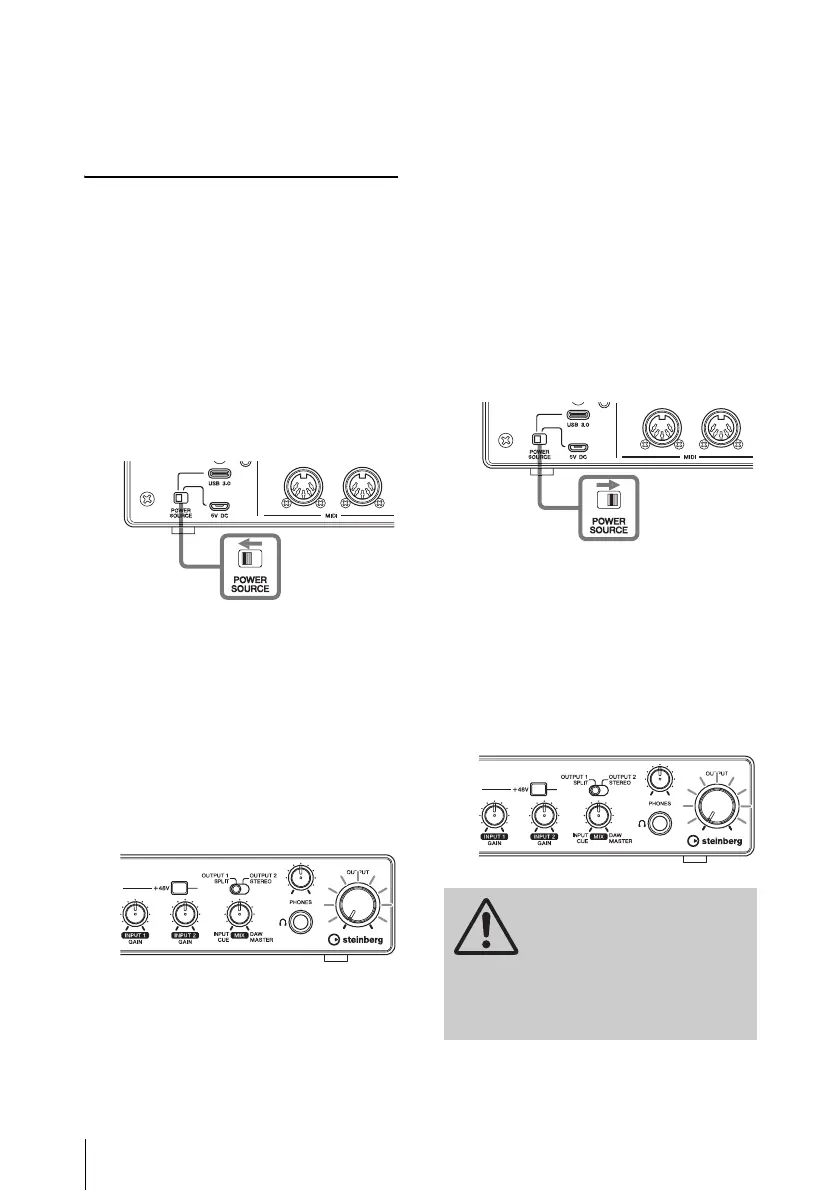
1. Move the [POWER SOURCE]
switch on the rear panel to the left.
2. Connect the included USB cable to
the [USB 3.0] jack on the rear
panel.
3. Connect the included USB cable to
the USB 3.0 jack on the computer.
4. The POWER indicator on the front
panel lights when the power is
turned on.
Connecting the USB power
adaptor or the USB mobile
battery
When connecting the device to a USB 2.0
jack on a computer or to iOS/iPadOS
device, you will need a commercially
available USB power adapter or USB
mobile battery for external power supply.
1. Move the [POWER SOURCE]
switch on the rear panel to the
right.
2. Insert the plug of the USB power
adaptor or USB mobile battery into
the DC IN [5V] port on the rear
panel.
3. The POWER indicator on the front
panel lights when the power is
turned on.
WARNING
Before turning the power of all
devices on or off, set all
volume levels to minimum.
Failing to do so may result in
hearing loss, electric shock, or
device damage.



 To Next Page