- 8 -
English
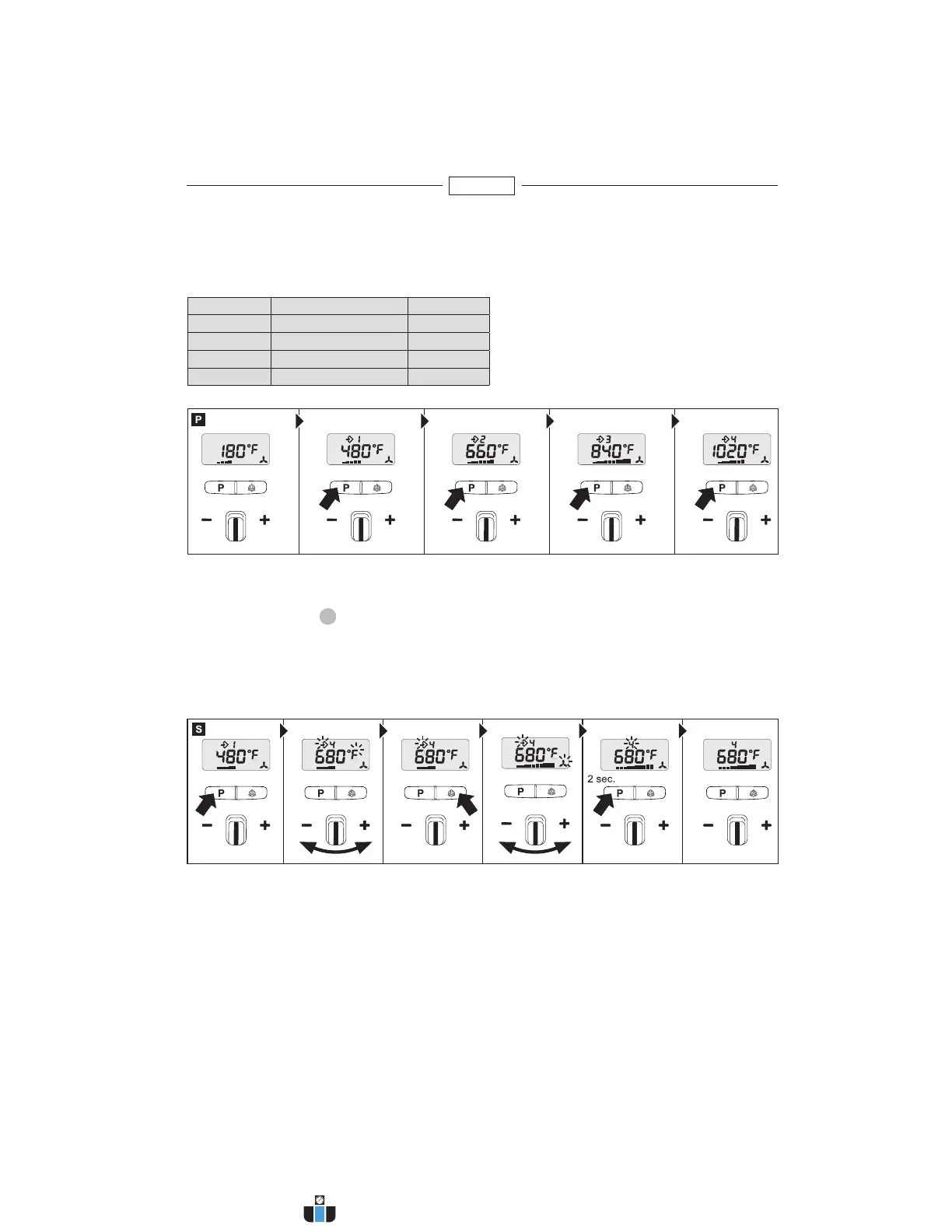
Programming mode [P]
Four programs are factory-set for the most common types of work. Press button "P" for programming mode.
Number 1 is displayed for programme 1. Continuing to press the programme button will take you to programs
2-4. Pressing the button again will return the tool to normal operation.
Memory function [S]
The values selected for the four programs can be changed and memorised at any time. To do this, first press
the program button "P"
11
until the display shows the program you wish to change. Set the temperature
and airflow rate you require. Memory symbol on the LCD flashes to indicate that the user program selected
has been changed. To memorise this setting in the user program selected, press and hold down the program
selector button. The memory symbol continues to flash for approx. 2sec. The settings entered are saved
once the memory symbol stays on all the time. To return to normal operation, press the program button until
the program symbol disappears from the display.
Preset programs
Program Temperature °F (°C) Air cfm
1 480 °F (250°C) 7 cfm
2 660 °F (350 °C) 9 cfm
3 840 °F (450 °C) 11 cfm
4 1020 °F (550 °C) 11 cfm
www.calcert.com sales@calcert.com1.888.610.7664
0
5
10
15
20
25
30


 To Next Page