21
USA and Canada 800.683.2378, International 904.641.1666 Econ FP
MODE
%
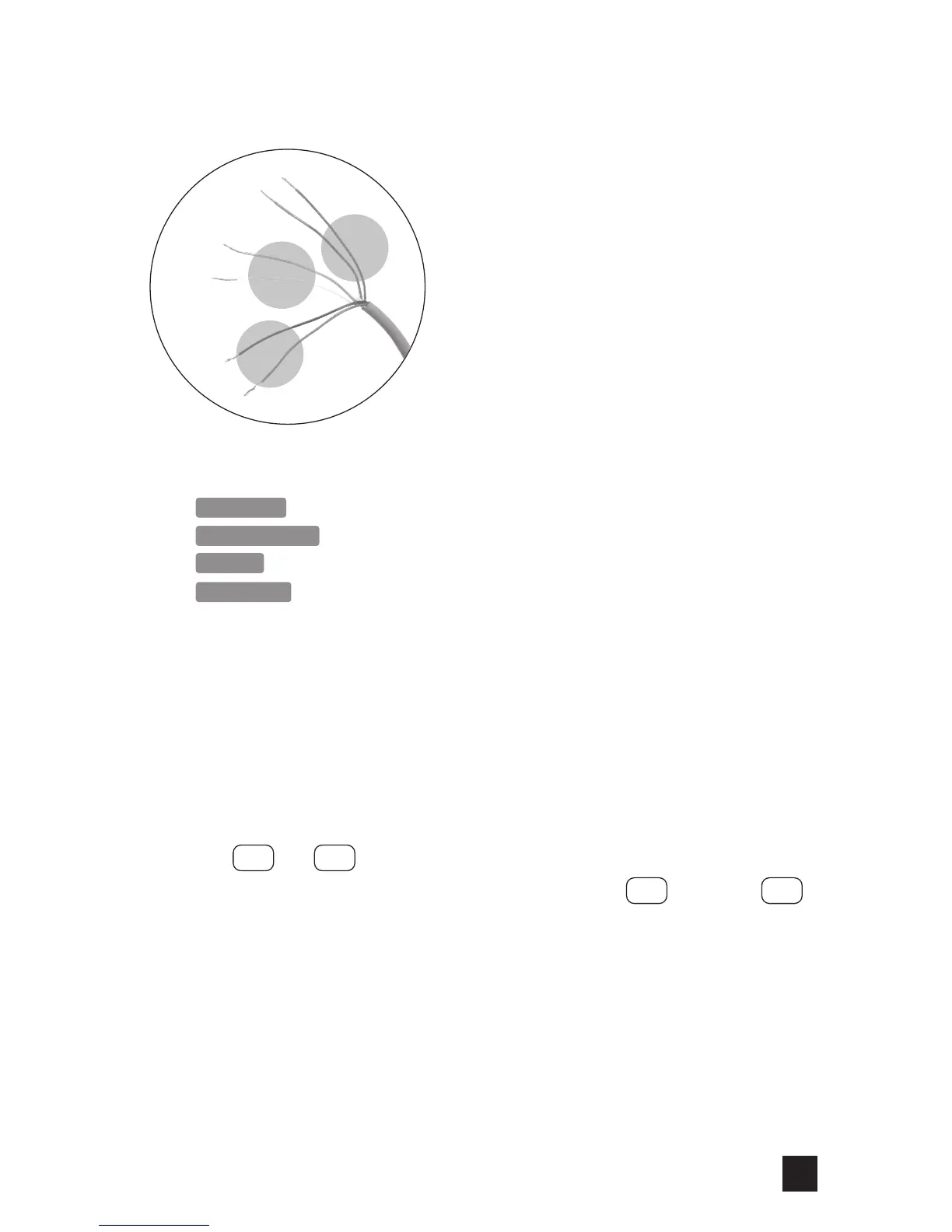
1. Connect signal wires as required by the installation:
SECONDS Black & Red
FLOW SWITCH Black & Red
PAUSE Green & White
AUXILIARY Brown (or Orange) & Blue
- For AC signal, there is no polarity.
- For DC signal, blue wire is connected to signal positive (+) and brown (or orange)
is connected to signal negative (—).
NOTE: If polarity is reversed when connecting a DC signal to the AUX input, the
pump will not respond to the signal.
2. Cap all non-terminated wires.
NOTE: All non-terminated wires must be capped to prevent operational errors or damage to
the pump.
3. Plug power supply into receptacle. To unlock the keypad, simultaneously press and
hold and for 5 seconds.
4. Put the pump in standby. First, press and continue to hold , then press .
5. Program the pump for the desired operating mode and % setting, refer to Program
Pump Settings in the manual.
NOTE: Leave the unit in standby until the signal wires are connected and the pump is
ready for priming.
INSTALLATION
SECONDS or
FLOW SWITCH
PAUSE
Brown
(or Orange)
Blue
Green
Black
R
ed
White
AUXILIARY
STBYMODE
+
—



 To Next Page