REQUIRED TOOL LIST
StepManiaX STAGE Setup
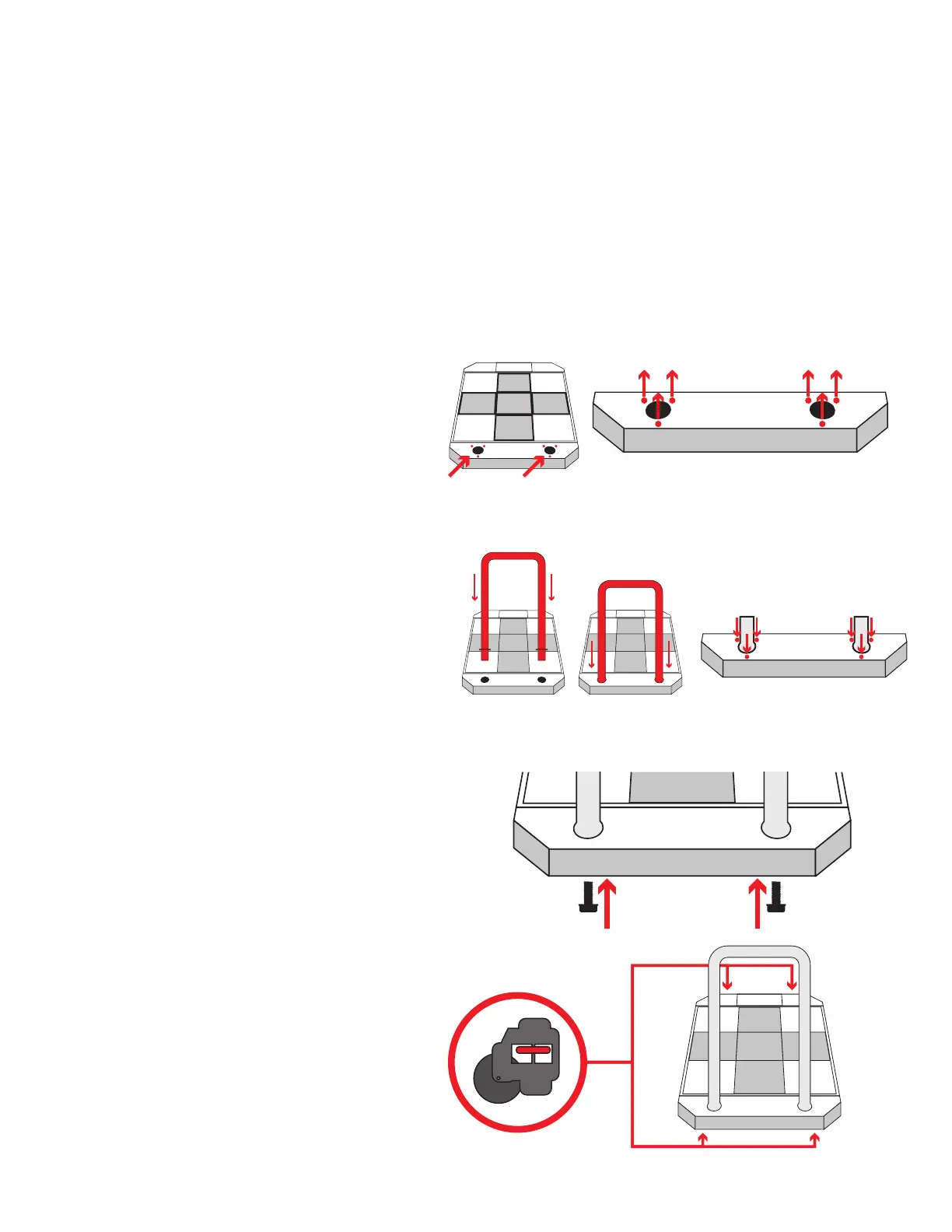
Attaching the bar
The back support bars for the stages are detached for shipment.
You will require some basic tools to assemble both the StepManiaX Stages and the main unit.
1. Locate the 6 M5 screws on the top of
the stage near the back. Remove these
screws and set them aside.
2. Take the back support bar and insert
it into the stage. Note the orientation
of the screw holes on both the stage
and the bar to make sure they align.
Re-install the screws into the three holes
on each side of the installed bar. Tighten
until secured.
3. Using 2 of the included large lug bolts,
securely fasten them into the base of
the bar from the underside of the stage.
Tighten using a wrench until firmly in
place. Repeat this step for both Stage P1
and Stage P2.
4. Stabilize the stages from movement and
vibrations by spinning the red tightener
on each stage’s wheels counter-
clockwise until tight and firmly secure.
Phillips Screw Driver
2.5mm Allen Key
3mm Allen Key
4mm Allen Key
5mm Allen Key
Wide Jaw Crescent Wrench (2.5” reach)


 To Next Page