EasyManua.ls Logo

Steren CCTV-087 - User Manual

Steren CCTV-087
29 pages
Go to English
Print Icon
To Next Page IconTo Next Page
Loading...
1
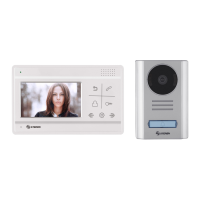
Video intercomunicador con pantalla a color y controles touch CCTV-087
V0.0 0116v
V0.0 / 0316v

Questions and Answers

  • C
    casetashaAug 11, 2025
    How to fix Steren Intercom System when there is no sound and image?
    • R
      Rachel ScottAug 11, 2025
      If your Steren Intercom System has no sound and image, first ensure that the device is properly connected to a power supply. Next, carefully review all connections according to the connection diagram. Finally, check the wires for any damage or cuts that may be affecting the signal.
  • M
    Michelle TorresAug 20, 2025
    What to do if Steren Intercom System image is with noise or unclear?
    • X
      xgreerAug 20, 2025
      If the image on your Steren Intercom System is noisy or unclear, start by verifying that all connections are secure, as a loose cable could be the cause. If the connections are good, try adjusting the brightness and contrast controls to improve the image clarity.
  • R
    Randall SheltonAug 30, 2025
    Why the door can’t be open with Steren Intercom System?
    • E
      Elaine GutierrezAug 30, 2025
      If the door cannot be opened using your Steren Intercom System, first review the connection of the electric lock to ensure it's properly connected. Then, verify that the electric lock is compatible with your Steren Intercom System.

Steren CCTV-087 Specifications

General IconGeneral
BrandSteren
ModelCCTV-087
CategoryIntercom System
LanguageEnglish

Related product manuals