66
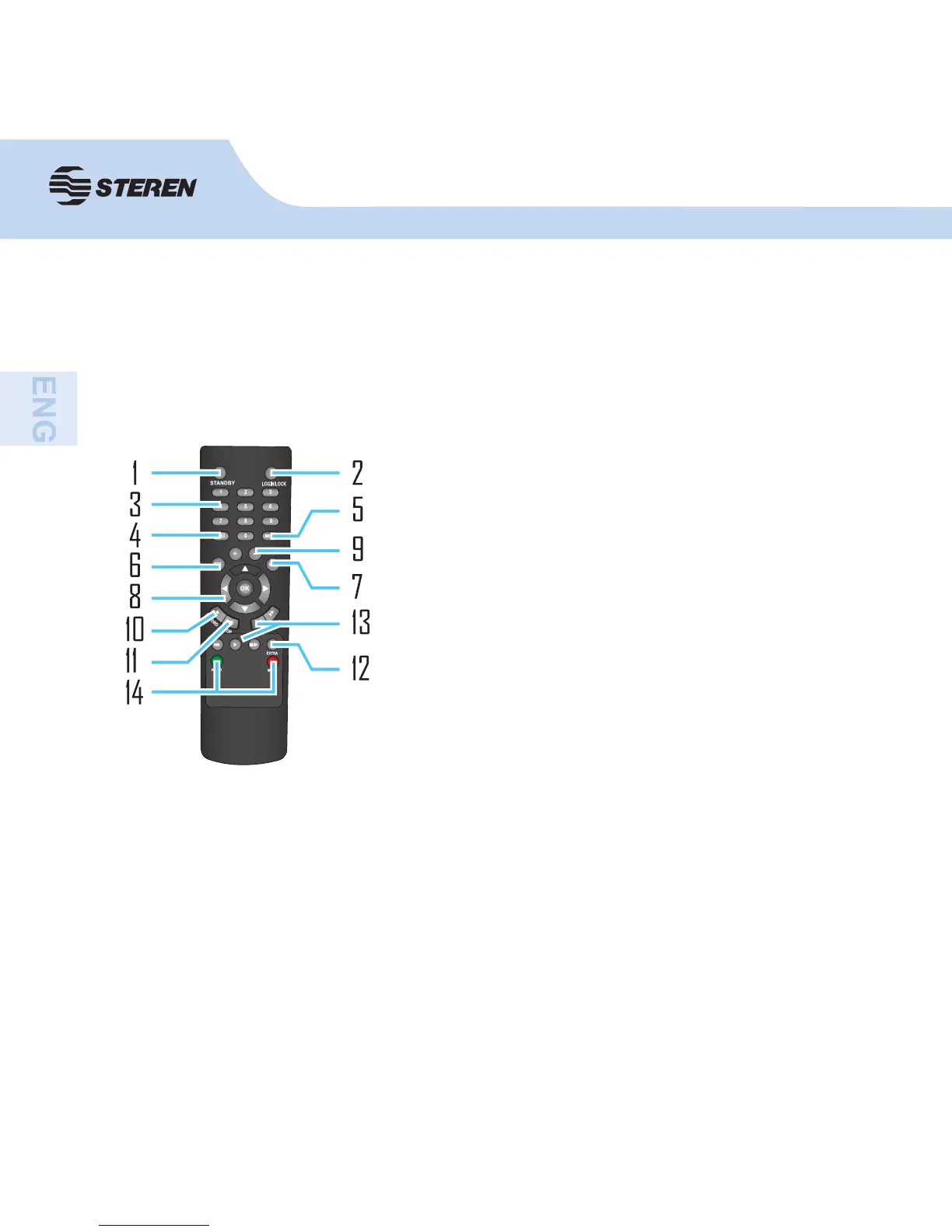
8. Navigation/OK:
• : Move cursor in menus up,Channel Up
• : Move cursor in menus right,Channel Up, during playback, increase forward playback
speed (2X, 4X, 8X,16X,32X).
• : Move cursor in menus left, Channel down, during playback, increase reverse playback
speed (2X, 4X, 8X,16X,32X)
• : Move cursor in menus down, Channel down
• OK: In menus, press to confi rm selections;
9. +/ - : In menus, press to adjust values.
10. RECORD: Press to start manual recording.
11. STOP: Press to stop manual recording.
REMOTE CONTROL
In device operation, the enter key on remote control has the same function as left click of
the mouse.
1. STANDBY: Press to turn on/off standby mode.
2. LOGIN/LOCK: You can control the DVR using
the remote control by pairing it entering the device
number. See “Use Remote controller to select the
device number” section.
3. Number/Channel buttons: While in menus,
press buttons 0~9 to enter values; during live
viewing, press to view channels in full-screen.
4. : Press to switch between quad and split-screen
displays.
5. MENU: Opens the main menu.
6. PTZ: Press to open the PTZ control window.
7. EXIT: Close menu windows.



 To Next Page