ENGLISH
ENGLISH-2
Before using your new RF presenter wireless laser and
mouse read this instruction manual to prevent any damage.
Put it away in a safe place for future references.
IMPORTANT
Never aim the laser beam directly to the eyes.
Clean only with a soft, dry cloth.
Do not try to open this device, may cause malfunction and war-
ranty repeal.
Do not use or store the presenter near wet places.
Check the batteries regularly.
When the presenter will not to be used for a long time, remove
the batteries.
MAIN CHARACTERISTICS
Controls the presentations easily
Operating range up to 20 metres
Laser maximum operating range: Up to 200 metres
Clock
Alarm
Chronometer
For Windows 98, SE, ME, 2000, XP, Mac OS, Linux
No drivers required (Only for Windows 98)
Plug & Play
CONTROLS
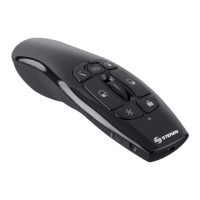
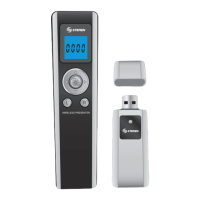
1.- Battery compartment
2.- Laser beam
3.- LCD screen
4.- Movement arrows / Pointer
Use this button move the mouse pointer / Press in the centre to
generate the laser beam
5.- Mouse’s left button
Same function as in the mouse
6.- Mouse’s right button
Same function as in the mouse
•
•
•
•
•
•
•
•
•
1
2
3
4
5
6
Before usin
our new RF presenter wireless laser and
ouse read this instruction manual to prevent an
dama
e.
ut it awa
in a safe place for future references


 To Next Page