ENGLISH
ENGLISH-5
6.- Unplug the receiver from the computer, after their use.
HOW TO USE THE MOUSE
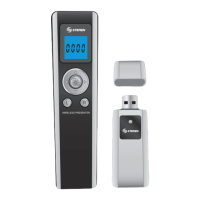
This device can be used as a wireless mouse, includes
forward, backward buttons, and the left and right buttons such as
a mouse, even you can control and move the pointer through the
screen.
1.- Plug the receiver into an available USB port.
2.- Use the Movement arrows to move the pointer.
3.- Use L and R buttons to open menus or select options. This
buttons have the same functions as a mouse.
4.- If you want to jump into pages, press the Page Up / Page
down buttons.
ALARM / CLOCK SET
1.- Press and hold Setting button for 3 seconds. The alarm icon
blinks in the screen.
2.- Press Pointer button, the fi rst number will blinks.
3.- Use the Movement arrows (Up and Down) to change the
blinking number.
4.- The fi rst 2 numbers confi gure the Hours, and the last 2
numbers confi gure the minutes.
5.- Using the Movement arrows, move to the left or right to
change to next position.
6.- Once you have confi gured the alarm, press Pointer button to
store the changes in memory.
7.- Now, repeat the steps 3 to 6 to confi gure the current time.
8.- Remember to press Pointer button to store the changes.
Press R button to turn the alarm off.
If you want to confi gure the current time without set an
alarm, follow these simple steps: when the icon of the alarm
blinks, move to the right the Movement arrow, automatically
you’ll enter to the Clock set. Then follow the instructions to
update the time.
If you don’t want to edit the alarm or the time, move the
Movement Arrow to the right, twice.
The time is in 24 system (5pm=17hrs), if you want to enter a
time higher than 24 hours, the system will reject it
automatically.
ress R button to turn the alarm off
f
ou want to confi
ure the current time without set an
larm, follow these sim
le ste
s: when the icon of the alarm
blinks, move to the ri
ht the Movement arrow, automaticall
ou’ll enter to the Clock set. Then follow the instructions to
ate t
e t
me
f
ou don’t want to edit the alarm or the time, move the
ovement Arrow to the ri
ht, twice
he time is in 24 s
stem
5pm=17hrs
, if
ou want to enter a
ime hi
her than 24 hours, the s
stem will re
ect it
utomaticall


 To Next Page