EasyManua.ls Logo

Steren SWI-008 - User Manual

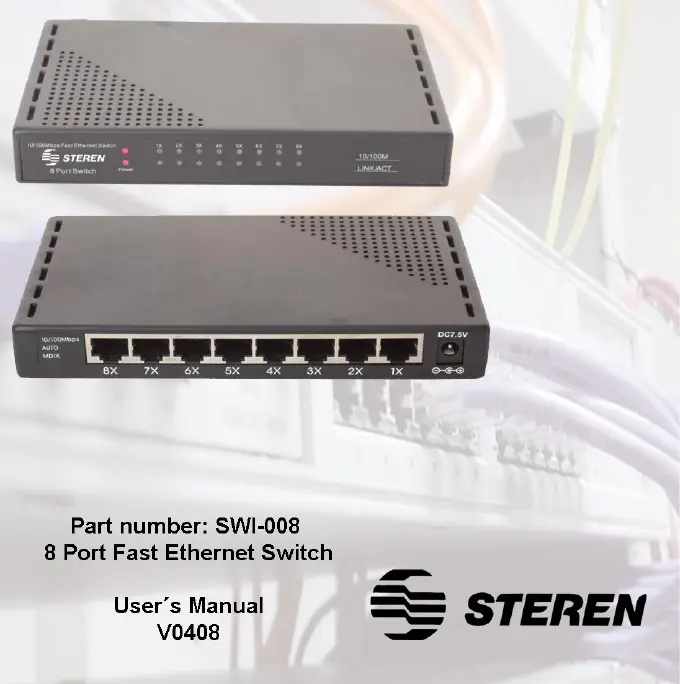
Steren SWI-008
18 pages
Print Icon
To Next Page IconTo Next Page
Loading...

Other manuals for Steren SWI-008

Questions and Answers

  • L
    Lori ThomasAug 4, 2025
    How to troubleshoot Steren Network Router when the power LED is not lit?
    • S
      Stephen HendersonAug 4, 2025
      If the Power LED on your Steren Network Router isn't lighting up, verify that the AC power adapter is correctly plugged into both the outlet and the router's power jack. Also, ensure the power source is switched on. Finally, confirm that you're using the power adapter that originally came with your Steren Network Router.
  • D
    drakecarolynAug 17, 2025
    What to do if the Activity LED is not lit on my Steren SWI-008 Network Router?
    • A
      Andrew JonesAug 17, 2025
      If the Activity LED on your Steren Network Router isn't lighting up when a device is connected, ensure that the cable connectors are securely plugged into both the router and the device. Also, verify that the connected device is powered on and its adapter is correctly installed and working. Lastly, make sure the cable length is less than 328 feet.

Summary

Important Safety and Usage Recommendations

Handling Precautions

Recommendations for safe operation, including avoiding opening the unit, extreme weather, and wet places.

Product Features

Details on standards compliance, data transfer, port features, and LED indicators.

Device Controls and Indicators

Power LED

Indicator light for when the equipment is plugged into an AC outlet.

Link;ACT LED

Indicator light for connection status and data transmission activity.

RJ45 Connector

Port for connecting devices to the switch via Ethernet cable.

AC Power Adapter Port

Connection point for the included AC power adapter.

Installation Guide

Choosing a Location

Recommendations for selecting a suitable and safe placement for the switch.

Connecting Devices and Power

Step-by-step instructions for connecting devices and the power adapter.

Troubleshooting Common Issues

Power Light Not Lit

Solutions for when the power indicator LED does not illuminate.

Port Light Not Lit

Solutions for when a connected device's port indicator LED does not illuminate.

Technical Specifications

Network Interface and Data Rates

Details on network standards, interface types, and data transfer speeds.

Operating and Storage Conditions

Information on temperature and humidity ranges for operation and storage.

Product Warranty Information

Warranty Conditions

Requirements for claiming warranty service and service terms.

Warranty Void Cases

Conditions under which the product warranty becomes void.

Retailer and Support Information

Contact Details and Service

Information for retailers and customer support contact numbers.

Steren SWI-008 Specifications

General IconGeneral
BrandSteren
ModelSWI-008
CategoryNetwork Router
LanguageEnglish

Related product manuals