CAUTION: Always follow the basic precautions listed below to avoid
the possibility of physical injury to you or others, or damage to the
device or other property. Sterling Audio will not be held responsible for
damage caused by improper use or modification of the device. These
precautions include, but are not limited to, the following:
HANDLING CAUTION:
• Do not use the device in a location where it may come into contact with
corrosive gases or salt air. Doing so may result in malfunction.
• Do not rest your weight on the device or place heavy objects on it.
Avoid applying excessive force to the connectors to prevent injuries.
• Avoid pulling the connected cables to prevent injuries or damage to
the device.
• When removing the plug from the connected device, be sure to pull out
by the plug following the cable connection and disconnect instructions.
Bending or pulling the cable forcefully may cause damage to it.
Storing: Store the product out of reach of children to avoid them
swallowing small parts. If a child swallowed them, consult a physician
immediately.
Notice: To avoid the possibility of malfunction/damage to the
product, damage to data, or damage to other property, follow the
notices below.
HANDLING AND MAINTENANCE
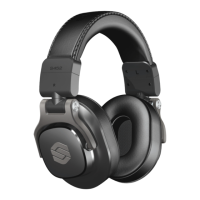
• Handle the headphone arms gently when you rotate or fold in the earcups.
• Refer also to the manuals supplied with the devices to be connected.
STERLINGAUDIO.NET
EAR CUSHION REMOVAL/
REPLACEMENT
In the event that your headphones
require new ear cushions
from damage, abuse, or from
passionately playing with them
too hard, you can replace the ear
cushions with new ear cushions
from your local authorized
Sterling Audio dealer.
When installing new ear cushions,
you will need to press in the four
(4) posts until you hear or feel
a “snap” or “lock” action during
installation.
Threaded 1/4” (6.3mm)
gold-plated adapter
2.4mm
Straight Cable
1. Insert
2. Rotate clockwise to align marks
21


 To Next Page