Need help?
Do you have a question about the StetSom STX2448 and is the answer not in the manual?
Crucial pre-installation steps and safety warnings to ensure proper setup and operation.
Details on sequential product activation and automatic amplifier turn-on connections.
Instructions for connecting the positive and negative battery terminals for power.
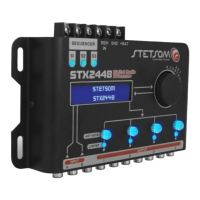
Explains the visual display and rotary encoder for system interaction.
Description of shortcut keys for channel selection and LEDs indicating limiter status.
Details on RCA input connectors and processed audio output connectors.
How to navigate menus and adjust parameters using the encoder.
How to select output channels and control features using hotkeys.
Details on the 15-band graphic equalizer and its presets for input processing.
Explains parametric equalization and audio source routing options for outputs.
Defines cutoff frequencies, filter types, and attenuations for high-pass and low-pass filters.
How to digitally align speakers using time correction for improved audio fidelity.
Reversing output phase to resolve frequency cancellation issues.
Protects system from peaks using adjustable threshold, attack, and release.
Adjusting individual output gains and the overall master volume.
Controls for muting output channels individually or collectively.
Lists and describes the 12 available graphic equalization presets.
Saving and loading personalized user configurations and factory presets.
Steps to restore the device to its original factory default configuration.
Generates specific audio frequencies with adjustable gain for testing and setup.
Analyzes frequency response by sweeping through a range of frequencies.
Configuring the time intervals between sequential output activations.
Independent control to turn individual sequencer outputs on or off.
 General
| Brand | StetSom |
|---|---|
| Model | STX2448 |
| Category | Computer Hardware |
| Language | English |

 To Next Page