27
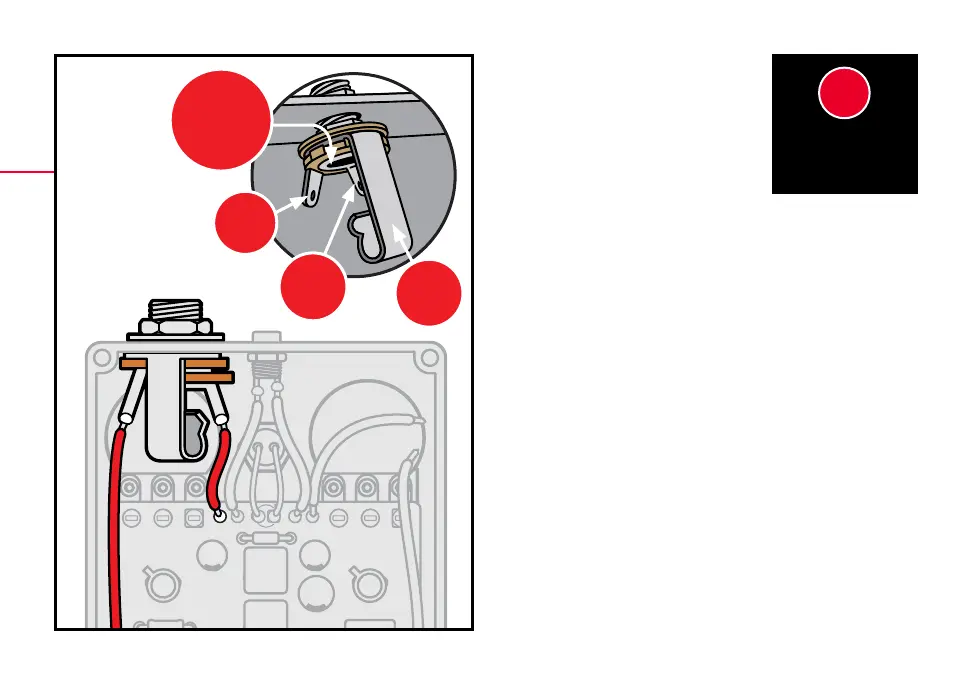
SLEEVE
TIP
SLEEVE
LUG
TIP
LUG
shown in the diagram. Add the washer and thread
the nut on to the shaft enough so that the pot can
rotate freely.
Solder the right wire at the top of the PCB to the input
jack lug that corresponds with the sleeve connection.
The sleeve lug should be the one closest to the DC jack.
Solder the left 4” wire from the breakout board to the
lug of the input jack that corresponds with the tip
connection. The tip lug should be the one closest to
the outside wall of the enclosure.
Once the solder has cooled, orient the jack as shown in
the diagram, make sure none of the connections on the
jack are shorting to any other components, and tighten
the nut on the jack.
INSTALL THE
INPUT JACK
1515
Model 12252 comes with two
mono jacks. One will be your
input jack and the other your
output jack. Insert the jack into
the left side of the housing with
the tip connection facing up, as



 To Next Page