< 30 >
Assembly procedures
S25UX//UXi
1. Check the contents//Accompanying parts, required tools, & others…
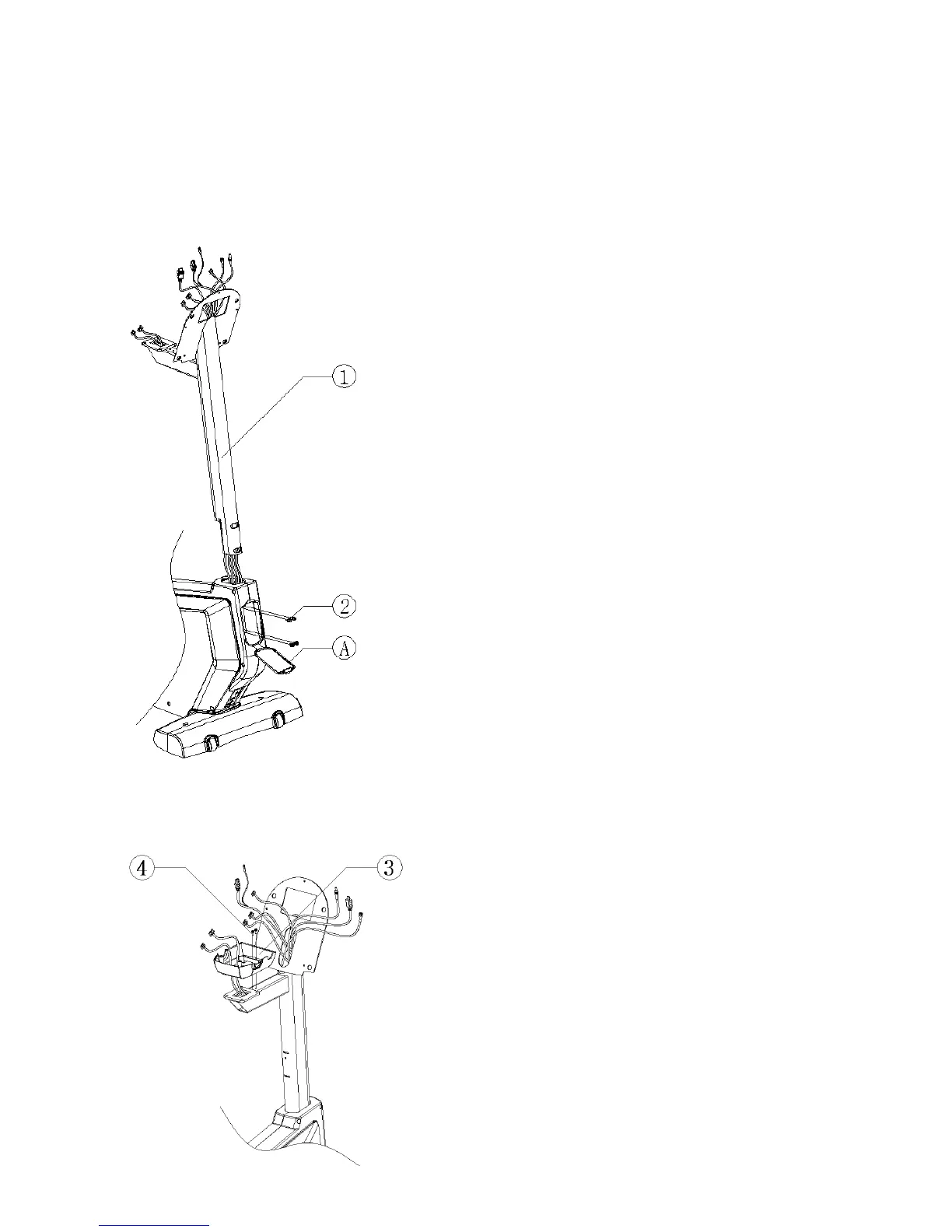
2. Secure the DISPLAY CONSOLE SUPPORT COLUMN(1).
1) Open the FRONT CAP(A) of the base frame.
2) Feed the wires through the DISPLAY CONSOLE SUPPORT
COLUMN(1).
3) Slide the DISPLAY CONSOLE SUPPORT COLUMN over the front
part of a base frame as shown. Secure the DISPLAY CONSOLE
SUPPORT COLUMN using four M620mm SCREWS(2).
4) Close the FRONT CAP of the base frame.
3. Secure the FAST TRACK_BOTTOM COVER(3).
1) Position the FAST TRACK_BOTTOM COVER(3) as shown.
2) Secure the FAST TRACK_BOTTOM COVER using two
M512mm SCREWS(4).
Note: Be careful not to pinch wires.



 To Next Page