< 31 >
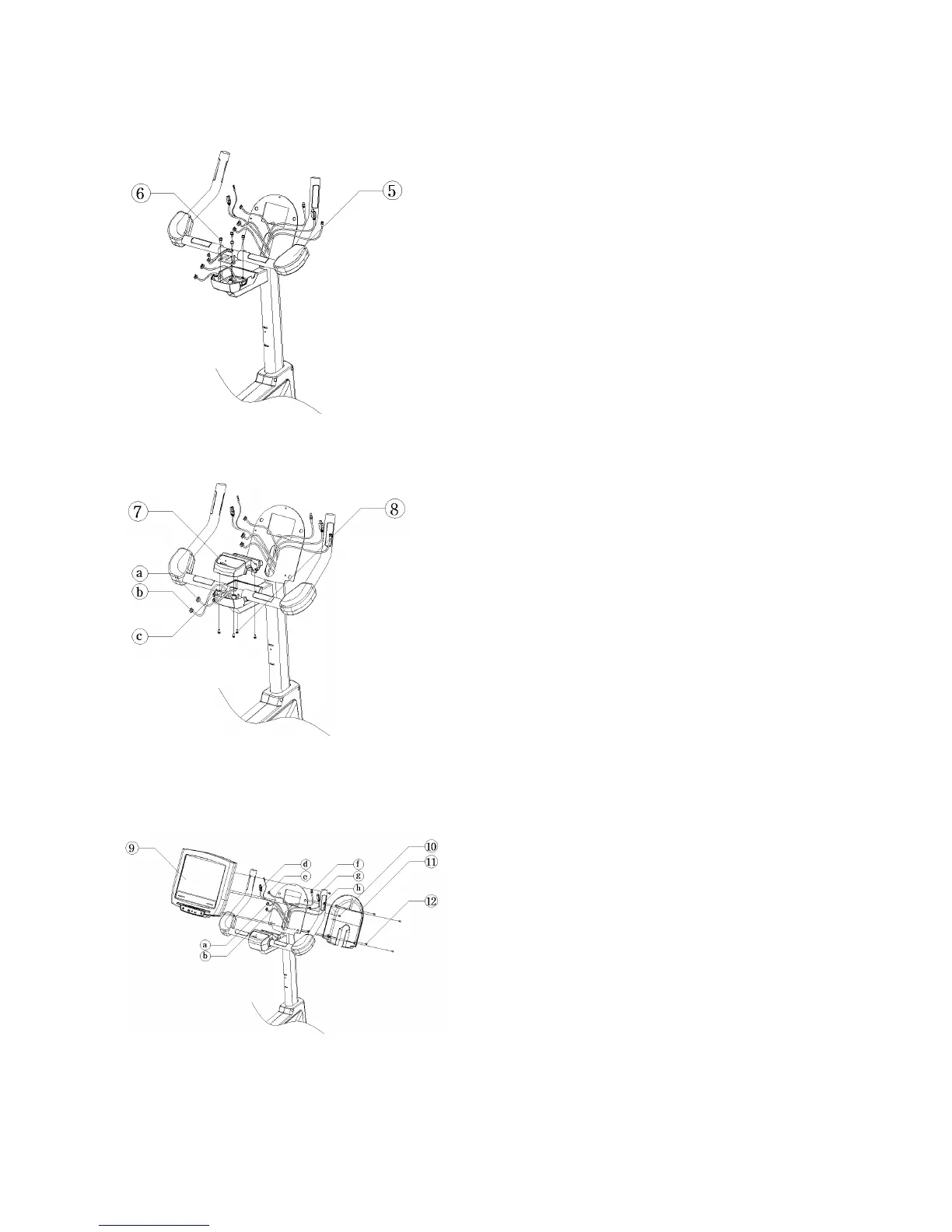
4. Secure the front HANDLEBAR(5).
1) Position the front HANDLEBAR(5) as shown.
2) Secure the HANDLEBAR to the upper DISPLAY CONSOLE
SUPPORT COLUMN using four M615mm SCREWS(6).
Note: Be careful not to pinch wires.
5. Secure the FAST TRACK_TOP COVER(7).
1) Position the FAST TRACK_TOP COVER(7) as shown.
2) Connect the HEART RATE CABLE(a) and FAST TRACK
CABLE(b) leading from the upper DISPLAY CONSOLE
SUPPORT COLUMN to their respective locations in the back of
the FAST TRACK_TOP COVER.
3) Connect the HEART RATE CABLES(c) leading from the
front HANDLEBAR to their respective locations in the back of
the FAST TRACK_TOP COVER.
4) Secure the FAST TRACK_TOP COVER using four
M512mm SCREWS(8).
Note: Be careful not to pinch wires.
6. Secure the DISPLAY CONSOLE(9).
1) Position the DISPLAY CONSOLE(9) as shown.
2) Connect the HEART RATE CABLE(a) and FAST
TRACK CABLE(b), the MAIN CONSOLE CABLE(d),
RS-232 CABLE(e, optional), the POWER CABLE(f),
the HDMI CABLE(g, optional), and COAXIAL
CABLE(h) leading from the upper DISPLAY CONSOLE
SUPPORT COLUMN to their respective locations in the
back of the DISPLAY CONSOLE.
Note: Be careful not to pinch wires and be sure all
connectors are fully seated.
3) Secure the DISPLAY CONSOLE on the console bracket using five M512mm SCREWS(10).



 To Next Page