EasyManua.ls Logo

STI SA5000 Series - User Manual

STI SA5000 Series
8 pages
Print Icon
To Next Page IconTo Next Page
Loading...
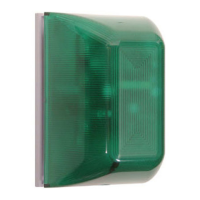
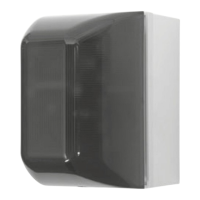
Select-Alert Alarm
Mini Controller
We protect the things that protect you.
®
Features
· Use as a cabinet alarm, door alarm,
link with push button/switch or as a
burglar alarm.
· Independent strobe and siren timing
of 15 seconds, 30 seconds, 60
seconds or continuous.
· Durable, polycarbonate construction.
· Includes ten high intensity LED’s.
· Siren offers 32 user selectable tones.
· Choose piercing 100 or 85 dB alarm.
· For indoor use only.
· Available with amber, green, blue,
red or white lens.
· Includes a tamper switch which
triggers the alarm when unit is
being removed from a wall.
· Low battery indicator.
· Powered by a 9 VDC battery
(not included) or external 12 – 24
volts.
· One Form “C” dry relay contact
output.
STI-SA5000 SERIES

Other manuals for STI SA5000 Series

Question and Answer IconNeed help?

Do you have a question about the STI SA5000 Series and is the answer not in the manual?

Summary

Select-Alert Alarm Features

Select-Alert Assembly Parts List

Select-Alert Alarm Accessories

Safety Warnings and Precautions

Select-Alert Alarm Warranty Information

Select-Alert Alarm Dimensions

Select-Alert Alarm Installation Guide

Step 1: Electronic Setup

Guide to connecting wires to the terminal strip and setting up the alarm's electronic components.

Step 2: Alarm Tones Configuration

Details on setting the 32 user-selectable siren tones using the S1 switch configuration.

Step 3: Alarm Timing and Volume Settings

Configuration of siren and strobe timing (15s, 30s, 60s, continuous) and volume levels.

Step 4: Terminal Strip Connections

Explanation of DC IN polarity sensitive terminals and dry contact connections for monitoring.

Step 5: Mounting Options

Instructions for mounting the unit using the STI backbox or directly to a wall/electrical box.

Step 6: Electronics Final Assembly

Procedure for connecting wires after board mounting and installing the lens with tamperproof screw.

Step 7: Operation Instructions

How to arm, reset alarm, and understand alarm triggers like cover removal or cabinet opening.

Summary

Select-Alert Alarm Features

Select-Alert Assembly Parts List

Select-Alert Alarm Accessories

Safety Warnings and Precautions

Select-Alert Alarm Warranty Information

Select-Alert Alarm Dimensions

Select-Alert Alarm Installation Guide

Step 1: Electronic Setup

Guide to connecting wires to the terminal strip and setting up the alarm's electronic components.

Step 2: Alarm Tones Configuration

Details on setting the 32 user-selectable siren tones using the S1 switch configuration.

Step 3: Alarm Timing and Volume Settings

Configuration of siren and strobe timing (15s, 30s, 60s, continuous) and volume levels.

Step 4: Terminal Strip Connections

Explanation of DC IN polarity sensitive terminals and dry contact connections for monitoring.

Step 5: Mounting Options

Instructions for mounting the unit using the STI backbox or directly to a wall/electrical box.

Step 6: Electronics Final Assembly

Procedure for connecting wires after board mounting and installing the lens with tamperproof screw.

Step 7: Operation Instructions

How to arm, reset alarm, and understand alarm triggers like cover removal or cabinet opening.

STI SA5000 Series Specifications

General IconGeneral
BrandSTI
ModelSA5000 Series
CategoryController
LanguageEnglish

Related product manuals