ARCS / ARCS Blue
Upgradable readers
Installation instructions
ARCS / ARCS Blue
Lecteurs évolutifs
Notice d’installation
ARCS / ARCS Blue
Lectores escalables
Procedimiento de instalación
conforme con NOM-024 -SCFI-2013
© STid - 20 PA des Pradeaux FR13850 Gréasque - NI1114C06- Page 4 sur 15 - Ed. 08/04/2019
STid reserves the right to make change without notice, for the purpose of product improvement.
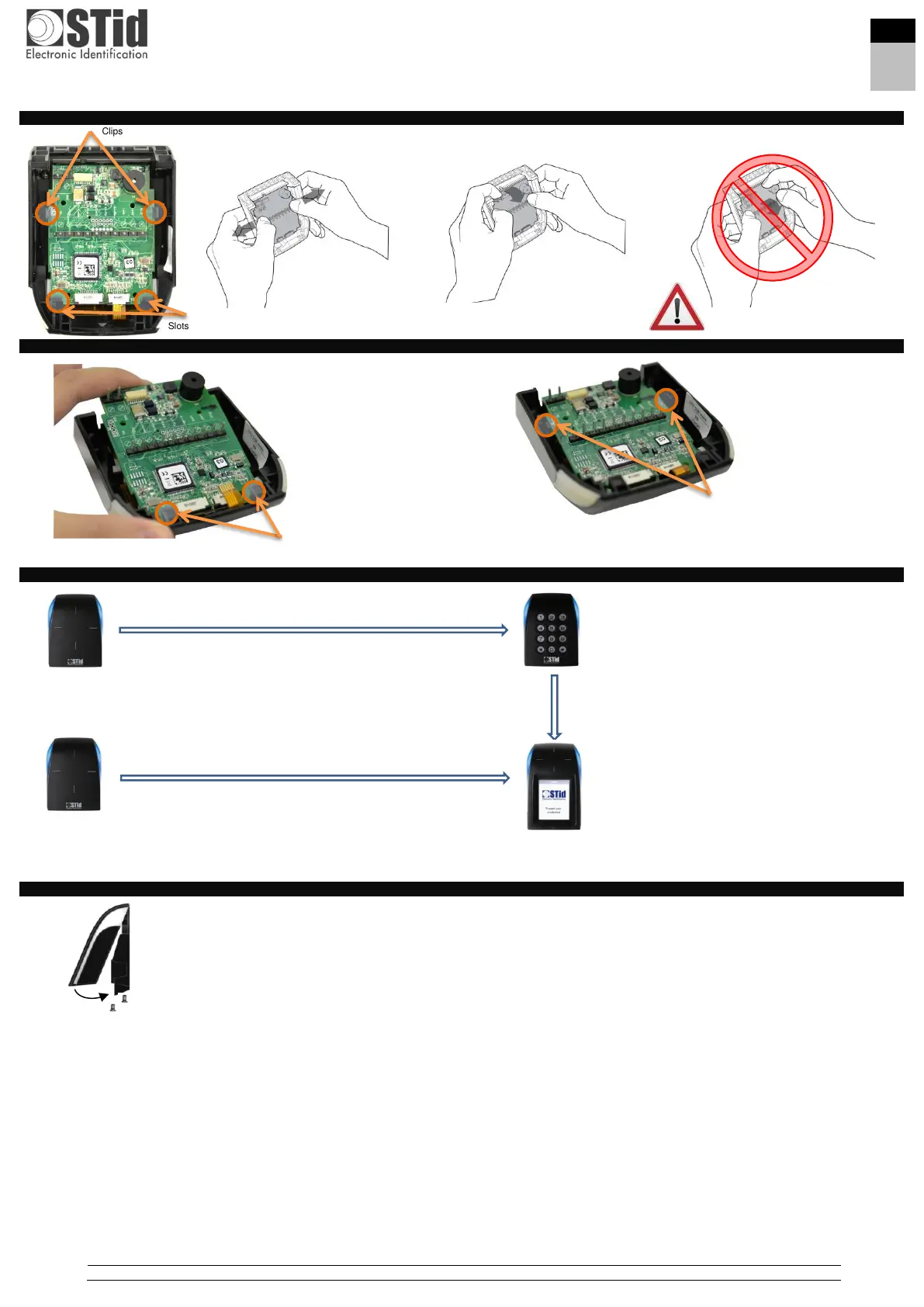
Steps to remove the core from the front cover
Procedure to install the core into the front part
Procedure to change the front part
Mounting
- Pass the cables through the hole in the base.
- Screw the base in its final location.
- Connect the reader.
- Test the readings and communication.
- Place the reader on the base (clip the top part and then pivot it down).
- Lock the reader with the two screws provided using the specific tool.
Do not use the buzzer as a lever
Place the core between the two slots at the top
of the cover.
And then pivot the core and press to insert it
between the two clips.
- Disconnect the flat flexible antenna cable from connector J6.
- Remove the core from the front part (steps 1, 2).
- Install the core in the keyboard front part.
- Connect the flat flexible antenna cable to connector J6 and the
flat flexible keyboard cable to connector J7.
- Disconnect the flat flexible antenna cable of connector J6.
- Remove the core from the front part (steps 1, 2).
- Install the core in the screen front part.
- Connect the flat flexible antenna cable to connector J6 and the
screen ribbon to connector J14.
- Disconnect the flat flexible antenna cable from
connector J6 and the flat flexible keyboard cable
from connector J7.
- Remove the core from the front part (steps 1, 2).
- Install the core in the screen front part.
- Connect the flat flexible antenna cable to connector
J6 and the flat flexible screen cable to connector
J14.



 To Next Page