EasyManua.ls Logo

STIEBEL ELTRON WPM - User Manual

STIEBEL ELTRON WPM
14 pages
Print Icon
To Next Page IconTo Next Page
Loading...
BEDIENUNG
OPERATION
UTILISATION
USO
rmepumpen-Manager | Heat pump manager | Gestionnaire de pompe à chaleur |
Quadretto di comando pompa di calore
» WPM
OKMENU

Other manuals for STIEBEL ELTRON WPM

Question and Answer IconNeed help?

Do you have a question about the STIEBEL ELTRON WPM and is the answer not in the manual?

Summary

General Information

Relevant Documents

Lists associated commissioning instructions for the WPM.

Safety Instructions

Details structure of safety warnings, symbols, and keywords like DANGER, WARNING, CAUTION.

Other Symbols in Documentation

Explains symbols for material losses, appliance disposal, and user actions.

Safety

Intended Use

Defines the appliance's purpose and appropriate usage.

Safety Instructions

Covers general safety warnings, potential risks, and emergency procedures.

Test Symbols

Refers to symbols found on the appliance's type plate.

Appliance Description

Operation

Controls Overview

Describes the display, MENU key, Touch-Wheel, and OK key.

Symbols

Explains symbols indicating the current operating status of the heat pump.

Entering Parameters

Details how to adjust set temperatures and date/time using the Touch-Wheel.

Selecting Operating Modes

Guides on selecting modes like STANDBY, PROGRAMMED, COMFORT, ECO, DHW, and EMERGENCY.

Menu

Menu Structure

Outlines the hierarchical structure of the device's menu system.

Menu Description

Explains how users can set parameters and where remaining parameters are located.

Programs

Details setting times for HEATING, DHW, PARTY, HOLIDAY, PASTEURISATION, and CIRCULATION programs.

Settings

Covers general settings, heating, DHW, and cooling parameters.

Settings

Standard Settings

Lists factory default switching times and temperature settings.

Changed Settings

Provides tables to document user-programmed times and settings.

Notifications

Notification List

Explains how to display a list of registered faults and messages.

Care

Summary

General Information

Relevant Documents

Lists associated commissioning instructions for the WPM.

Safety Instructions

Details structure of safety warnings, symbols, and keywords like DANGER, WARNING, CAUTION.

Other Symbols in Documentation

Explains symbols for material losses, appliance disposal, and user actions.

Safety

Intended Use

Defines the appliance's purpose and appropriate usage.

Safety Instructions

Covers general safety warnings, potential risks, and emergency procedures.

Test Symbols

Refers to symbols found on the appliance's type plate.

Appliance Description

Operation

Controls Overview

Describes the display, MENU key, Touch-Wheel, and OK key.

Symbols

Explains symbols indicating the current operating status of the heat pump.

Entering Parameters

Details how to adjust set temperatures and date/time using the Touch-Wheel.

Selecting Operating Modes

Guides on selecting modes like STANDBY, PROGRAMMED, COMFORT, ECO, DHW, and EMERGENCY.

Menu

Menu Structure

Outlines the hierarchical structure of the device's menu system.

Menu Description

Explains how users can set parameters and where remaining parameters are located.

Programs

Details setting times for HEATING, DHW, PARTY, HOLIDAY, PASTEURISATION, and CIRCULATION programs.

Settings

Covers general settings, heating, DHW, and cooling parameters.

Settings

Standard Settings

Lists factory default switching times and temperature settings.

Changed Settings

Provides tables to document user-programmed times and settings.

Notifications

Notification List

Explains how to display a list of registered faults and messages.

Care

Overview

The Stiebel Eltron WPM is a heat pump manager, also referred to as a heat pump control unit or a control panel for a heat pump. It is designed for domestic use and can be operated by untrained persons, as well as in non-domestic environments like small businesses, provided it's used in the same way.

Function Description

The WPM is responsible for controlling and regulating the heat pump's processes. It allows users to make certain settings and display information about the heat pump's operation. The device manages various functions including heating, domestic hot water (DHW) heating, cooling, and defrosting. It supports different operating modes such as STANDBY, PROGRAMMED OPERATION, COMFORT MODE, ECO MODE, DHW MODE, and EMERGENCY OPERATION, each tailored for specific needs and energy efficiency.

The WPM also includes programming capabilities for setting time-based operations for heating circuits, DHW heating, DHW circulation, swimming pool heating, and silent modes. It can manage multiple heating circuits (up to 5) and DHW temperatures (up to 2), with additional options available if the WPE heat pump extension is connected.

Usage Features

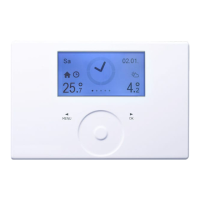
The WPM features a user-friendly interface with a display, a "MENU" key, a Touch-Wheel, and an "OK" key.

  • Display: The programming unit display shows the current system status, messages, and information, including date, time, outside temperature, actual DHW temperature, actual return temperature, operating mode, and system status picture symbols.
  • Touch-Wheel: This touch-sensitive sensor is used for circular movement to navigate through menus, select items, and adjust parameter values. Clockwise motion moves the selection indicator downwards or to the right and increases values, while anti-clockwise motion moves it left or upwards and reduces values.
  • "MENU" Key: Tapping this key from the start screen navigates to the first of 5 menu structure levels. Within the menu structure, it returns the user to the previous menu level.
  • "OK" Key: From the start screen, tapping OK activates the previously selected operating mode. Within the menu structure, it confirms selected menu items, takes the user to the next menu level, saves set parameters, and can be used to go back to a higher menu level by selecting "BACK".

The device locks after 5 minutes of inactivity, requiring a 3-second press of the MENU key to reactivate. It provides a selection indicator to show the current position in the menu structure.

Operating Modes:

  • STANDBY MODE: For longer periods of inactivity, with frost protection enabled.
  • PROGRAMMED OPERATION: Allows heating and DHW based on seven-day program times, switching between comfort and ECO temperatures. Remote controls are effective only in this mode.
  • COMFORT MODE: Maintains heating circuits at a constant comfort temperature (for HK 1 and HK 2) and DHW heating according to programmed times.
  • ECO MODE: Maintains heating circuits at a constant ECO temperature (for HK 1 and HK 2) and DHW heating according to programmed times, suitable for short periods of absence.
  • DHW MODE: For summer mode when only DHW is required, with heating according to programmed times, switching between comfort and ECO temperatures. Frost protection for heating mode is active.
  • EMERGENCY OPERATION: Activated if the heat pump cannot function, utilizing a second internal or external heat source. This mode may result in higher operating costs.

Programming Features:

  • Heating Program: Sets times for heating circuits to achieve comfort temperature.
  • DHW Program: Sets times for DHW heating to achieve comfort temperature.
  • Party Program: Extends the comfort heating period for a few hours.
  • Holiday Program: Reduces room heating to ECO temperature for a freely adjustable period, with DHW frost protection active.
  • Pasteurisation Program: Heats the DHW cylinder to its highest value at specified times and days, requiring an emergency/booster heater or external heat source.
  • DHW Circulation Program: Controls the DHW circulation pump according to programmed times.
  • Swimming Pool Program: Sets times for swimming pool water heating.
  • Silent Program 1: Reduces fan speed and potentially compressor power to lower noise levels.
  • Silent Program 2: Switches off the heat pump, with an internal emergency/booster heater or external heat source taking over heating and DHW. This mode results in higher operating costs.

Settings: Users can adjust general settings like time/date, summer time dates, language, display contrast, and brightness. Heating circuit parameters (comfort and ECO temperatures) and DHW temperatures (comfort and ECO) can be set individually. Cooling functionality is available on some heat pumps, configurable by a qualified contractor.

Important Technical Specifications

The manual refers to the WPM as a "Wärmepumpen-Manager" (Heat pump manager) with part number 234727. It is designed to control and regulate heat pump processes. The system supports up to 5 heating circuits and allows for two separate DHW temperature settings. The heating curve slope can be adjusted (e.g., 0.6 for heating curve 1, 0.2 for heating curve 2, with a range of 0-5). Comfort and ECO temperatures for heating circuits can be set between 5-30 °C, and for DHW, between 50-70 °C (or OFF/50-70 °C for ECO).

The programming unit has a locking mechanism after 5 minutes of inactivity to prevent unintended changes. Some menu items are protected by a code for access by qualified contractors, ensuring system-specific settings are not inadvertently altered.

Maintenance Features

  • Care: The plastic parts of the WPM in its wall-mounted enclosure can be cleaned with a damp cloth. Abrasive or corrosive cleaning agents should not be used.
  • Notifications: The device registers and displays faults with a clear message (e.g., "FAULT WPM 30007 PLS INFORM SERVICE DEPT"). A notification list, accessible via DIAGNOSIS / NOTIFICATIONLIST, stores up to 50 recent faults, including code, time, date, and WP (possibly indicating the fault source or type). Users are advised to notify a qualified contractor in case of a fault.

STIEBEL ELTRON WPM Specifications

General IconGeneral
BrandSTIEBEL ELTRON
ModelWPM
CategoryHeat Pump
LanguageEnglish

Related product manuals