Beep( ): Turn on/off beep sound;
Collision Force( ): Collision protection sensitivity;
To navigate through the setup menu use the below buttons:
Backspace
key
(back
to
previous
menu)
or Exit
Setup
Mode
Tab switch
Enter key (enter to next menu or confirm the current operation)
If there is no numeric key pressed within 20 seconds the Setup Mode will be exited.
2/4
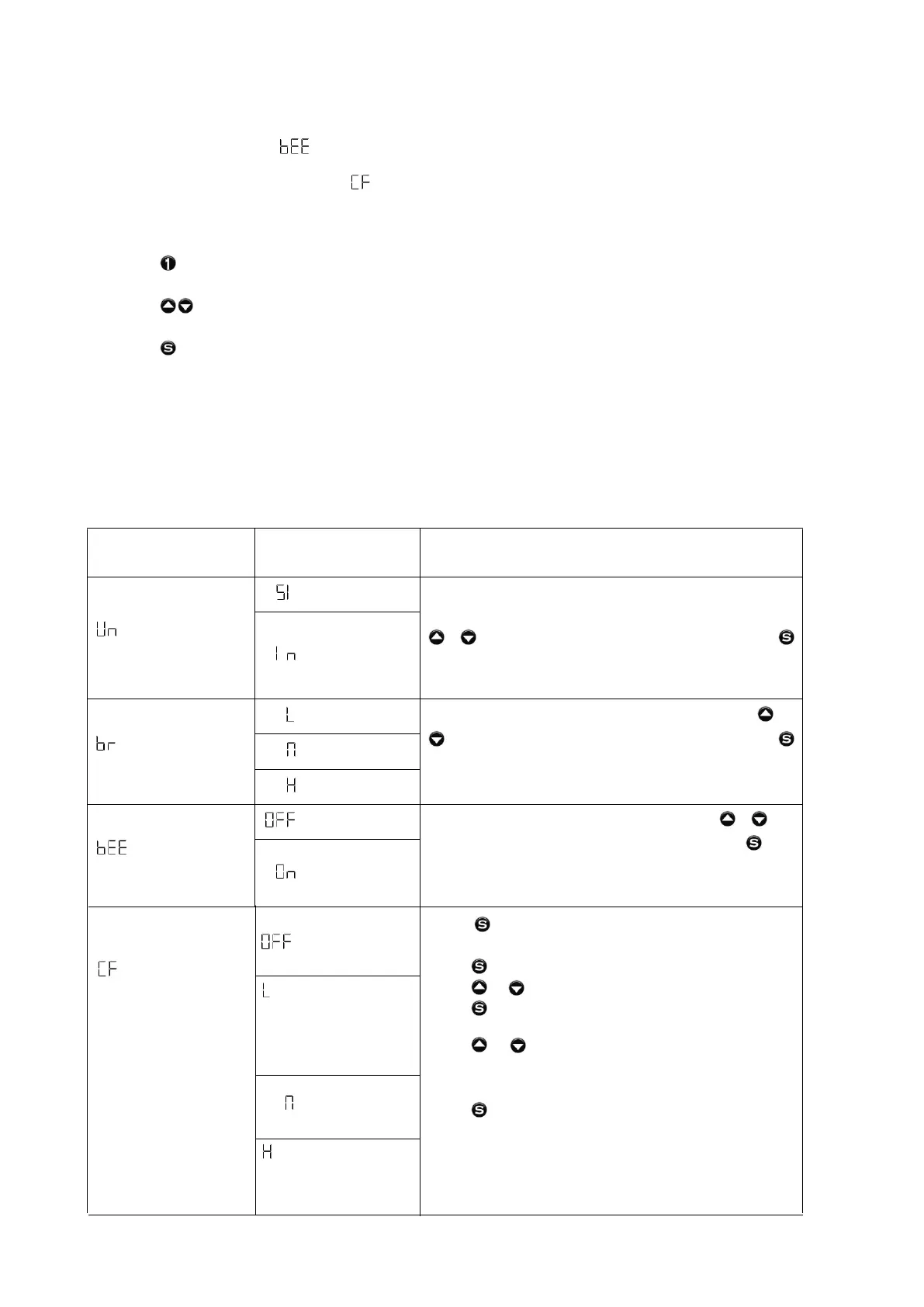
Main menu interface
Submenu
interface
Description
CM
Unit
Inch
Select height unit to be displayed in cm or
inches.
or to choose the height unit, and press
to confirm and save it. The system will exit after
2 seconds.
Low
Normal
Brightness
High
Select brightness setting of controller. Use or
to choose the and press
to confirm and save it. The system will exit after
2 seconds.
Off
Beep
On
Turn on or off the beep sound. Use or to
choose sound on or off, and press to
confirm and save it. The system will exit after 2
seconds.
brightness level,
Off
Light - Light touch will
Normal
Anti-Collision
Heavy - Requires significant
Press button for a few seconds until
controller shows "S--".
Press button 1 time. Screen will show "Un".
Press or until screen shows "CF".
Press button 1 time to get into anti-collision
Press or to select anti-collision sensitivity.
Refer to left options to select the sensitivity
level (suggest Heavy Level "H" or OFF.
Press to confirm your selection then "S" again
Sensitivity
to exit the menu and return to desk height.
options.
Adjustment
cause desk to stop movement.
Suitable where desk may come
into contact with objects to
prevent damage eg. Filing
drawer beneath desk.
touch/impact to cause desk to
stop movement. Suitable
where there are not
obstructions.


 To Next Page
 Loading...