Controlling attachments using a
quadruple mini-lever
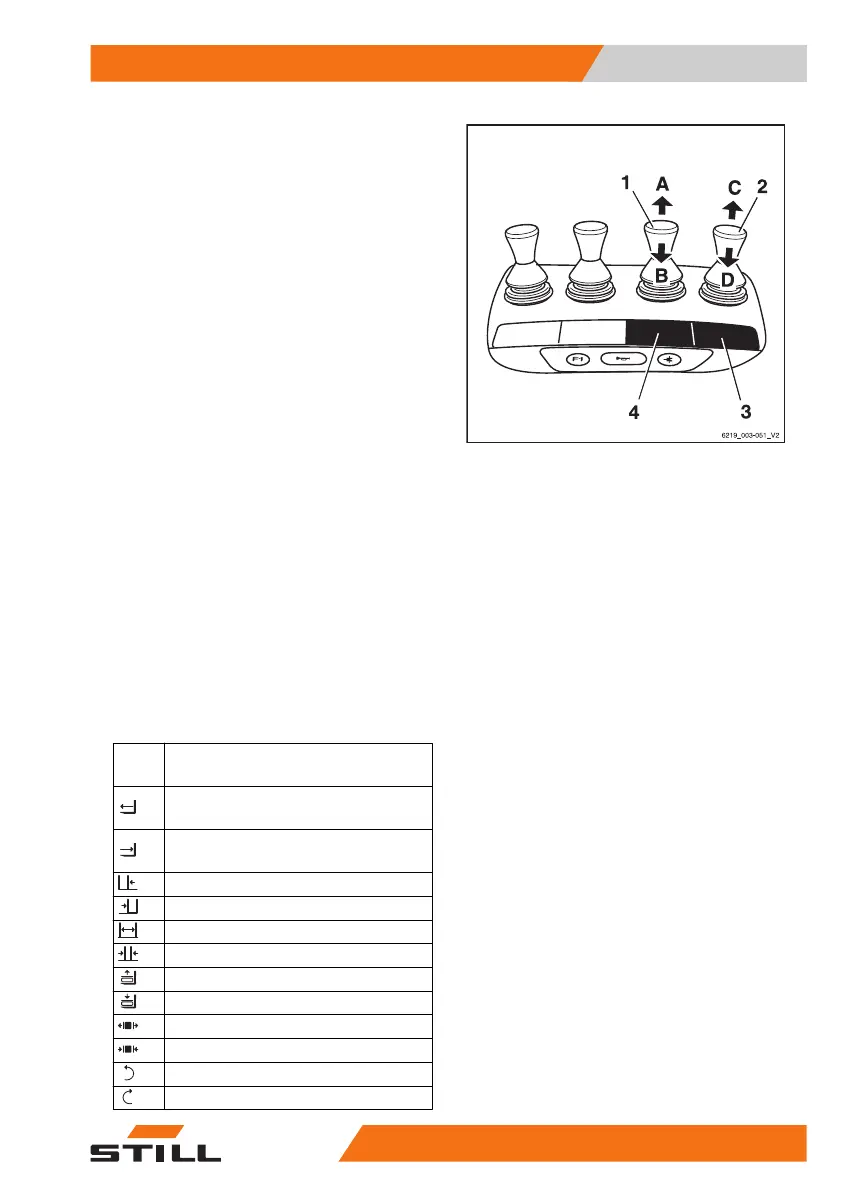
In this version, the attachments (variant) are
controlled using the operating levers(1,2).
The adhesive label bearing the pictograms for
the hydraulic functions(3) for the operating
lever(2) and the adhesive label(4) for the op-
erating lever(1) are affixed at the designated
points.
– If the adhesive labels become illegible or
are missing, please contact your authorised
service centre.
– Observe the pictograms for the attachment
functions on the adhesive labels (3,4).
The pictograms on the operating levers show
the respective functions that are activated by
these levers.
The following applies:
– Move the operating lever(1) in the direction
of the arrow(A) or (B).
The attachment moves accordingly in the di-
rections(A) or (B) as shown in the pictogram.
– Move the operating lever(2) in the direction
of the arrow(C) or (D).
The attachment moves accordingly in the di-
rections(C) or (D) as shown in the pictogram.
Picto-
gram
Attachment function
Move the side shift frame or fork for-
wards
Move the side shift frame or fork
backwards
Move the sideshift to the left
Move sideshift to the right
Adjust fork arms: open
Adjust fork arms: close
Release load retainer
Clamp load retainer
Open clamps
Close clamps
Rotate to the left
Rotate to the right
Operation
4
Attachments
31757378011527EN-12/2023 - 07



 To Next Page