6
SETTING UP
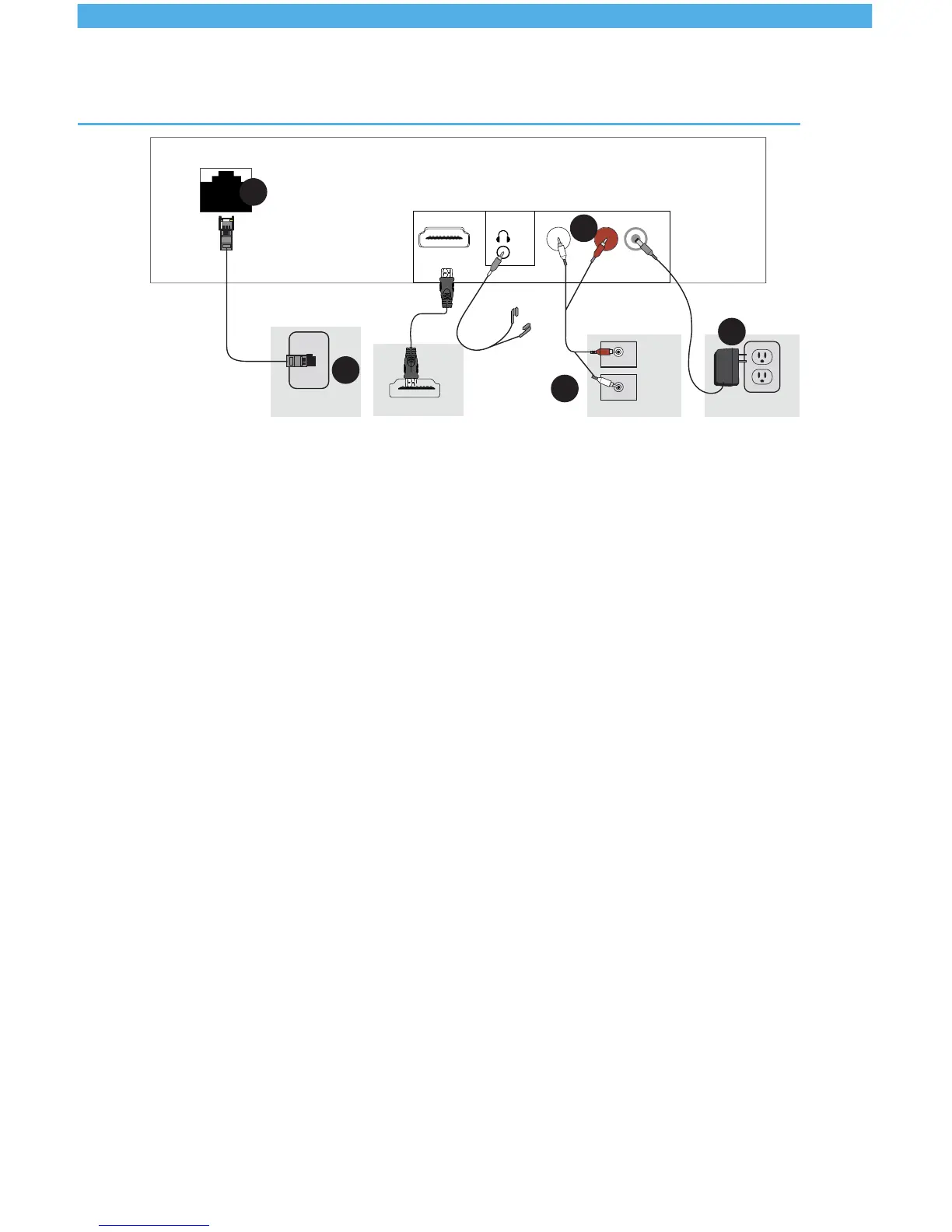
Setting up the network connection
Skipsteps1and2ifyoudon’thaveaninternetconnection.
1. Connect the network cable to an active network connection.
2.Connecttheotherendofthenetworkcabletotheethernet
port on the SB-3.
Setting up audio
3.Attachbothheadsatoneendofyouraudiocabletotheaudio
outputs “1” and “2” on your SB-3.
4.Attachtheotherendsofyouraudiocabletotheamplier
inputs.Ifyouonlyhaveoneamplierinput,plugonlyone
cable head in and leave the other one dangling. You will not be
needing it.
Settingupon-holdmusicandmessagesfor
phones (Optional)
Tocompletethecircuittothetelephonesystem,followsteps1
to4,butmakesureyouattachoneheadoftheaudiocableto
theamplierinputlinkedtomusicon-hold.
Setting up digital signage or music videos
ToconnectyourSB-3toascreen,plugoneendoftheHDMI
cabletotheHDMIoutputofyourSB-3andattachtheotherend
to your TV HDMI source.
Internet I n
5.0
P
1.
2.
3.
4.
5.
TV HDMI Source
Internet Source
Amplifier
Power Source
1 - AUDIO - 2
DC 5V
HDMI


 To Next Page