Getting Started
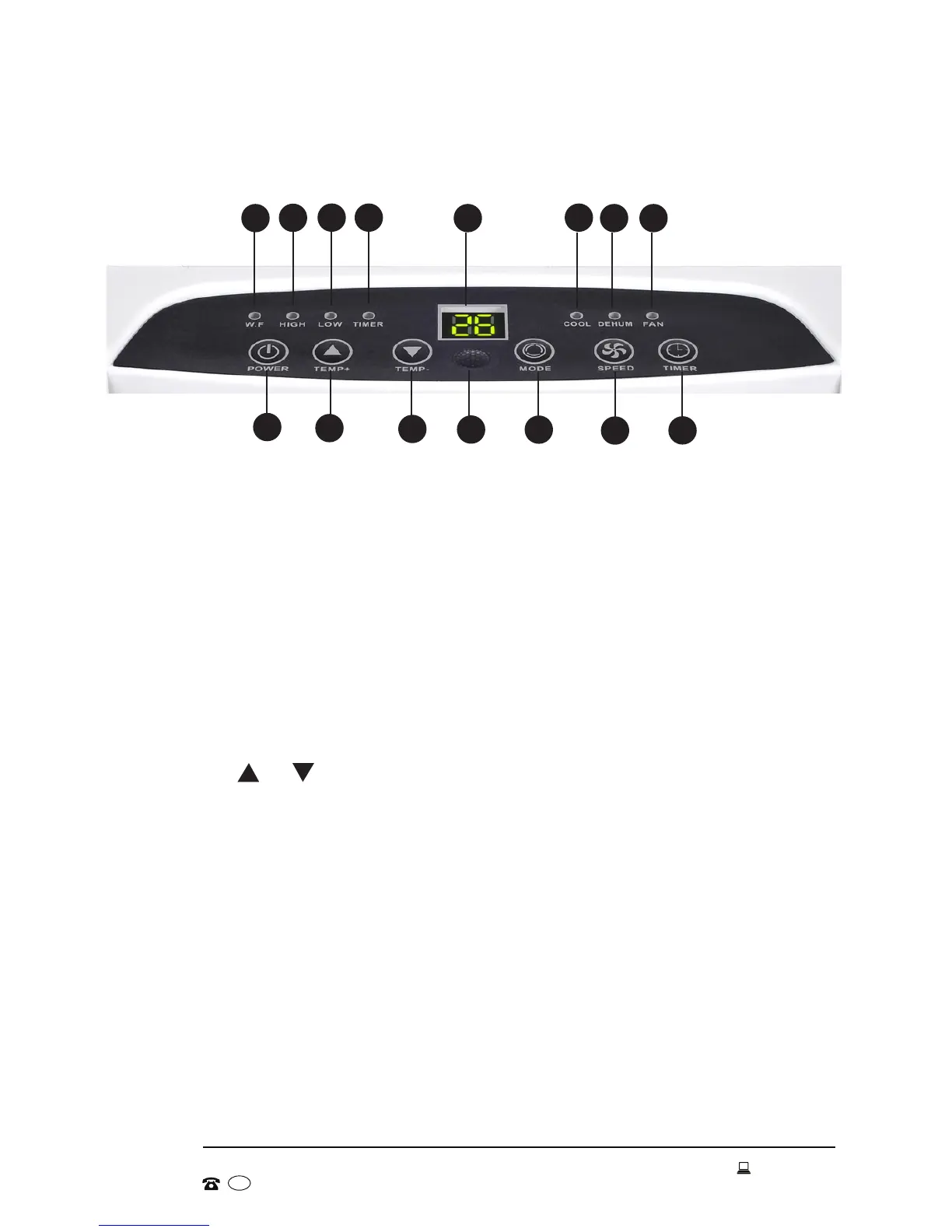
Control panel
1 WF: Water full indicator
2 HIGH: High fan speed indicator
3 LOW: Low fan speed indicator
4 TIMER: Timer indicator
5 Display screen
6 COOL: Cooling mode indicator
7 DEHUM: Dehumidifying mode indicator
8 FAN: Fan mode indicator
9 POWER: Press to turn the unit on or off.
10 TEMP + / - : Press to set the desired room temperature. With each
press, the temperature setting will be increased or decreased by 1°C.
These buttons can also be used to set the timer, in hours.
11 Signal receiver: Aim the remote control at this sensor.
12 MODE: Press repeatedly to select the desired mode of operation
(cooling, dehumidifying or fan).
13 SPEED: Press to choose high or low fan speed.
14 TIMER: Press to set the time period (in hours) for automatic switch-on/
switch-off.
10
11
12
13
14
1
2
3 4
5
6
7 8
9
10


 To Next Page