11
AUS
AFTER SALES SUPPORT
MODEL: STR-E15BGD PRODUCT CODE: 708548 10/2022
1300 112 534
tempo.org/support
Product Overview (Cont.)
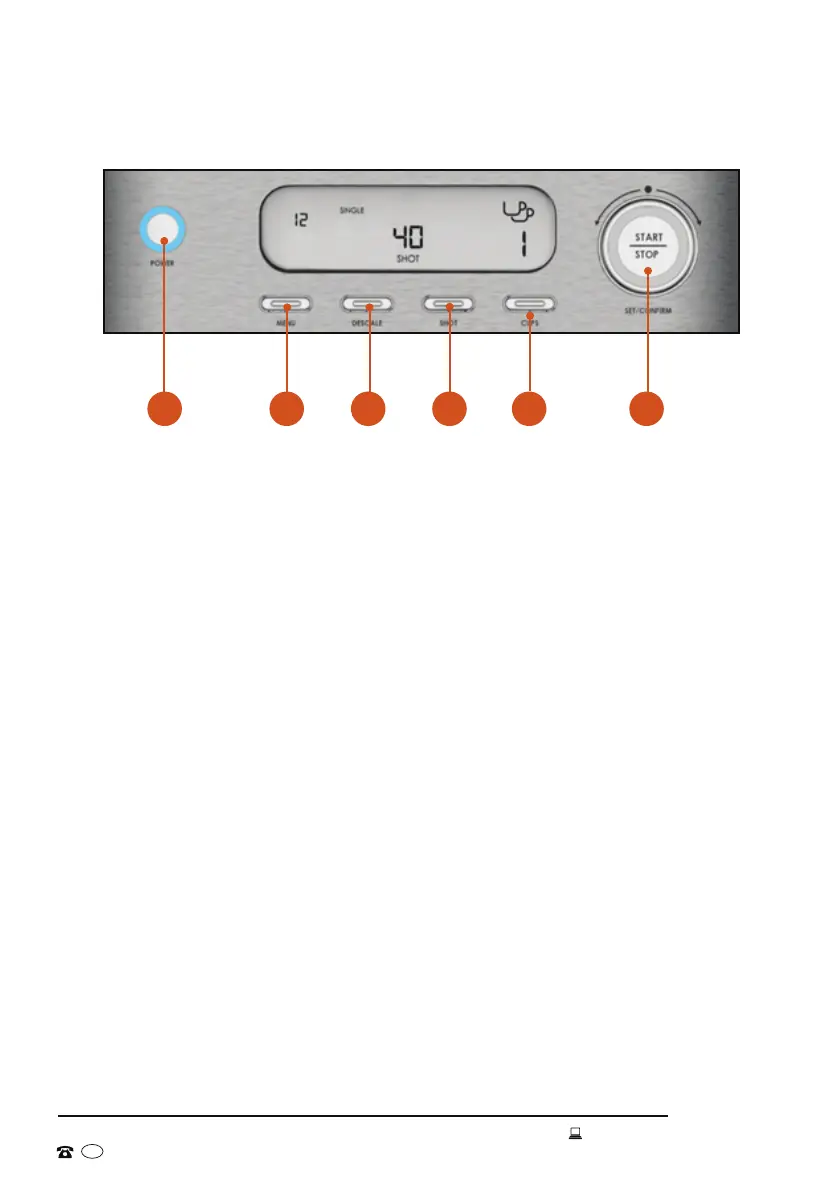
Control panel (Fig. 1)
A POWER button: used to switch the espresso machine on and off. This
appliance requires time to pre-heat - after turning it on, the power button will
flash. Wait for it to illuminate before use. To ensure the correct temperature
is reached, run a blank shot through the machine before pulling an espresso
(see page 18). If no action occurs within thirty minutes, the machine will
switch off automatically.
B MENU button: used to make selections between the different modes and
functions. You can select between dispensing hot water, steam, or pulling an
espresso shot.
C DESCALE button: used when descaling the machine. The descale icon will
appear on the LCD screen to indicate that descaling is required to ensure
continued optimum performance. See pages 30-31 for more information on
the descaling process.
D SHOT button: used to change the volume of a single or double espresso
shot (see page 20).
E CUPS button: used to switch between a single and double shot of espresso
(see page 20).
F START/STOP Rotation Knob/Button: pressed to start/stop the flow of
espresso, hot water, and steam. It can be rotated to adjust certain pre-
programmed values.
A
C
F
B
D
E


 To Next Page