

EasyManua.ls Logo

STONEX SH5A - User Manual

STONEX SH5A
11 pages
Print Icon
To Next Page IconTo Next Page
Loading...
SH5A
Quick Start Guide
Question and Answer IconNeed help?

Do you have a question about the STONEX SH5A and is the answer not in the manual?

Overview

The SH5A is a robust handheld device designed for various applications, offering a blend of traditional keypad input with modern touchscreen functionality. It features a durable design suitable for portable use, with an emphasis on connectivity and data capture.

Function Description

The SH5A serves as a versatile mobile device, capable of running applications, capturing data, and facilitating communication. Its primary functions include:
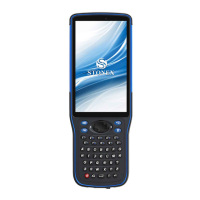
  • Data Input: Utilizes a full alphanumeric keypad for precise data entry, complemented by a touchscreen for intuitive navigation.
  • Navigation and Control: Equipped with a direction key (up, down, left, right), OK key for confirmation, and FN key for switching character sets and adjusting volume.
  • Application Management: Features an APP key for program-associated shortcuts, allowing quick access to frequently used applications.
  • Power Management: Includes a power key for turning the device on/off, entering sleep mode, and performing screen captures.
  • Connectivity: Supports Bluetooth for data transmission and includes a TYPE-C port for charging and data transfer.
  • Data Capture: Integrated rear camera with LED flash for image capture.
  • Memory and SIM Card Support: Allows for the installation of SIM cards for cellular connectivity and Micro SD cards for expanded storage.

Important Technical Specifications

  • Operating Temperature: -20°C to +45°C.
  • Storage Temperature: -40°C to +70°C.
  • Charging Port: TYPE-C.
  • Wireless Connectivity: Bluetooth, Wi-Fi (5150MHz ~ 5250MHz for indoor use).
  • SAR Limit: 1.6 W/kg (FCC and ISED averaged over one gram of tissue). Highest reported SAR value for body-worn operations is 1.482 W/kg.
  • Battery: Rechargeable lithium battery.
  • Memory Card Support: Micro SD.
  • SIM Card Support: Dual SIM (SIM1, SIM2).

Usage Features

  • Keypad Functionality:
    • OK key: Confirms functions.
    • Fn Key: Switches between character and number input. Long press coordinates with direction keys for volume adjustment.
    • Aa Key: Toggles uppercase input. An icon on the system indicates when uppercase is active.
    • Return Key: Navigates back one level in menus or applications.
    • Direction Key: Used for up, down, left, and right navigation.
    • APP Key: Activates program-associated shortcuts.
    • Backspace Key: Deletes characters.
  • Power On/Off and Sleep Mode:
    • To power on, press and hold the Power Button until the boot screen appears.
    • To shut down, select the shutdown option from the power menu (accessed by long-pressing the Power Button).
    • To enter sleep mode, click the Power Button when the device is on.
    • To wake up, click the Power Button again and slide the screen up to unlock. The device automatically enters sleep mode after a period of inactivity.
  • Charging:
    • Can be charged using a travel charger by connecting the USB cable to the TYPE-C port and then to a power socket.
    • Can also be charged via a computer's USB port using the USB cable.
  • SIM and Memory Card Installation:
    • Requires turning off the device before installation or removal.
    • The back cover needs to be pushed to the open position, and the battery compartment cover removed.
    • SIM and TF cards are inserted according to the labels in the battery compartment, paying attention to the chamfering direction of the metal contacts.
  • Battery Installation:
    • Align the copper part of the battery with the copper contact end in the battery compartment and gently insert it.
    • After installation, replace the battery compartment cover and push the rear cover to the locked position.
  • Home Screen Operation:
    • The home screen displays device status and allows access to applications.
    • Multiple panels can be viewed by swiping left or right.
    • The status bar at the top shows notifications, status, and display area.
    • The bottom features a shortcut panel with an app icon.
    • The "app icon" provides access to all installed applications and widgets. Tapping the Home button at the bottom closes the application panel and returns to the home screen.
  • LED Indicators:
    • Bluetooth LED: Illuminates when Bluetooth data transmission is active and when Bluetooth configuration is successful.
    • Power LED/Charging LED:
      • Green light always on: Battery capacity > 70%.
      • Green light flashes: Battery capacity 20%-70%.
      • Red light always on: Battery capacity < 20% or in shutdown charging state.
      • Full green light: Battery is fully charged.

Maintenance Features

  • Battery Care:
    • Use original rechargeable lithium batteries.
    • Charge the battery when power is low.
    • To maintain battery life, it's recommended to deplete the battery's power before charging.
    • Remove the charger from the power supply when not in use. Avoid connecting the charger to the battery for more than one week to prevent shortening battery life.
    • Temperature affects charging limits; the battery may need to be cooled or warmed.
    • Prevent short-circuiting the battery by avoiding contact between conductive materials and the battery's positive and negative terminals.
    • Do not use damaged batteries.
    • Avoid placing the battery in extremely cold or hot places, as this shortens battery life and can cause device malfunction.
    • Do not dispose of batteries in fire. Dispose of waste batteries properly at recycling stations, following local laws and regulations.
  • Device Handling:
    • Avoid using the device in special places like airports, hospitals, or gas stations where electronic equipment is restricted.
    • Do not use while driving a vehicle.
    • Keep away from vehicle airbags.
    • Avoid use during thunderstorms.
    • Although waterproof, do not leave the device in areas with water or moisture for extended periods.
    • Do not disassemble the product. For repairs, send it to authorized service centers.
    • At the end of its service life, discard the device properly to avoid environmental pollution.
    • When replacing the battery or using an external power supply, ensure the device is completely shut down before removing the battery or disconnecting the power supply to prevent damage.
  • Radio Interference:
    • This is a Class B product and may cause radio interference. Users may need to take preventive measures.
    • Indoor use is restricted for frequencies 5150MHz ~ 5250MHz to reduce potential interference.
  • AC Adaptor:
    • Only use AC adaptors with 3-pin and 2-pin detachable pins for Singapore.
  • FCC Compliance:
    • The device complies with FCC Rules, Part 15. Any changes or modifications not explicitly approved by the manufacturer could void the user's authority to operate the equipment.
    • If interference occurs, try reorienting the receiving antenna, increasing separation between equipment and receiver, connecting the equipment to a different circuit, or consulting a dealer/technician.
    • The device has been evaluated for general RF exposure and can be used in portable exposure conditions without restriction.
    • For body-worn operations, maintain a 0 cm separation distance between the device and the body. Use accessories (belt clips, holsters) that do not contain metallic components to ensure compliance with RF exposure requirements.

STONEX SH5A Specifications

General IconGeneral
BrandSTONEX
ModelSH5A
CategoryIP Phone
LanguageEnglish