SUPPORT@STOREITCOLD.COM
2020 © Store It Cold, LLC. 8 Rev 2020-8A. All Rights Reserved.
ENCLOSURE INSTALLATION INTRUCTIONS
Your walk-in cooler panels, door, screeding, hardware, or outdoor package might differ in design or
looks from the ones shown in this manual and the installation video.
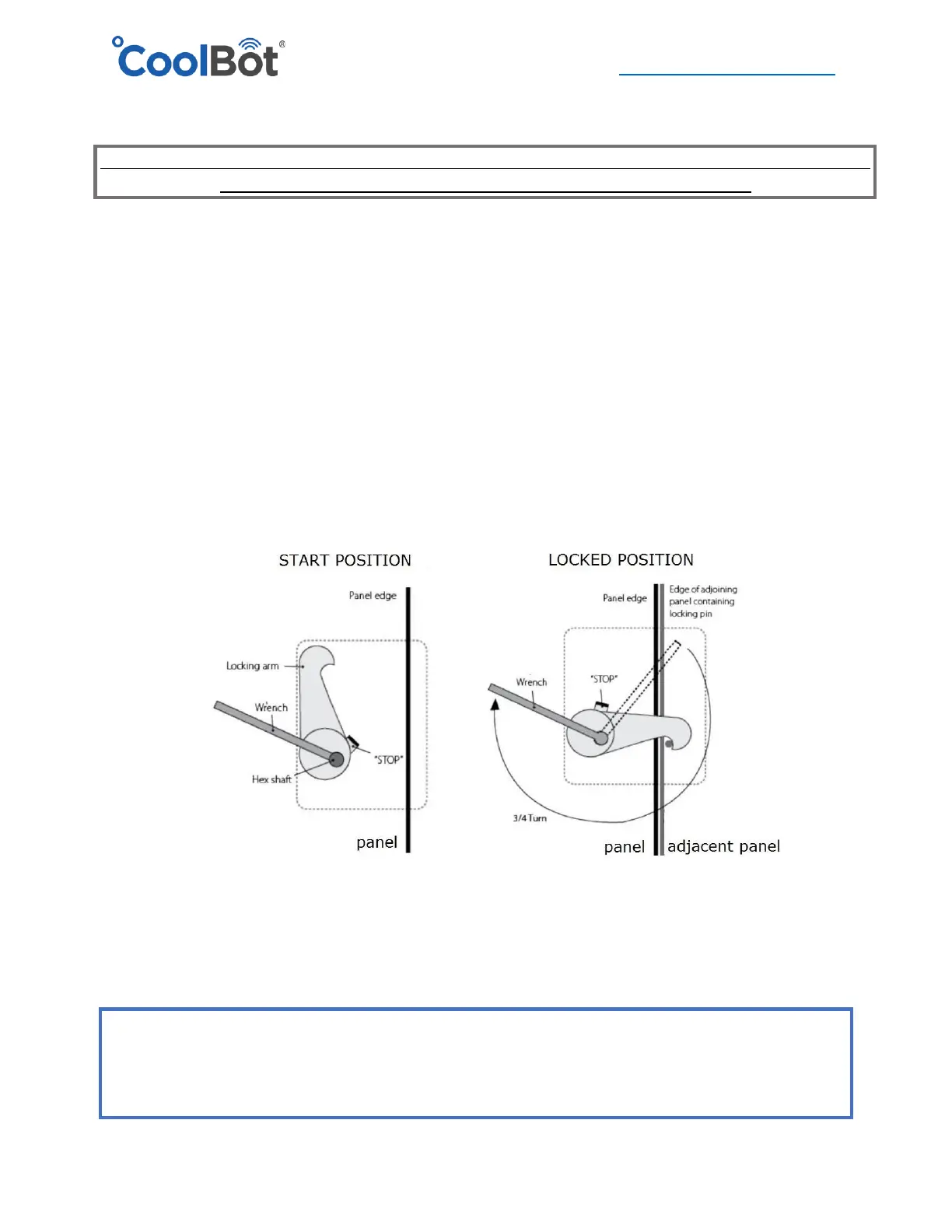
CAM-LOCK MECHANISM
Before starting to put your enclosure together, familiarize yourself with the operation of the Cam-
lock mechanism.
Locks will be on the right side of the panel and they operate in a clockwise rotation to lock. They
are accessible through the small holes on the right side of the panel.
Insert the Hex Wrench provided with your Installation package, and after the panels have been
carefully aligned, turn approximately ¾ of a full turn until panels are securely locked together.
DO NOT OVERTGHTEN! It will strip the Hex hole and damage the mechanism.
DO NOT drive the Hex Wrench with a hammer as this can damage the lock.
This locking mechanism is reversible. Simply rotate in the opposite direction to release the lock and
make adjustments. Don’t forget to lock your panel again after adjustments have been made.
ATTENTION!
Enclosed with the contents of your cooler, inside the hardware box, is a Set-up drawing,
showing the identification and proper placement of your walk-in cooler panels.




 To Next Page