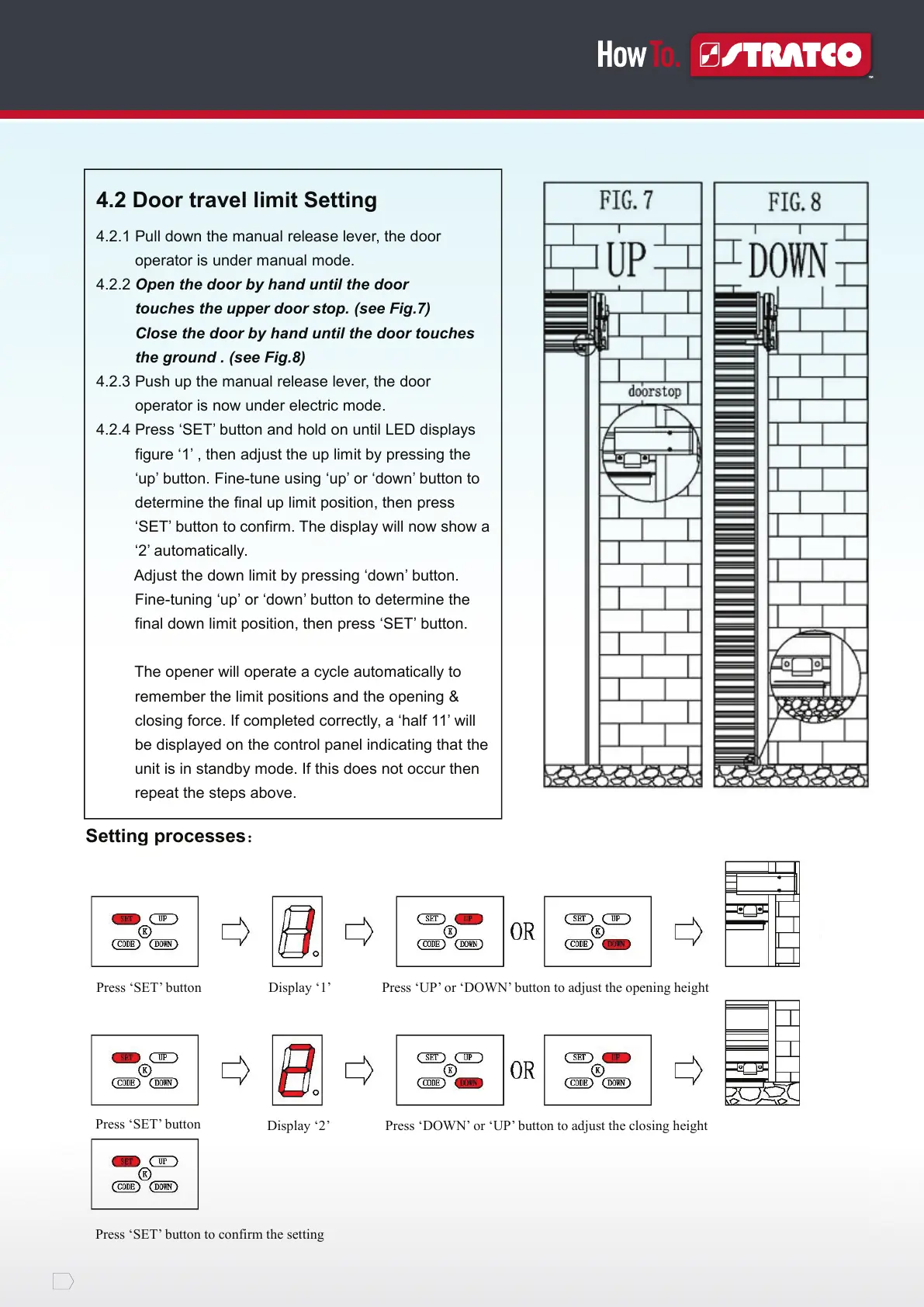
Setting processes:
4.2 Door travel limit Setting
4.2.1 Pull down the manual release lever, the door
operator is under manual mode.
4.2.2 Open the door by hand until the door
touches the upper door stop. (see Fig.7)
Close the door by hand until the door touches
the ground . (see Fig.8)
4.2.3 Push up the manual release lever, the door
operator is now under electric mode.
4.2.4 Press ‘SET’ button and hold on until LED displays
figure ‘1’ , then adjust the up limit by pressing the
‘up’ button. Fine-tune using ‘up’ or ‘down’ button to
determine the final up limit position, then press
‘SET’ button to confirm. The display will now show a
‘2’ automatically.
Adjust the down limit by pressing ‘down’ button.
Fine-tuning ‘up’ or ‘down’ button to determine the
final down limit position, then press ‘SET’ button.
The opener will operate a cycle automatically to
remember the limit positions and the opening &
closing force. If completed correctly, a ‘half 11’ will
be displayed on the control panel indicating that the
unit is in standby mode. If this does not occur then
repeat the steps above.


 To Next Page