4.4 Safety reverse force adjustment
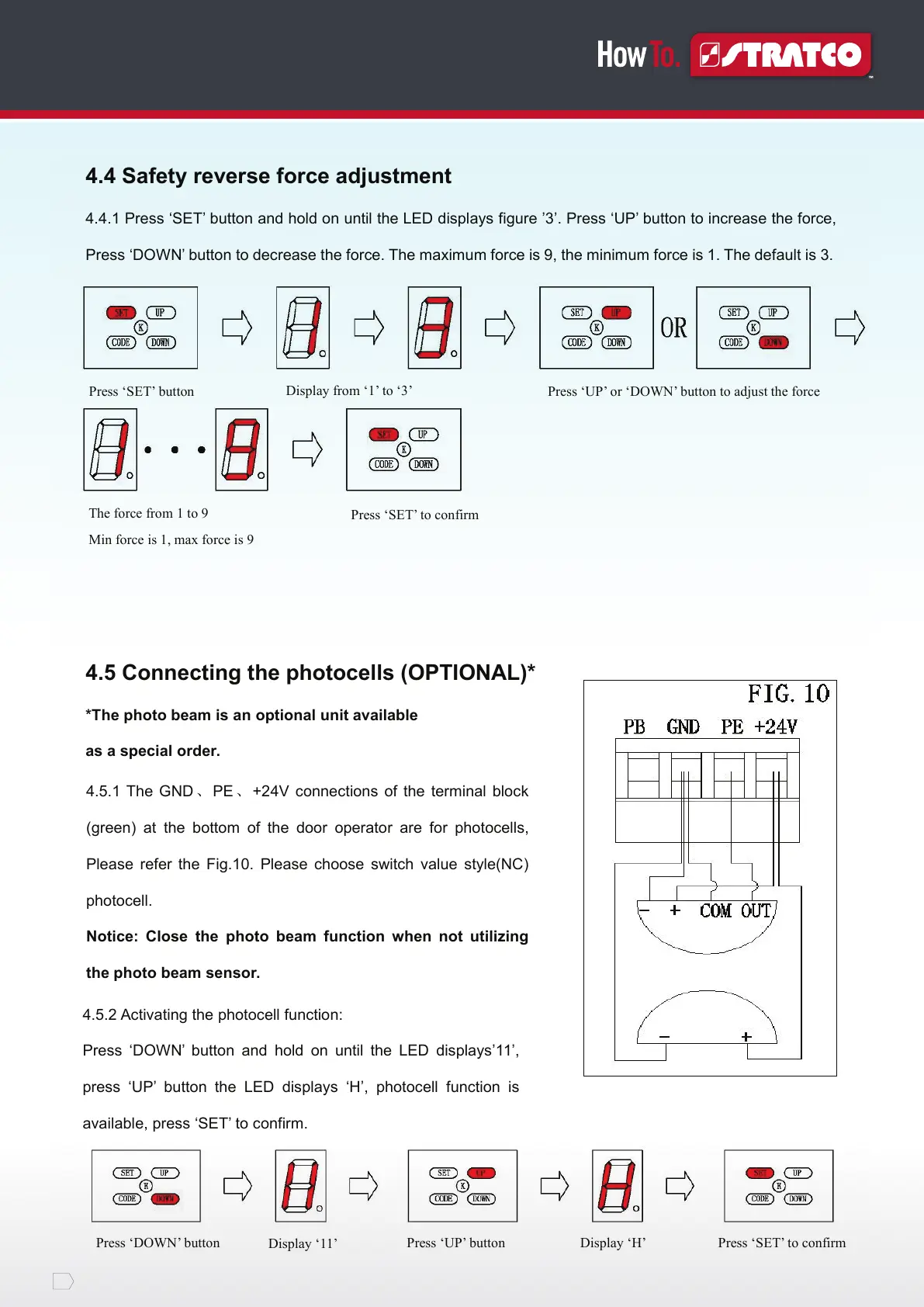
4.4.1 Press ‘SET’ button and hold on until the LED displays figure ’3’. Press ‘UP’ button to increase the force,
Press ‘DOWN’ button to decrease the force. The maximum force is 9, the minimum force is 1. The default is 3.
4.4.2 Recommended force:5-15 kg resistance is recommended. Lightly lift the door while door closing, the
door can be automatic reverse under approximate 5~15 kg resistance.
4.5 Connecting the photocells (OPTIONAL)*
*The photo beam is an optional unit available
as a special order.
Display from ‘1’ to ‘3’
Press ‘UP’ or ‘DOWN’ button to adjust the force
The force from 1 to 9
Min force is 1, max force is 9
4.5.2 Activating the photocell function:
Press ‘DOWN’ button and hold on until the LED displays’11’,
press ‘UP’ button the LED displays ‘H’ , photocell function is
available, press ‘SET’ to confirm.
4.5.1 The GND 、 PE 、 +2 4V connections of the terminal block
(green) at the bottom of the door operator are for photocells,
Please refer the Fig.10. Please choose switch value style(NC)
photocell.
Notice: Close the photo beam function when not utilizing
the photo beam sensor.
13


 To Next Page