8
PLACING RECEIVER IN AIRCRAFT
The snap-in window mount secures the receiver to its mounting location
during ight. Stratus 2S should not be powered on until it has been
mounted so that it can correctly calibrate.
To mount the receiver in the aircraft:
1. Position the mount in the desired location inside of the
aircraft.
2. Lay the receiver in the snap-in mount so that it is leaning
against the longer arm of the mount’s cradle. The LEDs
and Stratus logo should face the back of the aircraft. If
the receiver is facing the wrong direction, AHRS data (2S
only) will be incorrect and the chance of overheating will be
signicantly increased.
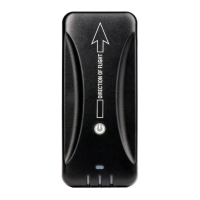
NOTE: The arrow on the back of the receiver should point in
the direction of ight.
3. Press on the top of the receiver until the device snaps into
place in the cradle, as shown in the gure on the following
page.
NOTE: The window mount provides better reception and better
temperature control than a dash mount. However, an optional dash mount
is available from your Stratus retailer. This mount allows for mounting the
receiver on the glare shield.
ForeFlight
PN: 153510-000008
Contains FCC ID: YOPGS2100MIP
This system incorporates elements of the UBR technology developed
by the Mitre Corporation on behalf of the U.S. Government
Direction of Flight
SSID: [Your Wi-Fi network name here]



 To Next Page