EasyManua.ls Logo

Streetwize SWOBD - User Manual

Streetwize SWOBD
44 pages
Print Icon
To Next Page IconTo Next Page
Loading...
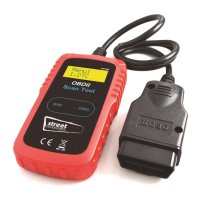
CAN OBD II SCAN TOOL
Read & erase diagnostic trouble codes for OBD II compliant vehicles.
PLEASE NOTE: YOU WILL ONLY BE ABLE TO TURN AN ENGINE WARNING LIGHT OFF
WHEN THE PROBLEM CAUSING THE WARNING LIGHT HAS BEEN RESOLVED.
Read and understand these instructions before use and
retain for future reference.
User Manual
Question and Answer IconNeed help?

Do you have a question about the Streetwize SWOBD and is the answer not in the manual?

Summary

Safety Precautions and Warnings

General Information

On-Board-Diagnostics (OBD) II Overview

Explains the OBD II system, its purpose in vehicle emissions monitoring, and its evolution.

Diagnostic Trouble Codes (DTCs) Explained

Details the structure and meaning of five-digit alphanumeric diagnostic trouble codes (DTCs).

Data Link Connector (DLC) Location

Guides users on finding the standardized 16-cavity connector for scan tool interface on vehicles.

OBD II Monitor Readiness

OBD II Readiness Monitors

Describes readiness monitors and lists continuous and non-continuous types for emissions testing.

OBD II Monitor Readiness Status

Explains how the system indicates if monitors have completed testing, crucial for inspections.

OBD II Terminology

Key OBD II Terminology Definitions

Defines essential terms like PCM, MIL, DTC, and Enabling Criteria used in OBD II systems.

Product Information

Scan Tool Description

Identifies and describes the physical components of the CAN OBD II Scan Tool, including buttons and display.

Product Specifications

Lists technical specifications like display, operating temperature, dimensions, and weight of the scan tool.

Product Features

Highlights capabilities such as vehicle compatibility, code reading/erasing, VIN retrieval, and ease of use.

Vehicle Compatibility

Details the range of vehicles and communication protocols supported by the OBD II scan tool.

Operating Instructions

Reading Diagnostic Trouble Codes (DTCs)

Step-by-step guide to connect the tool and read diagnostic trouble codes from a vehicle's system.

Erasing Diagnostic Trouble Codes

Instructions on clearing DTCs and the resulting impact on I/M readiness status.

Retrieving I;M Readiness Status

Explains how to check emission monitor readiness status for compliance with state inspections.

Viewing VIN and Rescanning Data

Procedures for retrieving the Vehicle Identification Number and rescanning data from the vehicle.

Diagnostic Trouble Code (DTC) Definitions

Summary

Safety Precautions and Warnings

General Information

On-Board-Diagnostics (OBD) II Overview

Explains the OBD II system, its purpose in vehicle emissions monitoring, and its evolution.

Diagnostic Trouble Codes (DTCs) Explained

Details the structure and meaning of five-digit alphanumeric diagnostic trouble codes (DTCs).

Data Link Connector (DLC) Location

Guides users on finding the standardized 16-cavity connector for scan tool interface on vehicles.

OBD II Monitor Readiness

OBD II Readiness Monitors

Describes readiness monitors and lists continuous and non-continuous types for emissions testing.

OBD II Monitor Readiness Status

Explains how the system indicates if monitors have completed testing, crucial for inspections.

OBD II Terminology

Key OBD II Terminology Definitions

Defines essential terms like PCM, MIL, DTC, and Enabling Criteria used in OBD II systems.

Product Information

Scan Tool Description

Identifies and describes the physical components of the CAN OBD II Scan Tool, including buttons and display.

Product Specifications

Lists technical specifications like display, operating temperature, dimensions, and weight of the scan tool.

Product Features

Highlights capabilities such as vehicle compatibility, code reading/erasing, VIN retrieval, and ease of use.

Vehicle Compatibility

Details the range of vehicles and communication protocols supported by the OBD II scan tool.

Operating Instructions

Reading Diagnostic Trouble Codes (DTCs)

Step-by-step guide to connect the tool and read diagnostic trouble codes from a vehicle's system.

Erasing Diagnostic Trouble Codes

Instructions on clearing DTCs and the resulting impact on I/M readiness status.

Retrieving I;M Readiness Status

Explains how to check emission monitor readiness status for compliance with state inspections.

Viewing VIN and Rescanning Data

Procedures for retrieving the Vehicle Identification Number and rescanning data from the vehicle.

Diagnostic Trouble Code (DTC) Definitions

Streetwize SWOBD Specifications

General IconGeneral
BrandStreetwize
ModelSWOBD
CategoryScanner
LanguageEnglish

Related product manuals