EasyManua.ls Logo

Streetwize SWOBD7 - User Manual

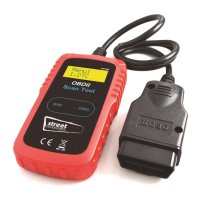
Streetwize SWOBD7
4 pages
Print Icon
To Next Page IconTo Next Page
Loading...
SWOBD7
Auto Diagnostic
OBDII Fault Scanner
with Colour Screen
Intention For Use
Thank you for purchasing this Auto Diagnostic
OBDII Fault Scanner with Colour Screen.
An advanced OBDII vehicle diagnostic reader
that comes with a TFT colour display. The
device provides clear Diagnostic Trouble Code
(DTC) readings to pinpoint the reason behind
why an engine warning light is showing.
Please read through the information in this
document. Please keep this document for
future reference.
Product Information
SWOBD7 works on all 1996 and later 12V petrol and diesel vehicles that are OBDII compliant
US, European and Asian vehicles. For your vehicle to be OBD II compliant it must have a 16-pin
DLC (Data Link Connector) and the Vehicle Emission Control Information Label must state that the
vehicle is OBDII compliant
The SWOBD7 can identify the cause of your CHECK ENGINE and perhaps fix it. It can help you to
pass annual emissions tests and SMOG CHECK.
It covers full OBDII/EOBD diagnostic functions for engine systems, O2 Sensor test, EVAP systems
test and on-board monitoring test, it can give you full control of your vehicle’s running status, while
the graphical and numeric data stream display will help you to find out the faulty sensor readings.
SWOBD7 can read common fault codes and can help to find the problem quickly and accurately,
thus enableing quick vehicle repair.
It support multi-languages, you can use the Find Tool Setup, then select the language you require.
Cleaning and Maintenance
To prevent personal injury or damage to vehicles and/or the scan
tool, read this instruction manual first and observe the following
safety precautions at a minimum whenever working on a vehicle:
Always perform automotive testing in a safe environment.
Wear safety eye protection that meets ANSI standards.
Keep clothing, hair, hands, tools, test equipment, etc.. away from all moving or hot
engine parts.
Operate the vehicle in a well ventilated work area: Exhaust gases are poisonous.
Put blocks in front of the drive wheels and never leave the vehicle unattended while
running tests.
Use extreme caution when working around the ignition coil, distributor cap, ignition
wires and spark plugs. These components create hazardous voltages when the
engine is running.
Put the transmission in PARK (for automatic transmission) or NEUTRAL (for manual
transmission) and make sure the parking brake is engaged.
Keep a fire extinguisher suitable for petrol/chemical/electrical fires nearby.
Don’ t connect or disconnect any test equipment while the ignition is on or the
engine is running.
Keep the scan tool dry & clean, free from oil/water or grease. Use a mild detergent
on a clean cloth to clean the outside of the scan tool, when necessary.
Question and Answer IconNeed help?

Do you have a question about the Streetwize SWOBD7 and is the answer not in the manual?

Summary

Intention For Use

Product Information

Cleaning and Maintenance

Technical Parameters and Operation

Unit Operation and Buttons

Details the function of each button on the device for navigation and operation.

Features and Functions Overview

Lists the comprehensive diagnostic capabilities and data display features of the scanner.

Main Menu Navigation

Explains how the main menu is displayed upon connection and how to begin diagnostics.

Diagnostic Functions

Diagnose Vehicle Process

Guides on performing a vehicle diagnosis and selecting information to view.

I;M Readiness Status Check

Details how to access and interpret the I/M Readiness status for emissions.

DTC Lookup Guide

Instructions on using the DTC lookup feature to find code definitions.

Battery System Test

Explains how to perform and view results for the battery system test.

Voltmeter Functionality

Describes how to use the built-in voltmeter to check vehicle battery voltage.

Review History Access

Guides on accessing previously recorded diagnostic data like DTCs and freeze frames.

Tool Setup and Support

Tool Setup Options

Instructions for configuring tool settings such as language.

Help and About Information

Accessing help topics and device information like software versions.

Technical Support Contact

Information on how to obtain technical support for the product.

Safety and Environmental Notes

Important safety warnings and information regarding WEEE symbol compliance.

Summary

Intention For Use

Product Information

Cleaning and Maintenance

Technical Parameters and Operation

Unit Operation and Buttons

Details the function of each button on the device for navigation and operation.

Features and Functions Overview

Lists the comprehensive diagnostic capabilities and data display features of the scanner.

Main Menu Navigation

Explains how the main menu is displayed upon connection and how to begin diagnostics.

Diagnostic Functions

Diagnose Vehicle Process

Guides on performing a vehicle diagnosis and selecting information to view.

I;M Readiness Status Check

Details how to access and interpret the I/M Readiness status for emissions.

DTC Lookup Guide

Instructions on using the DTC lookup feature to find code definitions.

Battery System Test

Explains how to perform and view results for the battery system test.

Voltmeter Functionality

Describes how to use the built-in voltmeter to check vehicle battery voltage.

Review History Access

Guides on accessing previously recorded diagnostic data like DTCs and freeze frames.

Tool Setup and Support

Tool Setup Options

Instructions for configuring tool settings such as language.

Help and About Information

Accessing help topics and device information like software versions.

Technical Support Contact

Information on how to obtain technical support for the product.

Safety and Environmental Notes

Important safety warnings and information regarding WEEE symbol compliance.

Overview

The Streetwize SWOBD7 is an Auto Diagnostic OBDII Fault Scanner with a Colour Screen, designed to assist in diagnosing vehicle engine issues. It is an advanced diagnostic reader featuring a TFT colour display that provides clear Diagnostic Trouble Code (DTC) readings to pinpoint the reason behind an illuminated engine warning light.

Function Description

The SWOBD7 works with all 1996 and later 12V petrol and diesel vehicles that are OBDII compliant, including US, European, and Asian models. For a vehicle to be OBDII compliant, it must have a 16-pin DLC (Data Link Connector) and the Vehicle Emission Control Information Label must state that the vehicle is OBDII compliant.

This device helps identify the cause of the CHECK ENGINE light, potentially assisting in fixing issues and passing annual emissions tests and SMOG CHECKS. It covers full OBDII/EOBD diagnostic functions for engine systems, including O2 Sensor test, EVAP systems test, and on-board monitoring test. It provides full control over the vehicle's running status, with graphical and numeric data stream displays to help identify faulty sensor readings. The SWOBD7 can read common fault codes, enabling quick and accurate problem identification and vehicle repair. It supports multiple languages, which can be selected via the Find Tool Setup.

Key features and functions include:

  • Voltmeter function and battery level indicator: Provides real-time voltage readings and battery status.
  • Cranking System Test: Analyzes the cranking system's state, displaying cranking voltage and time, and graphs the waveform of the cranking system.
  • Charging System Test: Analyzes the charging system's state, including waveform of the ripple test, unload, and load voltage.
  • Check Engine Light (MIL) diagnosis: Easily determines the cause of the Check Engine Light and allows for turning it off, clearing codes, and resetting monitors.
  • DTC definitions: Displays DTC definitions directly on the unit screen.
  • Freeze frame data: Views freeze frame data, which captures vehicle conditions at the moment a fault code is set.
  • Monitor and I/M readiness status: Displays emissions-related monitor status.
  • Pending codes identification: Identifies codes that have been detected but are not yet confirmed.
  • Live PCM data stream: Reads real-time data from the Powertrain Control Module.
  • Live O2 sensor test data: Displays real-time oxygen sensor readings.
  • Data graphing: Graphs data from 1996 and newer vehicles.
  • Data storage and playback: Reads, stores, and plays back live sensor data, DTC data, and freeze frame data.
  • Modules present test: Performs tests to determine which modules are present on the vehicle's network.
  • Vehicle information retrieval: Retrieves VIN (Vehicle Identification Number), CIN (Calibration Identification Number), and CVN (Calibration Verification Number).
  • Protocol support: Supports CAN (Controller Area Network) and all other current OBD-II protocols.
  • Built-in DTC lookup library: Provides a comprehensive database of diagnostic trouble codes.
  • Large backlit LCD screen: Ensures easy readability in various lighting conditions.

The device's main menu, accessible once the OBDII plug is connected and the ignition key is turned to standby, offers options such as Diagnose, I/M Readiness, DTC Lookup, Tool Setup, Help, About, Battery System, Voltmeter, and Review History.

Important Technical Specifications

  • Voltage Measurement Range: 6-18V DC.
  • Software Version: 1.0.9 (as per manual example).
  • Hardware Version: 1.1.2 (as per manual example).
  • Serial Number: 030722335321 (as per manual example).
  • Supported Protocols: OBDII/EOBD.
  • Display: TFT colour display.

Usage Features

The SWOBD7 features a user-friendly interface with dedicated buttons for navigation and function selection:

  • ESC (1): Exits the current screen or function.
  • I/M (2): Quick access to I/M Readiness.
  • Up (3): Navigates up through menus or increases values.
  • Down (4): Navigates down through menus or decreases values.
  • Left (5): Navigates left through menus or changes input.
  • Right (6): Navigates right through menus or changes input.
  • OK - Enter (7): Confirms selections or enters a function.

Visual indicators on the screen provide quick status updates:

  • Green icon (8): Indicates the engine system operates normally without fault codes.
  • Yellow icon (9): Indicates the engine system is abnormal and there is a pending fault code.
  • Red icon (10): Indicates the engine system has a fault, and the check engine light is on.

Maintenance Features

To ensure personal safety and prevent damage to the vehicle or the scan tool, the following safety precautions are emphasized:

  • Always perform automotive testing in a safe environment.
  • Wear safety eye protection that meets ANSI standards.
  • Keep clothing, hair, hands, tools, and test equipment away from all moving or hot engine parts.
  • Operate the vehicle in a well-ventilated work area due to poisonous exhaust gases.
  • Place blocks in front of the drive wheels and never leave the vehicle unattended during running tests.
  • Exercise extreme caution when working around ignition coils, distributor caps, ignition wires, and spark plugs, as these components create hazardous voltages.
  • Ensure the transmission is in PARK (for automatic) or NEUTRAL (for manual) and the parking brake is engaged.
  • Keep a fire extinguisher suitable for petrol/chemical/electrical fires nearby.
  • Do not connect or disconnect any test equipment while the ignition is on or the engine is running.
  • Keep the scan tool dry and clean, free from oil, water, or grease. Use a mild detergent on a clean cloth to clean the outside of the scan tool when necessary.

The device is designed for ethical dismantling or recycling to minimize environmental impact, indicated by the WEEE symbol. Users should check with their local authority for more information on disposal.

Important Safety Information

This device is NOT intended for use by persons (including children) with reduced physical, sensory, or mental capabilities or lack of experience and knowledge, unless they are supervised or have been given instruction concerning the use of the device by a person responsible for their safety.

Streetwize SWOBD7 Specifications

General IconGeneral
BrandStreetwize
ModelSWOBD7
CategoryScanner
LanguageEnglish

Related product manuals