PART 1 • English
4
Think about the way you might pass your cable in a discreet way from the SLIMSAT to your Set
top Box. The antenna should not be too distant from your satellite receiver; a cable longer than 30
meters can decrease the quality of the signal.
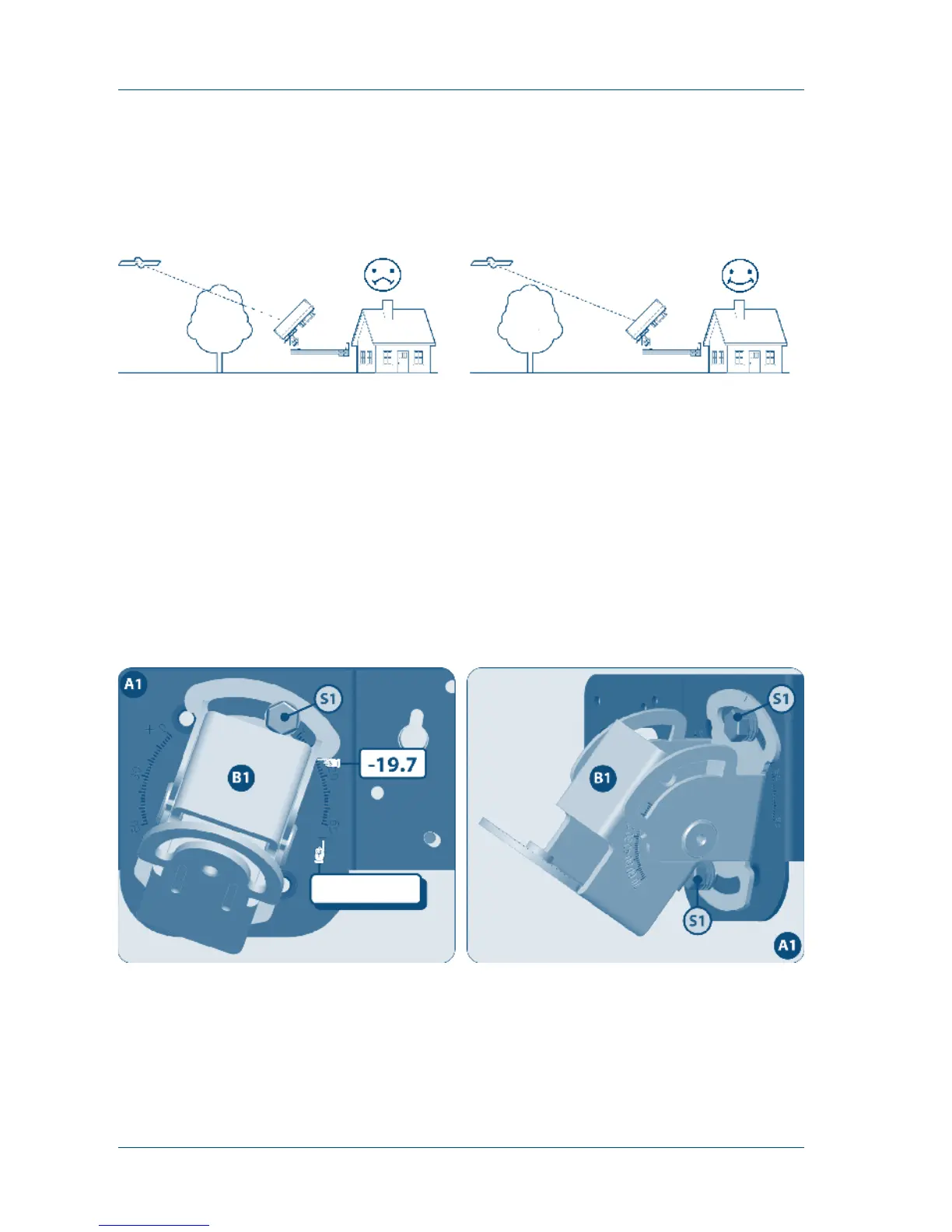
Bad Quality Signal Reception Good Quality Signal Reception
3.2 Step 2: Installation
In order to install your new antenna, you need to find the skew, elevation and azimuth angle by
referring to the table in the appendix of this manual. If you can’t find your location, please refer to
the information of the place nearest to your location. This manual will show you the installation
example for the reception of ASTRA1 satellite in Brest region of France.
The angle information for Brest region is Skew: -19.7º
El: 30º
Az: 149.6º
Part Assembly
1. Fixing the Skew (Joint of Angle Bracket and Antenna Body)
Join the Angle Bracket and Antenna Body with the supplied screw and adjust the skew angle to -19.7
Check –
2. Fixing the Elevation (Joint of Antenna Body and Main Support)
For the purpose of delicate adjustment of the elevation and azimuth angle, please don’t fix the bolt
and nut tightly.



 To Next Page