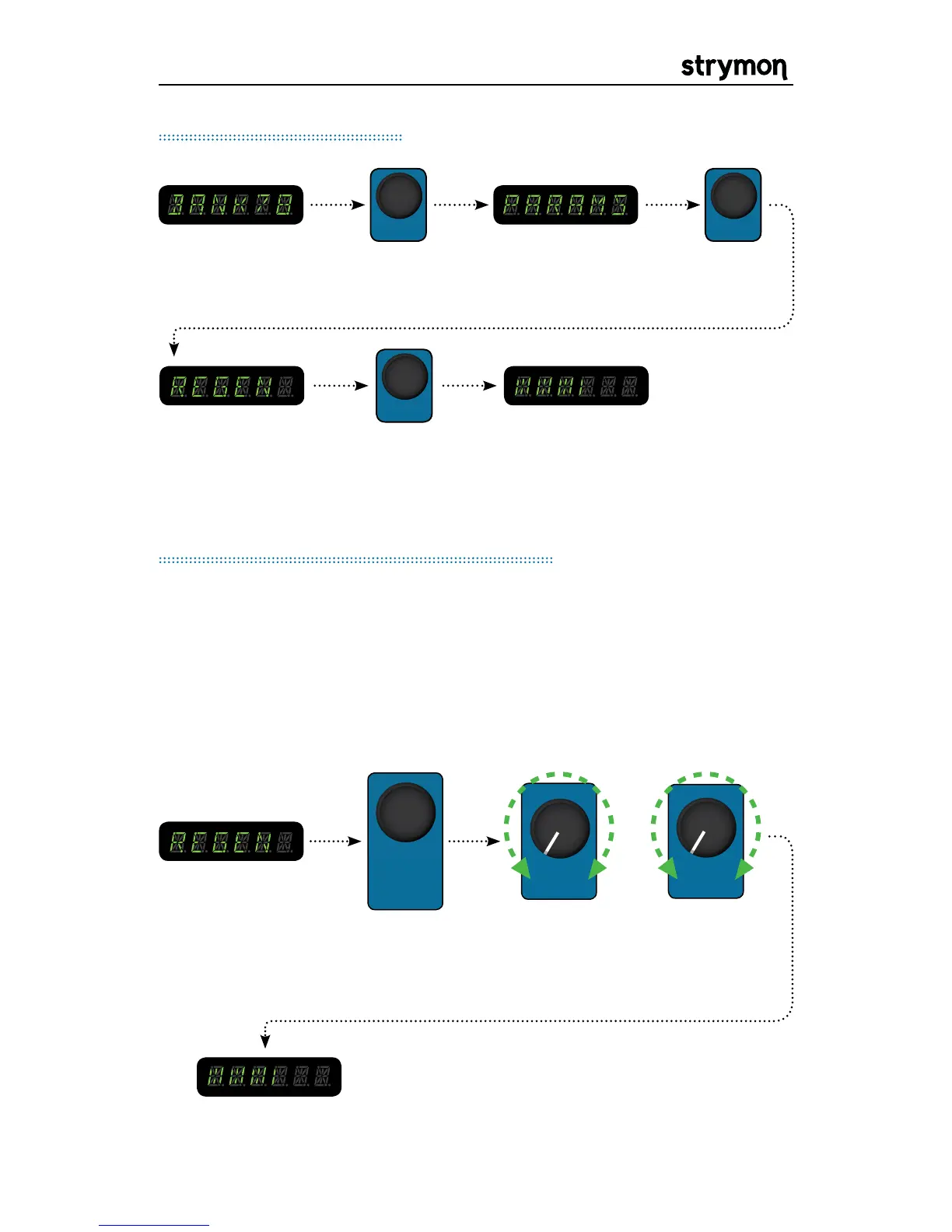
push the value
encoder again
and turn to edit
the selected
PARAMETER
Editing Parameters
The PARAM 1 & PARAM 2 knobs allow you to continuously control any
desired parameter of the currently active mod machine. This can be
very convenient in allowing continuous control over the various mod
machines. For example, REGEN in a flanger can be assigned to one of
the parameter knobs to allow for continuous control over the flanger
feedback.
In Depth: PARAM 1 & 2 Controls
ASSIGNING A PARAMETER
OR
STEP 1:
Navigate to
the desired
parameter to be
assigned.
STEP 2: Press
and hold the
value encoder.
STEP 3: While holding the
value encoder, turn either the
PARAM 1 or PARAM 2 knob to
assign a parameter.
STEP 4: Turn the newly
assigned PARAM knob to
adjust your parameter.


 To Next Page
 Loading...