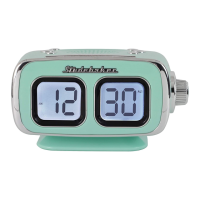
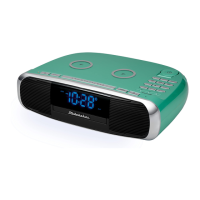
The Studebaker Workstation SB5050 is a versatile Hi-Fi CD Clock Radio and Wireless Charging Station designed to enhance your musical enjoyment and provide convenient charging solutions. This comprehensive device combines multiple audio functions with practical features for daily use, all while prioritizing user safety and ease of operation.
Function Description:
At its core, the SB5050 serves as a multi-functional audio system. It features a CD player, allowing you to enjoy your favorite compact discs. The unit also includes an FM radio, providing access to local broadcasts. For expanded audio options, it offers Bluetooth connectivity, enabling wireless streaming from compatible smart devices. An auxiliary input (AUX IN) further broadens its compatibility, allowing you to connect external audio sources like MP3 players or older CD players via a wired connection.
Beyond its audio capabilities, the SB5050 integrates a dual alarm clock, making it a practical bedside companion. Users can set two independent alarms, choosing between a traditional beeping alarm sound or waking up to their preferred FM radio station. The clock display is an LED, offering adjustable brightness settings (High, Medium, Low) to suit different environments and preferences.
A standout feature of the SB5050 is its wireless charging functionality. It includes two wireless charging pads, capable of charging Qi-compatible smartphones and Apple Watches. This eliminates the need for multiple charging cables, providing a clean and convenient charging experience. For devices without wireless charging capabilities, a USB charging port (DC 5V === 2.1A) is also available on the back of the unit, allowing for wired charging of smartphones and portable devices.
The device also incorporates an EQ operation, offering five different sound modes (FLAT, ROCK, CLASSIC, JAZZ, POP) to customize your listening experience. A sleep timer function is included, allowing the unit to automatically turn off after a designated period (10, 30, 60, 90, or 120 minutes), which is ideal for falling asleep to music. Additionally, a night light feature with adjustable brightness (Off, Low, High) adds to its utility, particularly in a bedroom setting.
Usage Features:
Operating the SB5050 is designed to be intuitive, with controls available both on the unit itself and via an included remote control.
Power and Standby: The unit powers on when plugged into an AC outlet, entering standby mode with the display flashing. A battery back-up system, powered by two AAA batteries (not included), ensures that clock and alarm settings are retained during power outages.
Clock and Alarm Setting: Setting the time is straightforward: press and hold the CLOCK SET button, then use the TUN+/- buttons to adjust hours and minutes, confirming each step with the CLOCK SET button. The PM indicator helps distinguish between AM and PM times. The unit can also synchronize its clock with a Bluetooth-connected smartphone, potentially requesting authorization for access. For alarms, the process is similar: press and hold the ALARM 1 or ALARM 2 button, select "ON," then set the desired hour, minute, wake-up option (alarm sound or FM radio), and volume level using the TUN+/- buttons. The snooze function allows for a temporary 9-minute silence of the alarm.
Radio Operation: To listen to the radio, power on the unit and repeatedly tap the SOURCE button to select FM radio mode. Manual tuning is achieved by tapping the TUN+/- buttons, while automatic tuning (SCAN) is activated by pressing and holding these buttons to find the next available station. For optimal FM reception, the FM antenna should be fully extended and positioned for the strongest signal. The unit also supports storing up to 20 FM preset stations for quick recall.
CD Playback: In CD mode, open the CD compartment using the CD OPEN/CLOSE button, load an audio CD label-side up, and close the tray. The unit will read the disc, display track information, and begin playback when the PLAY/PAUSE button is pressed. Repeat functions (Repeat 1 for current track, Repeat All for the entire disc) and program play mode (up to 20 tracks in a programmed sequence) are available. Skip and search modes allow for easy navigation through tracks.
Bluetooth Connectivity: To use Bluetooth, select Bluetooth mode via the SOURCE button. The Bluetooth icon will flash, indicating pairing mode. Enable Bluetooth on your smart device, search for "SB5050," and select it to pair. A "0000" passcode may be required. Once paired, the icon becomes solid, and you can stream music wirelessly. The SB5050 also features Bluetooth Out (Transmitter) mode, allowing it to transmit audio to Bluetooth headphones or speakers. In this mode, the unit's internal speakers are muted.
Auxiliary Input: Connect external audio devices to the AUX IN jack using a 3.5mm stereo audio cable. Select AUX mode via the SOURCE button, and audio from the external device will play through the SB5050's speakers. Volume can be controlled through the main unit, and for devices connected via headphone jack, both device and unit volume may need adjustment.
Charging Features: For wireless charging, place your Qi-compatible smartphone or Apple Watch on the designated charging pads. Indicators will light up to confirm charging. For wired charging, connect your device to the USB charging port using a USB cable.
Maintenance Features:
The SB5050 is designed for durability, but proper care is essential for longevity.
- General Care: Avoid exposing the unit to excessive force, shock, dust, or extreme temperatures. Do not tamper with internal components. Clean the unit with a dry cloth; solvents or detergents should not be used. Keep the unit away from direct sunlight, hot, humid, or dusty places, and sources of electrical noise like fluorescent lamps or motors.
- CD Care: If CD playback issues occur, the disc's bottom surface may require cleaning. Wipe the disc from the center outwards with a soft cleaning cloth. Do not attach labels or seals to CD-R/RW discs, as this can cause malfunctions.
- Battery Safety: Batteries (for remote and clock backup) should not be exposed to excessive heat. Ensure correct polarity when installing. Do not mix old and new batteries, or different types of batteries. Remove batteries if the unit will not be used for an extended period to prevent leakage and damage.
- Furniture Protection: The unit is equipped with non-skid rubber feet. To prevent potential marks or stains on fine wooden furniture from certain polishes or preservatives, it is recommended to apply small self-adhesive felt pads to the bottom of the rubber feet.
- Resetting the Unit: In case of malfunction due to electrostatic discharge, the unit can be reset by unplugging the power adapter for 30 seconds before plugging it back in.
- Wireless Charging Caution: Remove any metal or magnetic protective cases from phones before wireless charging. Do not place metal objects or magnetic-striped devices on the charging pads, as this could cause damage.
- USB Charging Port: The USB port is for battery charging only and does not support data transfer or connection to a computer. Do not connect it to another USB charger.
The SB5050 is a comprehensive and user-friendly device, integrating essential audio functions with modern charging conveniences, all while emphasizing safety and straightforward operation.


 To Next Page
 General