Aux 5.
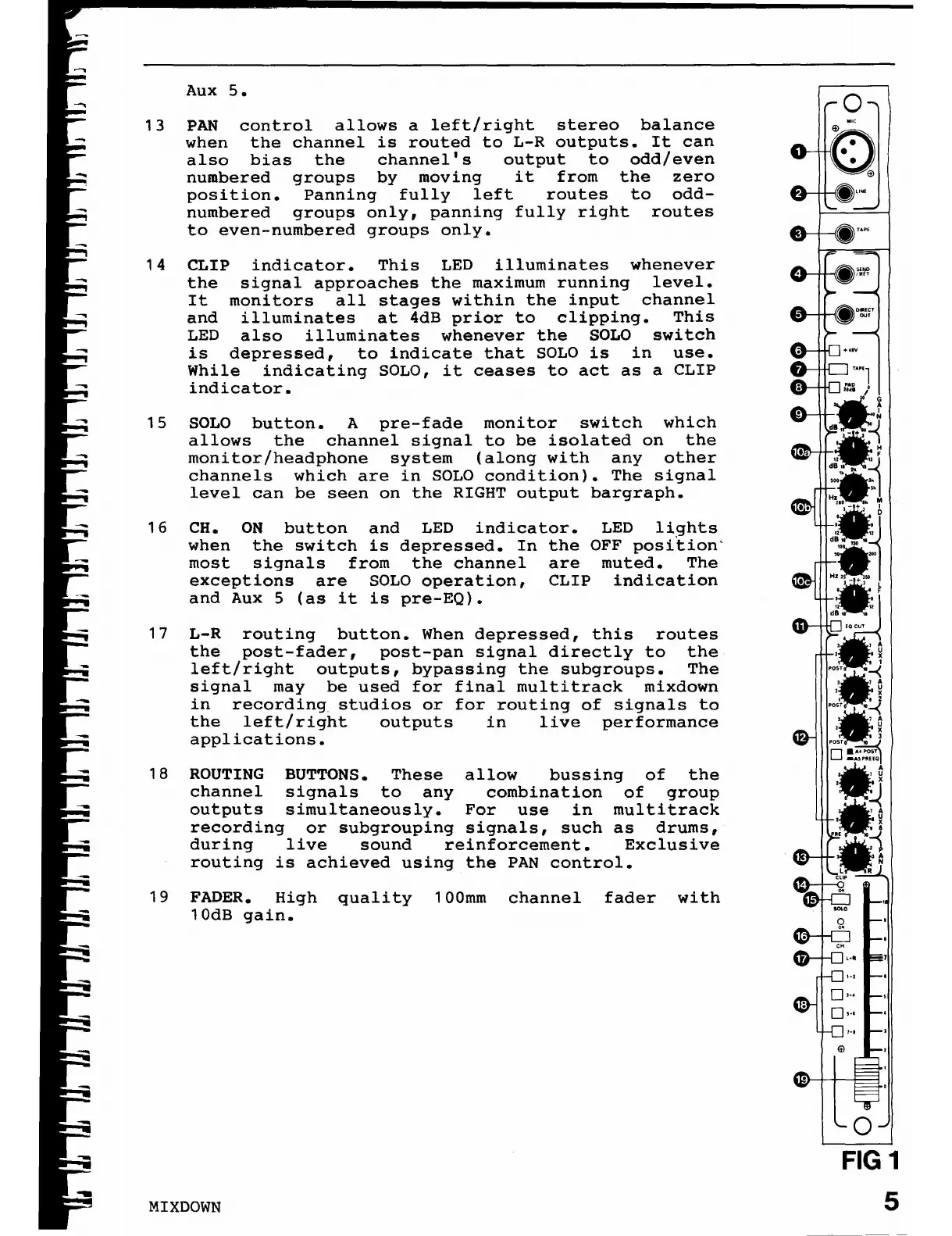
13 PAN control allows a left/right stereo balance
when the channel is routed to L-R outputs. It can
also bias the channel's output to odd/even
numbered groups by moving it from the zero
position. Panning fully left routes to odd-
numbered groups only, panning fully right routes
to even-numbered groups only.
14 CLIP indicator. This LED illuminates whenever
the signal approaches the maximum running level.
It monitors all stages within the input channel
and illuminates at 4dB prior to clipping. This
LED also illuminates whenever the SOLO switch
is depressed, to indicate that SOLO is in use.
While indicating SOLO, it ceases to act as a CLIP
indicator.
15 SOLO button. A pre-fade monitor switch which
allows the channel signal to be isolated on the
monitor/headphone system (along with any other
channels which are in SOLO condition). The signal
level can be seen on the RIGHT output bargraph.
16 CH. ON
button and
LED
indicator.
LED
li9
hts
when
the switch is depressed. In
the
OFF position'
most
signals
from the channel
are muted.
The
exceptions
are SOLO operation,
CLIP indication
and Aux
5 (as it is pre-EQ)•
17 L-R routing button. When depressed, this routes
the post-fader, post-pan signal directly to the
left/right outputs, bypassing the subgroups. The
signal may be used for final multitrack mixdown
in recording studios or for routing of signals to
the left/right outputs in live performance
applications.
18 ROUTING BUTTONS. These allow bussing of the
channel signals to any combination of group
outputs simultaneously. For use in multitrack
recording or subgrouping signals, such as drums,
during live sound reinforcement. Exclusive
routing is achieved using the PAN control.
19 FADER. High quality 100mm channel fader with
10dB gain.
MIXDOWN
o
FIG 1
5














 To Next Page