4
1. Confirm the connections between receiver and mixer as well as between mixer and amplifier are correct. Turn down the
volume on the amplifier or mixer.
3.6 How to operate
2. Turn on the receiver:
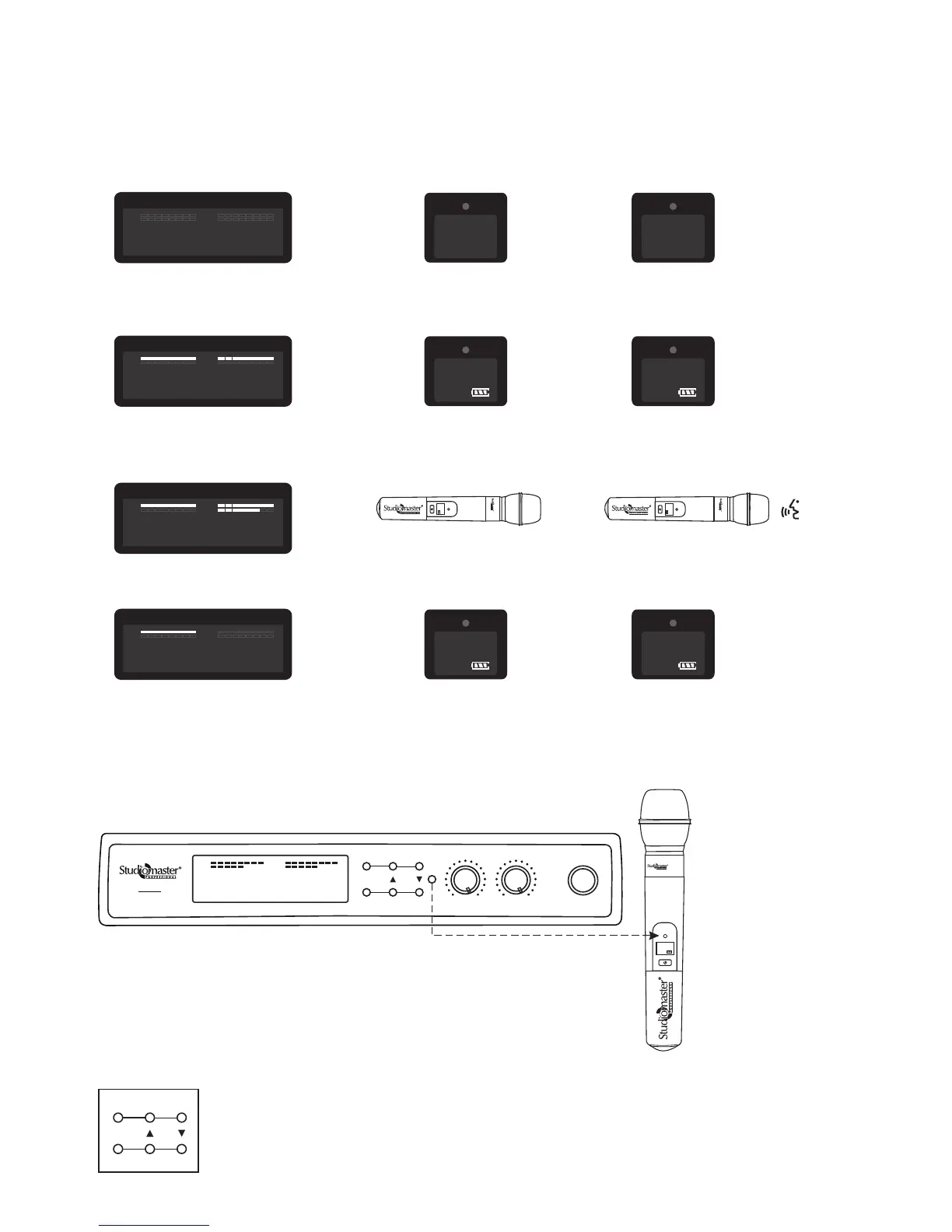
The receiver will display the last selected channel number, There will be no bargraph indication because the transmitters
are OFF.
CH–
003
007
CH–
RF RF
AF AF
5 510 1015 15
20 20
25 25
30 30
35 3540 40
-30 -30-25 -25-20 -20
-15 -15
-10 -10
-5 -5
0 0PEAK PEAK
CHANNEL A CHANNEL B
Receiver Display Channel A Transmitter is OFF
IR
5. Re-selecting the Channel frequency:
3. Turn on the transmitter:
The transmitter is turned ON, the receiver display shows the RF bargraph of respective channel as shown below.
Receiver Display
CH–
003
007
CH–
RF RF
AF AF
5 510 1015 15
20 20
25 25
30 30
35 3540 40
-30 -30-25 -25-20 -20
-15 -15
-10 -10
-5 -5
0 0PEAK PEAK
CHANNEL A CHANNEL B
Channel A Transmitter
584.50
003
CH
IR
Channel B Transmitter
586.50
007
CH
IR
Channel B Transmitter is OFF
IR
4. Test the transmitters:
When Microphone is active it is indicated by signal strength (AF) on receiver.
Receiver Display
CH–
003
007
CH–
RF RF
AF AF
5 510 1015 15
20 20
25 25
30 30
35 3540 40
-30 -30-25 -25-20 -20
-15 -15
-10 -10
-5 -5
0 0PEAK PEAK
CHANNEL A CHANNEL B
XR-8 0H
IR
584.50
200
CH
Channel A: No Audio
XR-8 0H
IR
586.50
007
CH
Channel B: Audio
Channel A Transmitter
584.50
003
CH
IR
Channel B Transmitter
683.00
200
CH
IR
Receiver Display
CH–
003
CH–
003
RF RF
AF AF
5 510 1015 15
20 20
25 25
30 30
35 3540 40
-30 -30-25 -25-20 -20
-15 -15
-10 -10
-5 -5
0 0PEAK PEAK
CHANNEL A CHANNEL B
CH–
007
To set transmitter & receiver channel follow the following procedure. Ensure IR on receiver & transmitter
facing each other & kept closed to each other.
• Bring the transmitter near to receiver, make sure transmitter IR window face to the receiver IR window.
• Change channel number on receiver unit using Up & Down key as shown below.
CHANNEL B
CHANNEL A
SET
POWER
XR-80
RE CE IVE R
MIN MINMAX MAX
IR
CHANNEL B
CHANNEL A
SET
VOL A VOL B
CH–
003
007
CH–
RF RF
AF AF
5 510 1015 15
20 20
25 25
30 30
35 3540 40
-30 -30-25 -25-20 -20
-15 -15
-10 -10
-5 -5
0 0PEAK PEAK
CHANNEL A CHANNEL B
XR- 80H
IR
683.00
200
CH
Channel B Transmitter


 To Next Page
 Loading...