2 EN/04.2017 © STULZ GmbH – all rights reserved
electrical optioNS
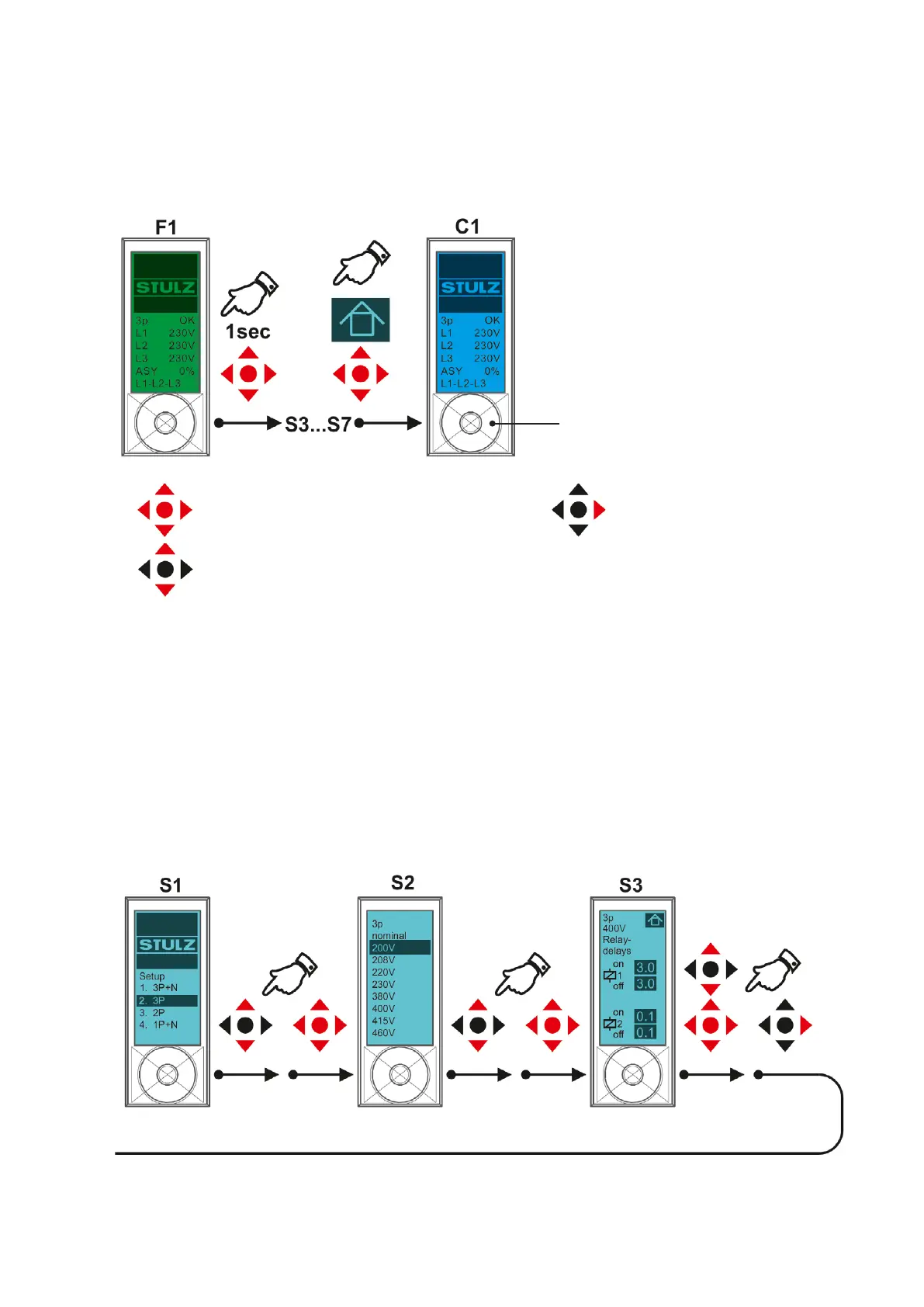
S1: Selecting the mains form
Note: select the setting “3P“ also for mains with neutral conductor.
S2: Selecting the nominal voltage
S3: Setting the delay times
for relay 1 (releases at S4, S5, S6) and relay 2 (releases at S7).
Modification of the adjusted values
• touch all four contact elds for 1 second to enter the change mode.
• after having completed the modications select the „House“ icon on the display using the contact elds (the
symbol flashes) and then touch all four contact fields.
means: touch all four contact fields
means: touch upper and lower contact field (to select
and adjust a value on the display)
Contact field
means: touch the right contact field (to
select the next menu)
Display colour
On delivery, the display is green when swit-
ched on.
After changing the basic setting, the display
is blue.
continued on next page



 To Next Page