E/0204/39/30
c) Configuration
• Use the keypad installed on unit 1.
• On the main page of the C1010 press „SET“ to choose unit 1 using arrow up/down
keys, press „SET“ again.
• Press „Menu“ to choose the menue.
• Press 1x Arrow-Up key to go to „Manufacturer Menue“, press „SET“
• Type in the password with Arrow-up/-down keys, press „SET“ to confirm.
• Use arrow-up/-down keys to go to the following menue-point for configuration.
• Go to M05, press „SET“, change value to „1“ or “2” with arrow-up/-down keys, press
„SET“ to confirm (M05 enables sequencing function on running unit time for “1”, on
running fan time for “2”)
• Configure M01=1 for unit 1 (M01 is the unit adress for sequencing).
• Configure M02=2 (M02 is the number of units in sequencing).
• Configure M03=2 (M03 is the number of units which can be ON parallel)
• Press 2x „ESC“ to leave menue.
• Press „SET“ to choose unit 2 with arrow up/down keys, press „SET“ again.
• Configure M01= 2 for this second unit .
• Configure M05,02,03 according to the above description.
2) Three to five units
a) Connection
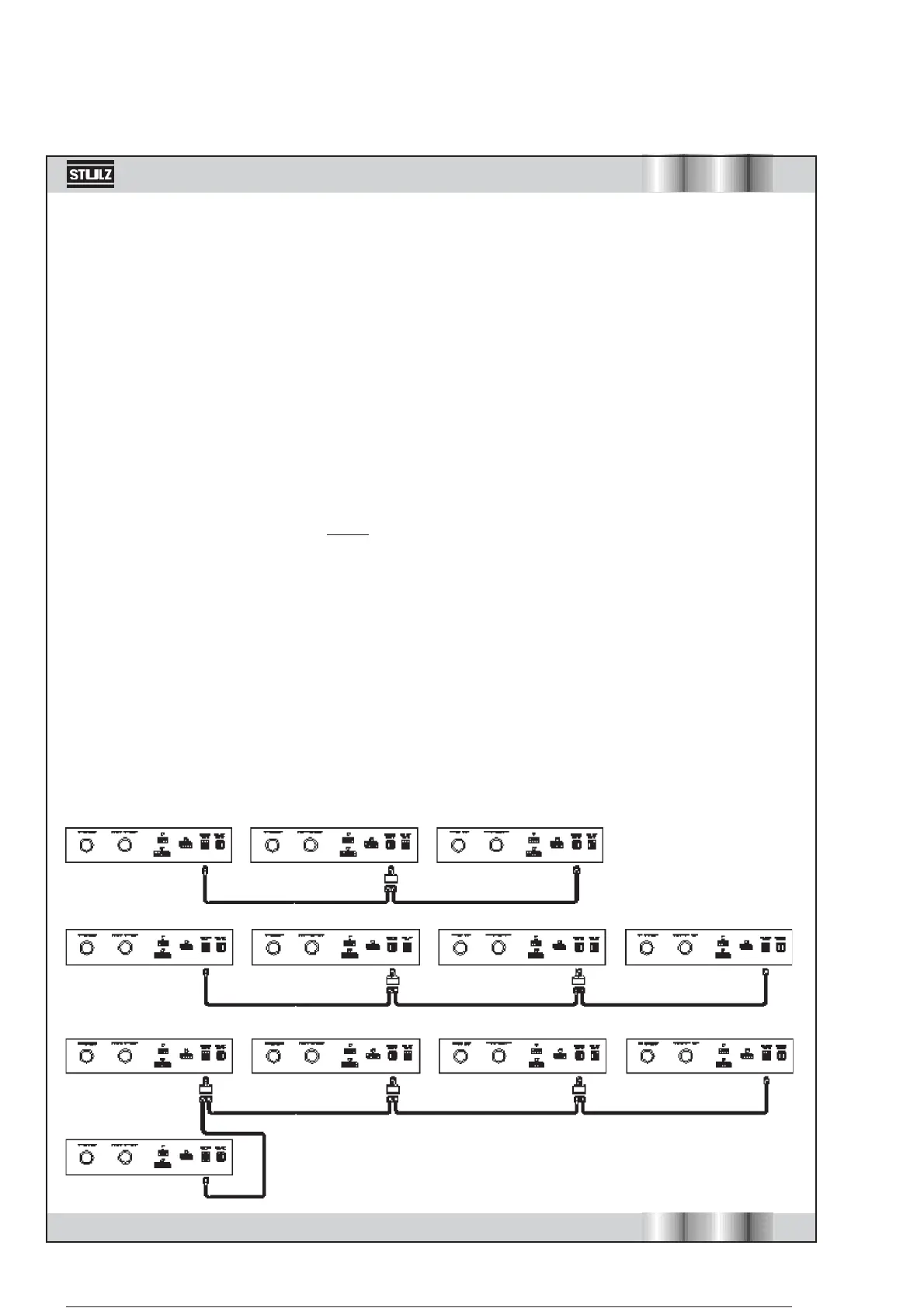
Connect the socket „Sequencing LAN“ of unit 1 with the SPLITTER, which has to be used
on all units between first and last unit. Connect the socket „Sequencing LAN“ of the last
unit with the SPLITTER on the second last unit. Connect the SPLITTER of the unit between
first and last unit directly from SPLITTER to SPLITTER. You find the sockets on the electrical
connection panel.



 To Next Page