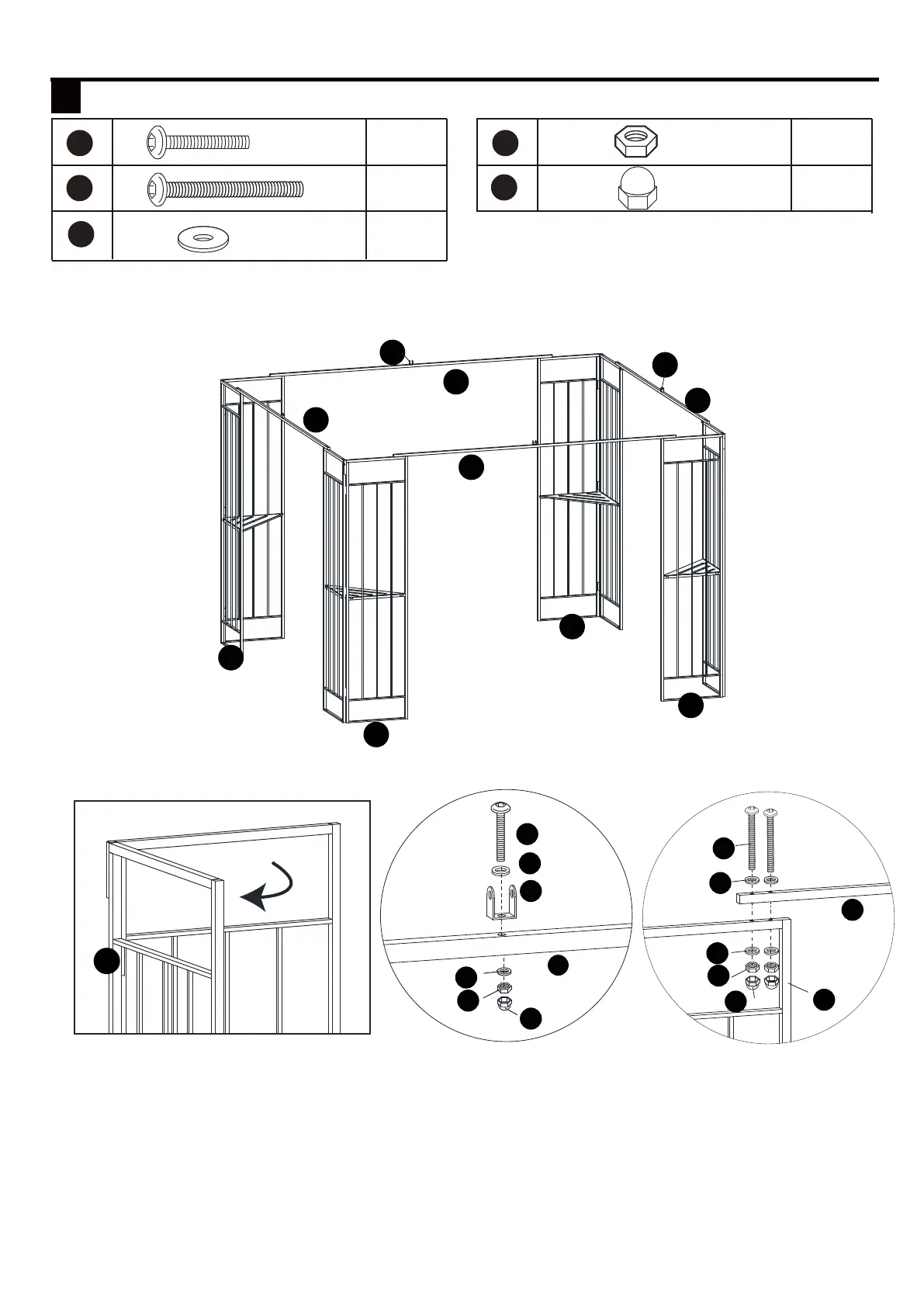
1.1. Unfold two corner panels (A).
1.2.Connect the connector (D1) onto the crossbeam (B1) by bolt (AA) and flat washers (DD), then
connect the crossbeam (B1) onto the corner panel (A) by bolt (BB), flat washers (DD), nut (EE).
Place cap (GG) on the nut (EE).
A
A
A
A
A
B1
B1
B11
B1
B1
A
D1
AA
DD
DD
DD
DD
EE
EE
BB
B1
D1
D1
GG
GG
AA
BB
DD
EE
GG
x4
x16
x40
x20
x20
INSTALLATION INSTRUCTIONS
1 Hardware Used
1 2 3 4 5 6
7 8 9 10 11 12
13 14 15 16 17 18
19 20 21 22 23 24
25 26



 To Next Page