2-24
Keys and doors
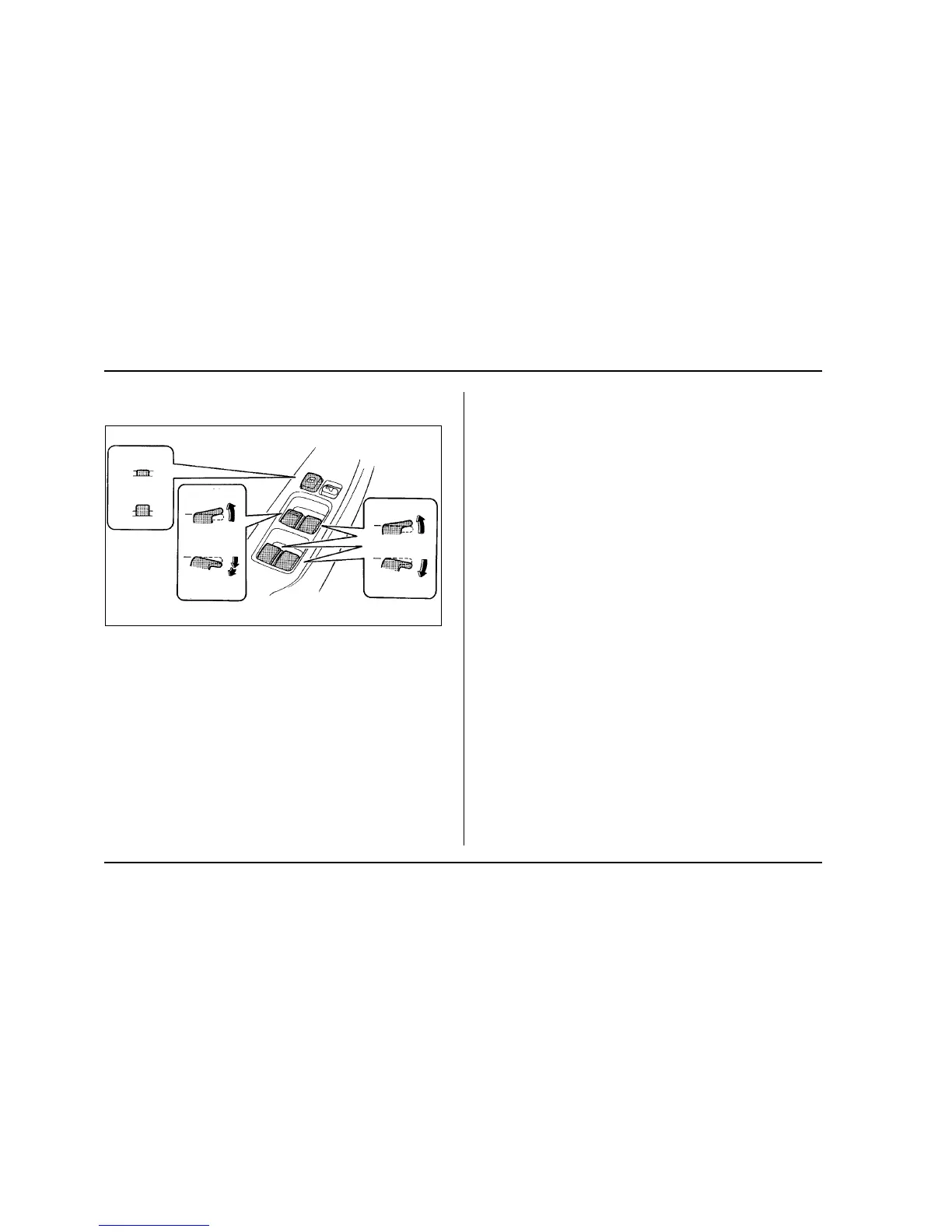
" Operating the driver’s window
1) Lock
2) Unlock
3) Close
4) Open
5) Automatically open
To open:
Push the switch down lightly and hold it. The window
will open as long as the switch is held.
This switch also has a one-touch auto down feature
that allows the window to be opened fully without hold-
ing the switch.
Push the switch down until it clicks and release it, and
the window will fully open. To stop the window half-
way, pull the switch up lightly.
To close:
Pull the switch up lightly and hold it. The window will
close as long as the switch is held.
" Operating the passengers’ windows
To open the passengers’ windows, push the appropri-
ate switch down and hold it until the window reaches
the desired position. To close the window, pull the
switch up and hold it until it reaches the desired posi-
tion.
" Locking the passengers’ windows
To lock the passengers’ windows, push the lock
switch. When the lock switch is in the “LOCK” position,
the passengers’ windows cannot be opened or closed.
1
2
3
4
5
3
4
UB2008DB






 To Next Page