7
Safety & Navigation
Information
Emergency
Screen
Finding an
Address
Finding a Point
of Interest
Home
Registration
Additional
Quick Tips
4
5
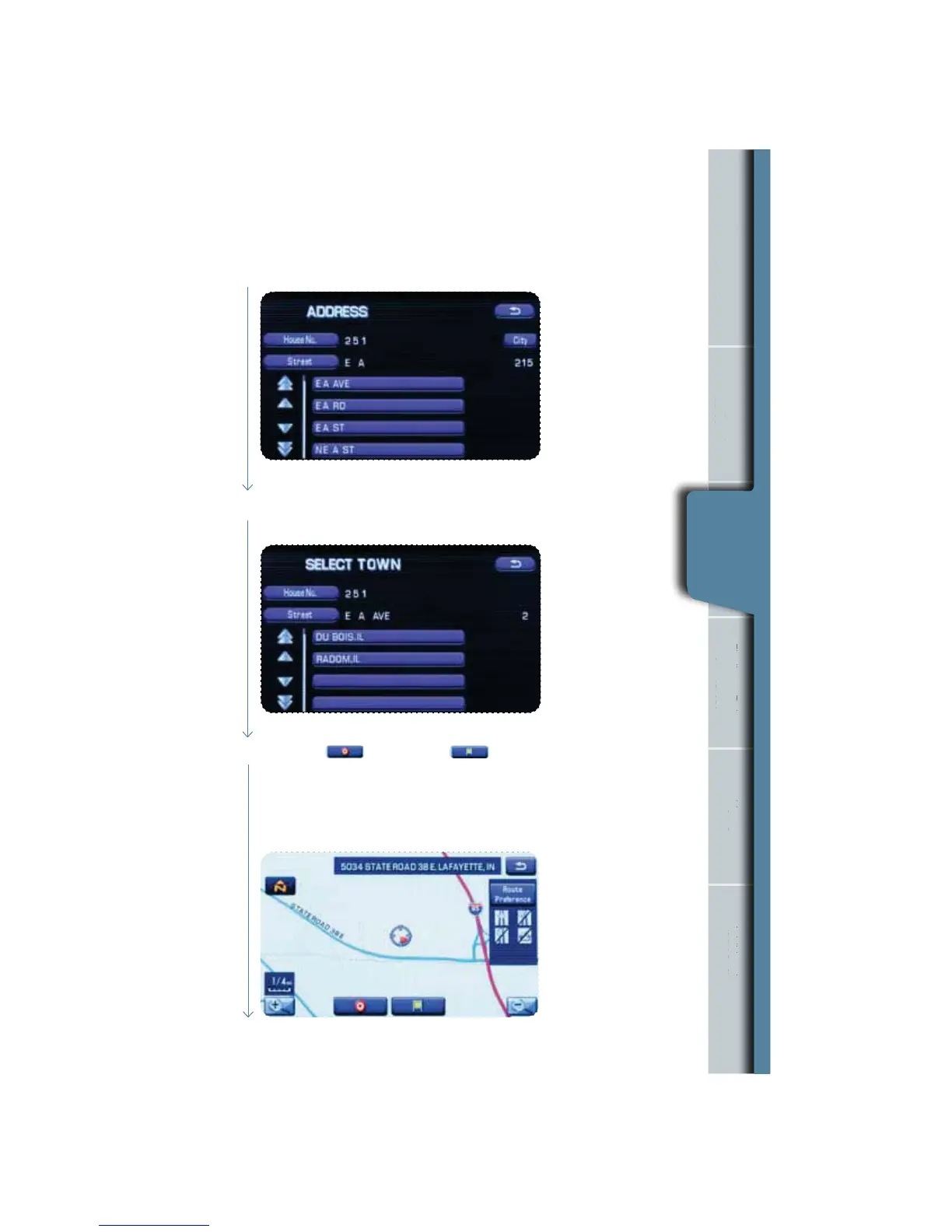
If the same street name exists in more than one city, a list of these towns will
be shown. Select the correct town from the list.
Select the desired street from the list.
n
Information
rgency
Scr
g an
ddres
g a
of Interes
Registration
ona
Quick Tips
Finding an
Address
Then select (destination) or (waypoint).
t4FMFDUEFTUJOBUJPOUPTFUUIFBEESFTTFOUFSFEJOUIFBCPWFTUFQTBTUIFýOBMEFTUJOBUJPO
The system will calculate the route and display the entire route on the map.
t4FMFDUXBZQPJOUJGZPVXBOUUPTFUUIFBEESFTTFOUFSFEBTBXBZQPJOUPO
your route. You can program up to ve waypoints per trip.
6












 To Next Page