Connecting an iPhone
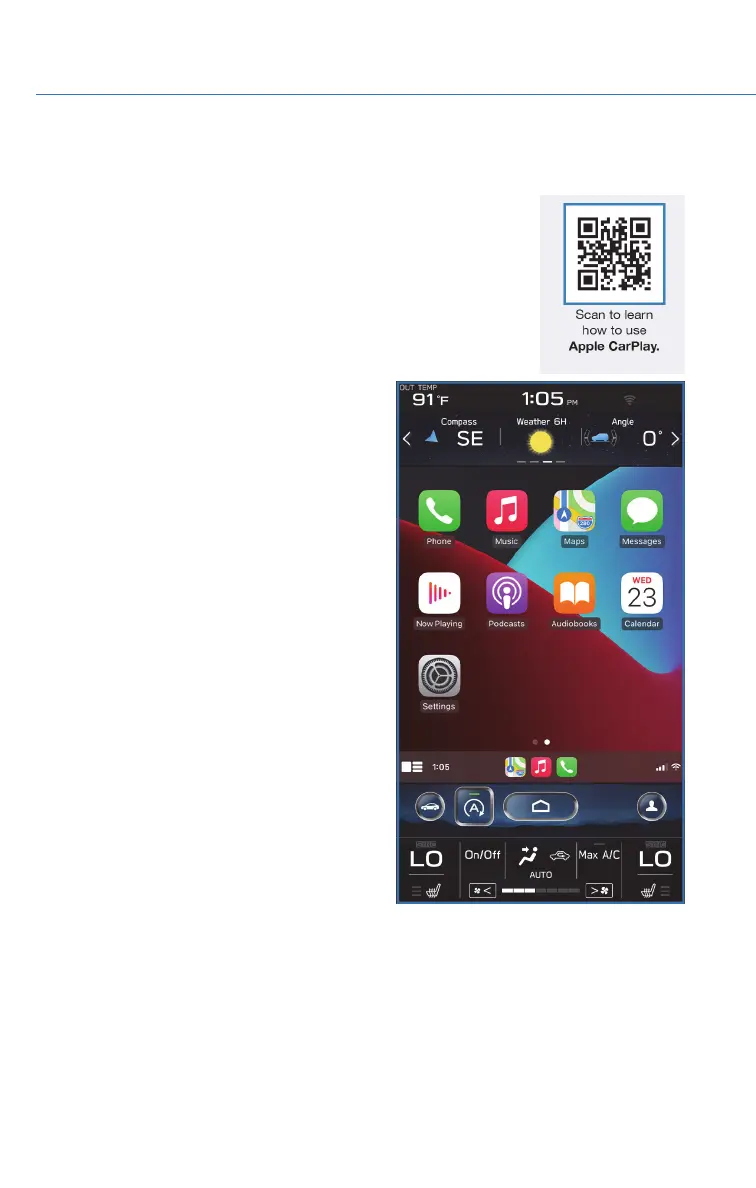
Your Subaru comes equipped with Apple CarPlay
®
, and allows you
to safely utilize certain iPhone features with your vehicle. You can
learn more about connecting your phone and using Apple CarPlay
®
from the how-to video linked in the QR code and the steps listed
below.
1. To set up Apple CarPlay
®
, make sure Siri is
turned on then plug the iOS/Apple phone
into the USB port of the vehicle. Make sure
to use an MFi certified cable.
2. Enable Apple CarPlay
®
on the Center
Information Display, then select “Allow” on
the iOS/Apple phone when prompted.
3. Select Apple CarPlay
®
on the vehicle screen.
This will bring you to the home page of your
phone in Apple CarPlay
®
.
Ensure the iOS/Apple phone is fully up to
date. Also ensure all apps that work on
Apple CarPlay
®
are up to date. Apple
CarPlay
®
might not function correctly if one
of the apps is outdated or having an issue.
Apps can be updated in the App Store.
HOW TO APPENDIX
142













 To Next Page