25
Getting
Started
Instrument
Panel
Gauges
Personalize Controls While
Operating
Safety / In Case
of Emergency
Additional
Information
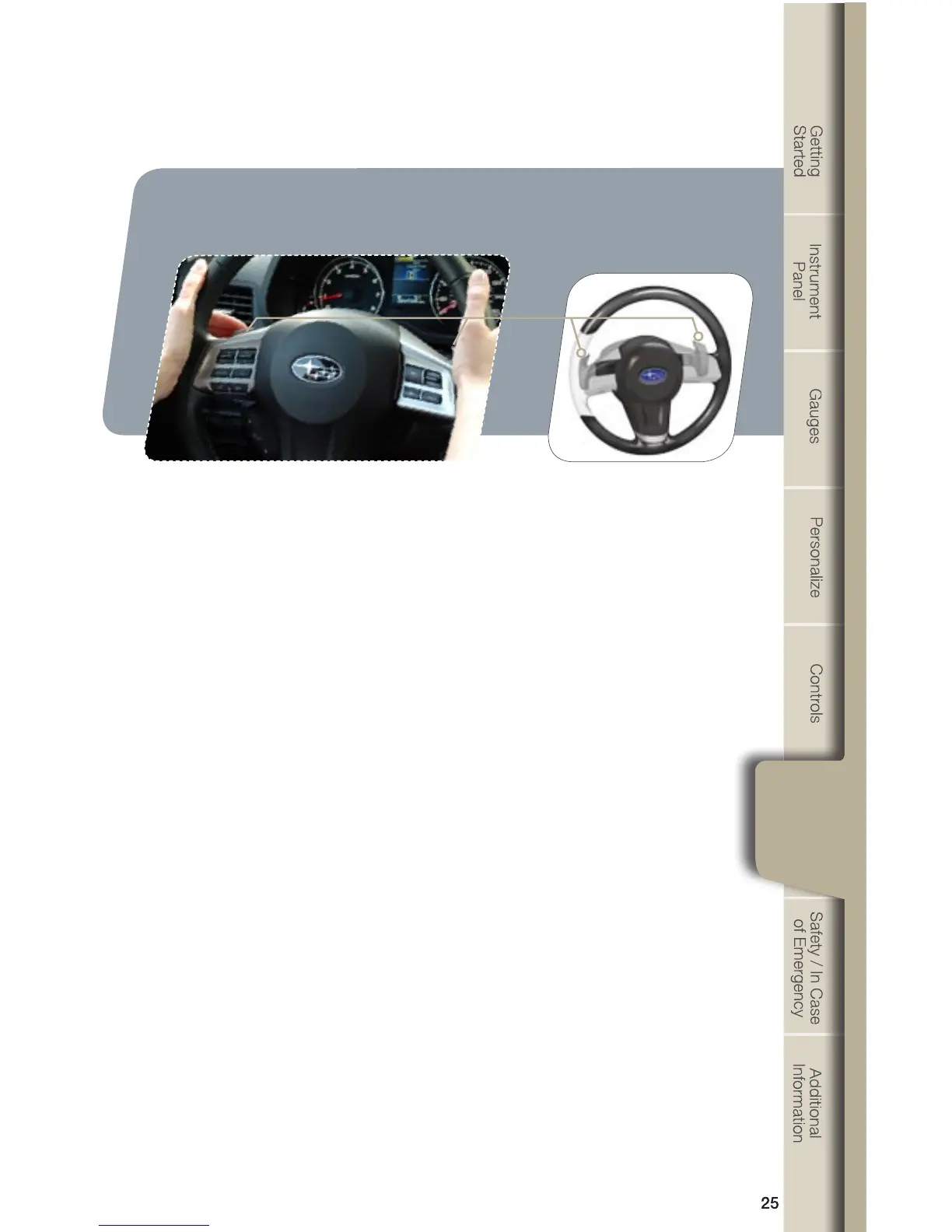
Paddle Shift Control Switches
•Temporaryuse:Evenwhentheselectorisinthe“D”(Drive)position,youcan
temporarilyshiftthegearbypullingthe“+”or“-”paddleshiftcontrolswitch.
ThetransmissionwillautomaticallyswitchbacktoNormalMode.
•WhentheselectorleverisinManualMode,shifttothenexthighergearby
pullingthe“+”paddleshiftcontrolswitchonthesteeringwheel.Pullthe“-”
paddle shift control switch to shift into the next lower gear.
When Manual Shifting Operation Is Possible
•Arrow-shapedlightsinthecenteroftheinstrumentpanelshowwhetheran
upshift is possible and whether a downshift is possible.
•Botharrowsareon:Upshiftinganddownshiftingarebothpossible.
•Uparrowonlyison:Onlyupshiftingispossible.
•Downarrowonlyison:Onlydownshiftingispossible.









 To Next Page