EasyManua.ls Logo

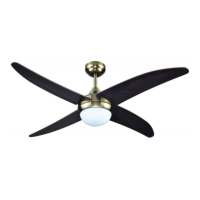
Sulion RICH - User Manual

Sulion RICH
42 pages
Go to English
Print Icon
To Next Page IconTo Next Page
Loading...
RICH
Ante cualquier pregunta, incidencia o falta de componentes, antes de consultar con su tienda habitual, llame a nuestro departamento de aten-
ción al cliente al teléfono 916 774 540, de 9:00 a 18:30 de lunes a jueves y de 9:00 a 14:00 los viernes. También puede consultarnos a través
del correo info@sulion.es o de nuestro servicio de atención técnica sat@sulion.es y a través de nuestra web www.sulion.es donde encontrarás
un acceso a vídeos, instrucciones y una guía de preguntas frecuentes.
In the event of any questions, incidents, or missing parts, before consulting with your retailer, call our customer service department at 916 774
540 from 9 a.m.- 6:30 p.m. from Monday-Thursday or 9 a.m.-2 p.m. on Fridays. You can also contact us via email at info@sulion.es or our
technical service at sat@sulion.es and on our web www.sulion.es, where you will find videos, instruction manuals and our FAQs.
REF 075094

Questions and Answers

  • J
    Jacob RileyJul 30, 2025
    What to do if my Sulion Fan does not work?
    • J
      John WellsJul 30, 2025
      If your Sulion Fan isn't working, first ensure the system has power and that it reaches the device. Check the fuses and switches on the device installation power circuit. Also, verify that wiring connections have been done correctly by a certified electrician. If using a remote, replace the battery or resynchronize the transmitter and receiver.
  • R
    Roy HoffmanAug 6, 2025
    Why is my Sulion RICH Fan making excessive noise?
    • M
      marissa21Aug 6, 2025
      Excessive noise from your Sulion Fan could be due to several reasons. First, lower the upper canopy, ensuring it is separated from the ceiling by at least 3 mm. Then, tighten all fastening screws, but not excessively. Also, retighten all ceiling mount screws. Finally, ensure you are using the correct remote control provided with the device, which should be supervised by a certified electrician.
  • W
    westjesseAug 13, 2025
    How to fix a wobbling Sulion RICH?
    • J
      John MorganAug 13, 2025
      If your Sulion Fan is wobbling, the fan blades may not be parallel to the ceiling, blade fastening screws may be loose or blades may be deformed. Follow the instructions indicated in the “Balancing” section of this manual.
  • M
    Maria LittleAug 21, 2025
    Why is the airflow inadequate from my Sulion Fan?
    • M
      Michael DicksonAug 21, 2025
      If your Sulion Fan turns but the airflow is inadequate, the blades may be rotating in the opposite direction. Follow the directions in the “Rotation Direction” section of this manual. Installing a fan without a shaft, flush with the ceiling, can reduce airflow. There may exist objects in the room that block airflow. The fan chosen may be too small for the volume of the room where it is installed.

Summary

General Cautions and Safety

Installation and Operation Warnings

Essential warnings for safe installation, operation, and user supervision, including distance requirements.

Electrical and Clearance Safety

Guidelines on authorized electricians, blade clearance, and user age for safe operation.

Detailed Safety Precautions

Electrical Connection Safety

Procedures for safe electrical connections, power isolation, and wiring regulations.

Mounting and Grounding

Instructions for secure ceiling mounting and proper fan grounding to prevent danger.

Operational Safety Rules

Guidelines on fan operation, direction changes, and avoiding obstructions for motor protection.

Technical Specifications and Preparation

Device Technical Specifications

Detailed electrical and performance specifications for the fan, including voltage, wattage, and dimensions.

Preparing for Installation

Notes and guidance for the installation process, estimated time, and required tools.

Remote Control Operation

Remote Control Functions

Overview of buttons and their functions for fan speed, modes, and timer settings.

Receiver Synchronization

Instructions for synchronizing the remote control with the fan receiver for proper operation.

Safety Functions

Explanation of blocking protection and overload protection features in the remote receiver.

Advanced Features and Troubleshooting

Light Color Temperature Control

Instructions on how to change and save the light's color temperature settings.

Rotation Direction Control

Guidance on switching between summer (downward) and winter (upward) airflow directions.

Troubleshooting Guide

Fan Not Working

Common causes and solutions for the fan not turning on, including wiring and power issues.

Fan Wobbling and Noise

Troubleshooting steps for fan wobbling, loose blades, canopy contact, and mechanical noise.

Lighting and Airflow Issues

Solutions for lights not turning on and inadequate airflow, including direction and placement checks.

Maintenance, Warranty, and Compliance

Maintenance and Cleaning

Instructions for regular cleaning and checking fastenings to maintain appearance and prevent issues.

Warranty Terms and Conditions

Details on warranty coverage, exclusions, service, and validity conditions for the fan.

Environmental Protection

Guidance on proper disposal and recycling of electrical products and packaging.

Sulion RICH Specifications

General IconGeneral
CategoryFan
TypeCeiling Fan
Blade MaterialWood
Remote ControlYes
Light KitYes
Light TypeLED
ModelRICH
Blade Size52 inches
MaterialMetal / Wood

Related product manuals