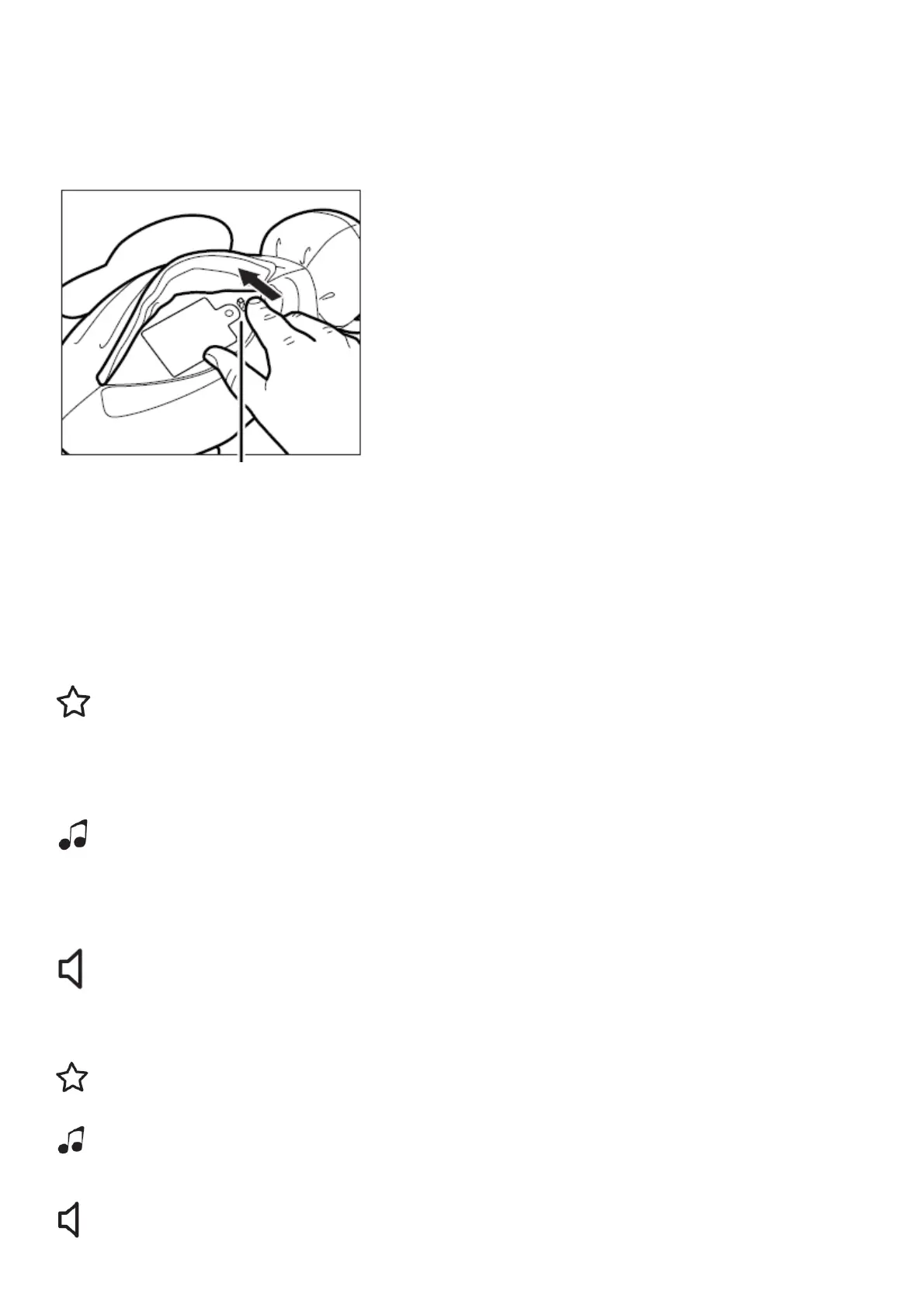
Power/Timer Control:
The On/Off/Timer Switch switch can be found next to the battery door on the bottom of the unit. To activate the
normal play mode, open the pocket on the bottom of unit, and move the switch to any of the three
timer positions. When in “Try Me” mode, each function will automatically shut off after 3 seconds.Turn switch to the
“Off” position during long periods of inactivity.
On/Off/Timer Switch
ON/OFF/Timer Switch Functions:
1st position: “Try Me” mode
2nd position: Off
3rd position: On / 15 min auto shut off
4th position: On / 30 min auto shut off
5th position: On / 45 min auto shut off
Nightlight:
Press the nightlight button sequentially to switch on red, green, blue and light show (all colours), followed by Off. The
nightlight can be used with the lullabies/nature sounds.
Lullabies/Nature Sounds:
Press the lullabies button sequentially to switch on each of the 3 different lullabies, followed by each of the 2 nature
sounds, and again for Off.
Volume:
Adjust the sound level with the volume button (Low / Medium / High) on each unit.
Nightlight Display
(Red / Green / Blue / Light Show / Off)
Lullabies/Nature
3 Lullabies / 2 Nature Sounds / Off
Lullabies/Nature



 To Next Page