EasyManua.ls Logo

Sun-Mate Info-Mate 837 - Operation and Recharging Methods; Rechargeable Power Sources; Playing the Radio

Default Icon
14 pages
Print Icon
To Next Page IconTo Next Page
To Previous Page IconTo Previous Page
Loading...
fits
your
radio's
DC
12V
jack.
Using
a
DC
adapter
that
does
not
meet
these
spe-cifications
could
seriously
damage
the
radio
or
the
adapter.
USING
RECHARGEABLE IPOWER SOURCES
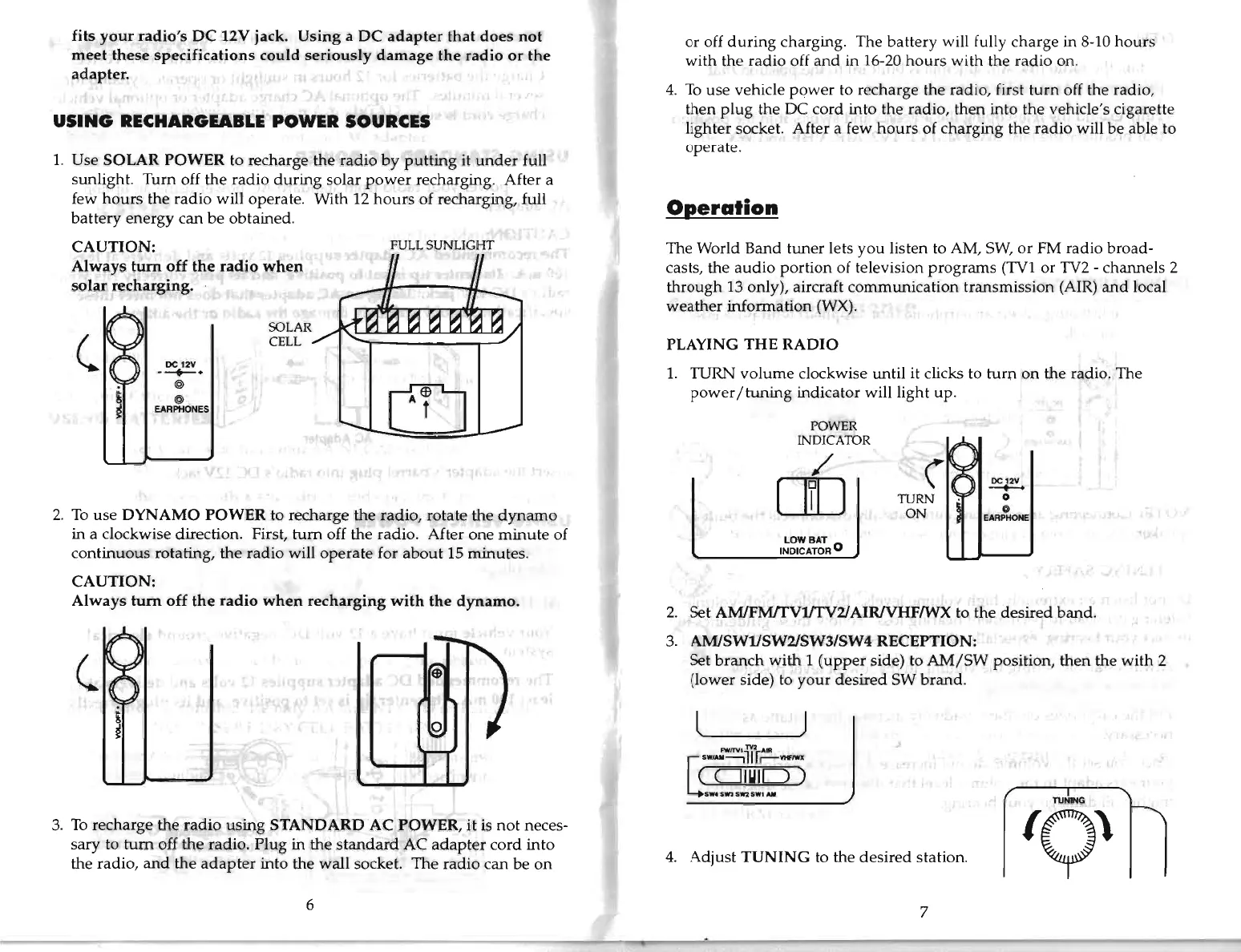
1.
Use
SOLAR
POWER
to recharge
the
radio
by
putting
it
under
full
sunlight.
Turn
off
the
radio
during
solar
power
recharging. After a
few
hours
the
radio
will operate. With 12
hours
of recharging, full
battery
energy
can
be
obtained.
CAUTION:
FULL
SUNLIGHT
Always
tum
off
the
radio
when
solar
recharging.
(
SOLAR
CELL
DC
12V
---t>-.
@
@
EARPHONES
~
2.
To
use
DYNAMO
POWER
to
recharge
the
radio,
rotate
the
dynamo
in a clockwise direction. First,
turn
off
the
radio. After
one
minute
of
continuous
rotating,
the
radio
will
operate
for
about
15
minutes.
CAUTION:
Always
turn
off
the
radio
when
recharging
with
the
dynamo.
~
3.
To
recharge
the
radio
using
STANDARD
AC
POWER,
it
is
not
neces-
sary
to
tum
off
the
radio.
Plug
in
the
standard
AC
adapter
cord
into
the
radio,
and
the
adapter
into
the
wall
socket.
The
radio
can
be
on
6
or
off
during
charging.
The
battery
will fully
charge
in 8-10
hours
with
the
radio
off
and
in 16-20
hours
with
the
radio
on.
4.
To
use
vehicle
power
to
recharge
the radio, first
turn
off the radio,
then
plug
the DC
cord
into
the radio,
then
into
the
vehicle's cigarette
lighter socket. After a few
hours
of
charging
the
radio
will
be
able to
operate.
Operation
The
World
Band
tuner
lets
you
listen to AM, SW,
or
FM
radio
broad-
casts,
the
audio
portion
of television
programs
(TV1
or
TV2 -
channels
2
through
13 only), aircraft
communication
transmission
(AIR)
and
local
weather
information
(WX).
PLAYING
THE
RADIO
1.
TURN
volume
clockwise
until
it clicks to
turn
on
the
radio.
The
power
/
tuning
indicator
will
light
up.
POWER
INDICATOR
/
[]]
TURN
ON
DC12V
--
o
o
EARPHONE
LOW
BAT
INDICATOR
°
2.
Set
AMlFM!fV1JTV2I
AIRlVHFfWX to
the
desired
band.
3.
AMlSWl/SW2ISW3/SW4
RECEPTION:
Set
branch
with
1
(upper
side) to
AM/SW
position,
then
the
with
2
(lower
side) to
your
desired
SW
brand.
l J
FWfTVl
TV2
AIR
sw,AM--,llf.-
vtFIWX
(OIUID)
SW4
S'ln
SW2
SWI
AlII
4.
Adjust
TUNING
to
the
desired
station.
Q
PO'1l
7