V07-2014 Page 6 of 24 ©
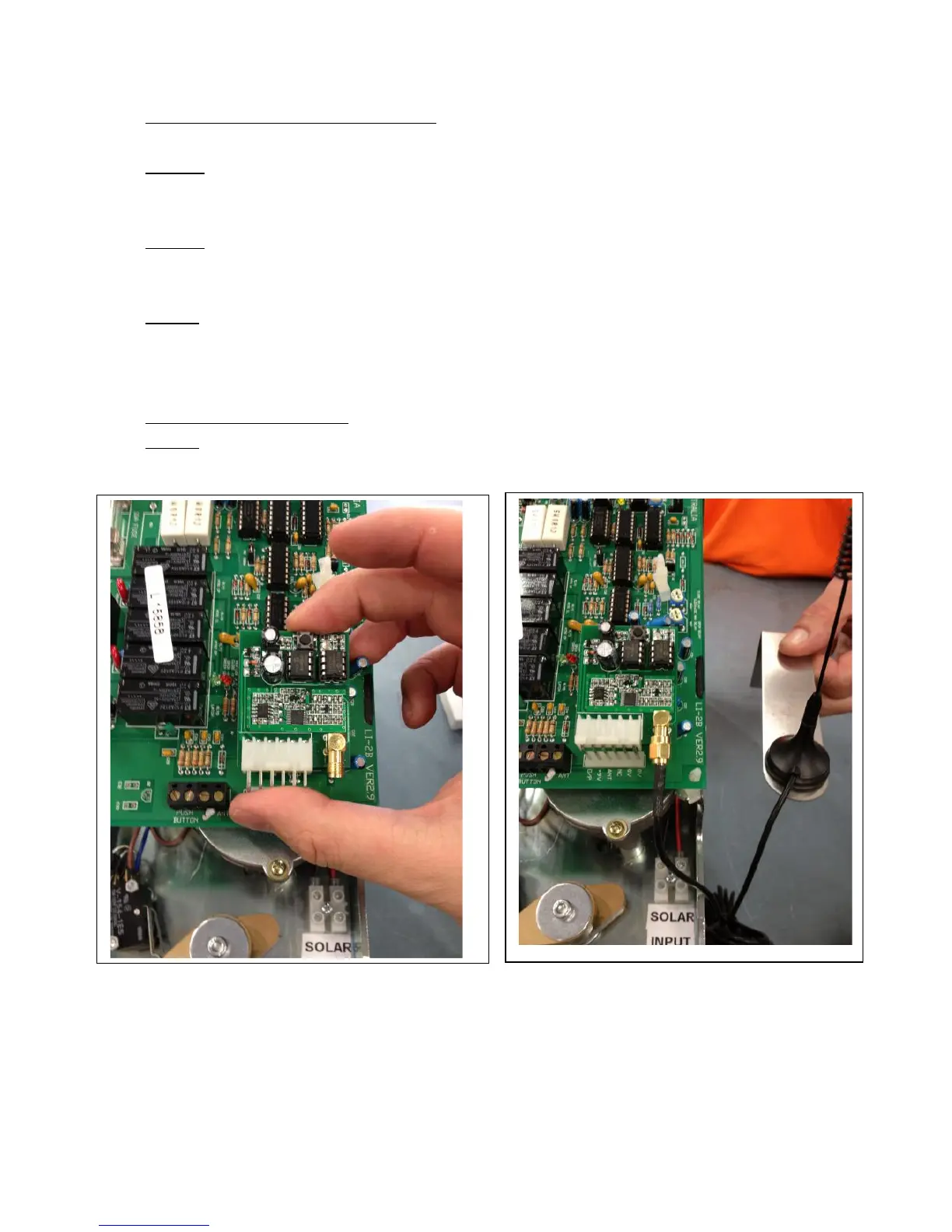
INSTALLING THE RADIO RECEIVER:
Step 1. Ensure that Positive lead [RED] is disconnected and away from the
Battery Positive terminal
Step 2. Ensure Solar Panel [or Mains power] is NOT Connected to the Gate
operator
Step 3. Line up the ports on the radio receiver [Rx] with the 6 PRONGS on the
Main circuit board - now slide the Radio Receiver [Rx] fully onto the 6
prongs at the bottom end of the main circuit board.
Attaching the Antenna.
Step 1. Attach the end of the Antenna cable to the Radio receiver board
[When ready]
Attach Radio receiver board Attach Antenna
Note: Kits from February 2014 come with a Box marked Rx30M this contains
3 Remote Controls [Tx10], 2 Keypads [DK50] and 1 Radio receiver [Rx 30].
The Remotes and Keypads are pre-programmed to the radio receiver.
Refer to page 19 for further information on Remotes and Keypads etc



 To Next Page