Document No. 8128000560
Software Revision – N1B (07 Oct 04)
7-16
RT-9000 B
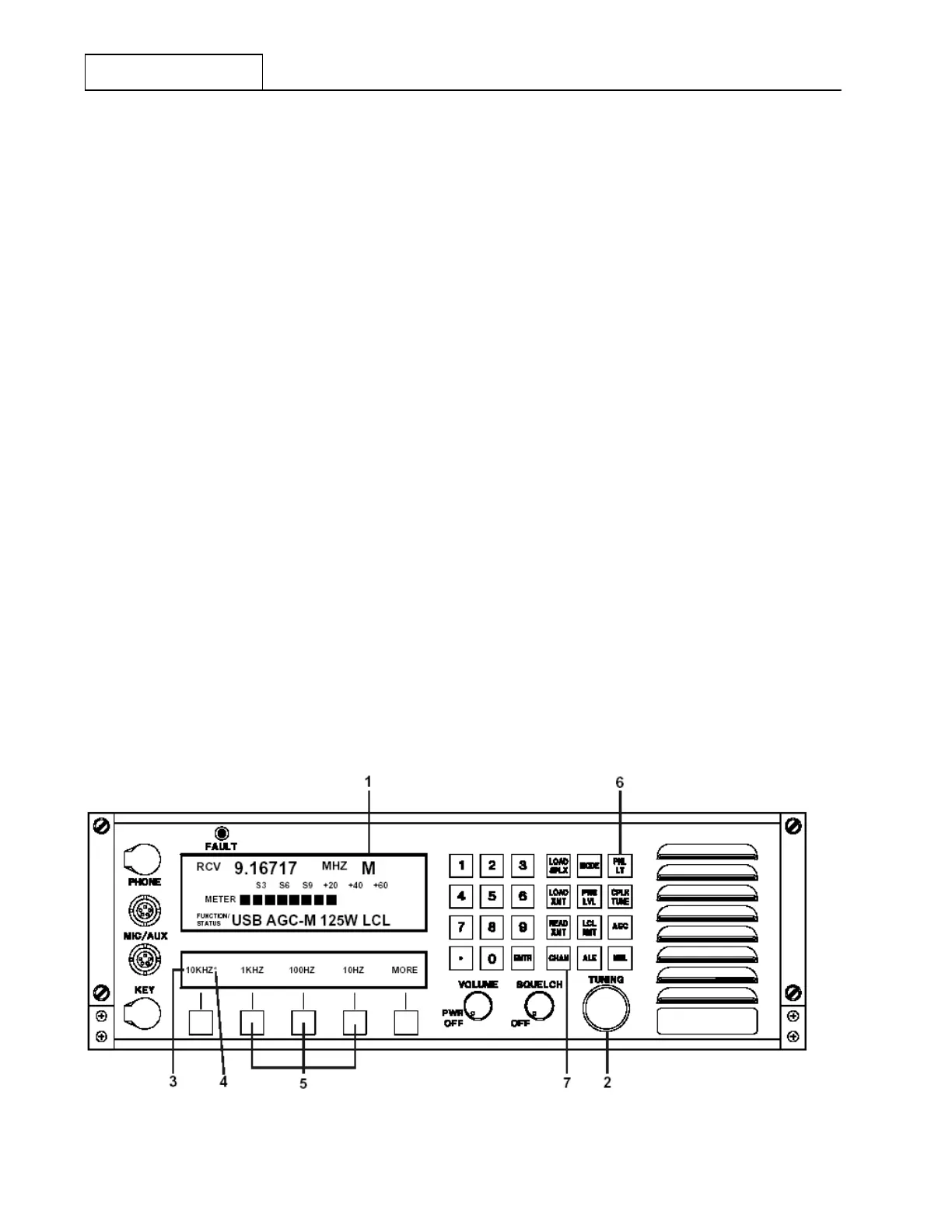
To manually tune the RT-9000 B Transceiver, the unit must be in Manual mode and have an operating
frequency established according to section 7.3.2.2. Refer to Figure 7.3.2.4.
The rate the operating frequency is changed is indicated in the Feature Menu Display at 3. Four (4) different
Frequency Step choices are available and are selected using the Feature keys directly below the Frequency
Step values shown in the Feature Menu Display. An asterisk (*) will appear immediately to the right of the
selected Frequency Step value.
As an example, in Figure 7.3.2.4, the asterisk beside ‘10KHZ’ shown at 4 indicates this is the current
Frequency Step value. Selecting any of the other values immediately enables that value. By using the
“TUNING” dial and the available Frequency Step values, the operator may easily and rapidly train in on a
specific frequency or range of frequencies.
If the user wishes to make large changes in operating frequency which would not be practical using the
‘TUNING’ control, the Load Simplex (‘LOAD SPLX’) key may also be used to enter the new operating
frequency. To do this, depress the ‘LOAD SPLX’ key. Key in the new frequency with the Numeric Keypad and
depress the Enter (‘ENTR’) key. The operator may then continue to operate the system as previously
described on the newly entered frequency.
All operating frequency entries in the Manual Tuning mode operate exclusively as Simplex frequencies. If the
User attempts to load a different Transmit frequency using the ‘LOAD XMT’ key, the following message will
briefly appear in the Operational Display and then automatically clear.
‘DISALLOWED IN MANUAL’
NOTE: Systems having an Antenna Coupler present and operating in ‘Manual
Tuning’ must be re-tuned whenever the current operating frequency is
changed before Transmitting. Refer to the previous section 7.3.2.4 for
details.
To exit Manual Tuning (‘MNL’) mode, depress the ‘CHAN’ key at 7 . Refer to section 7.3.2.7 for details about
operating with Pre-set Channels.
Figure 7.3.2.4 Manual Tuning Controls
RT-9000 B


 To Next Page
 Loading...
