Document No. 8128000560
Software Revision – N1B (07 Oct 04)
7-21
RT-9000 B
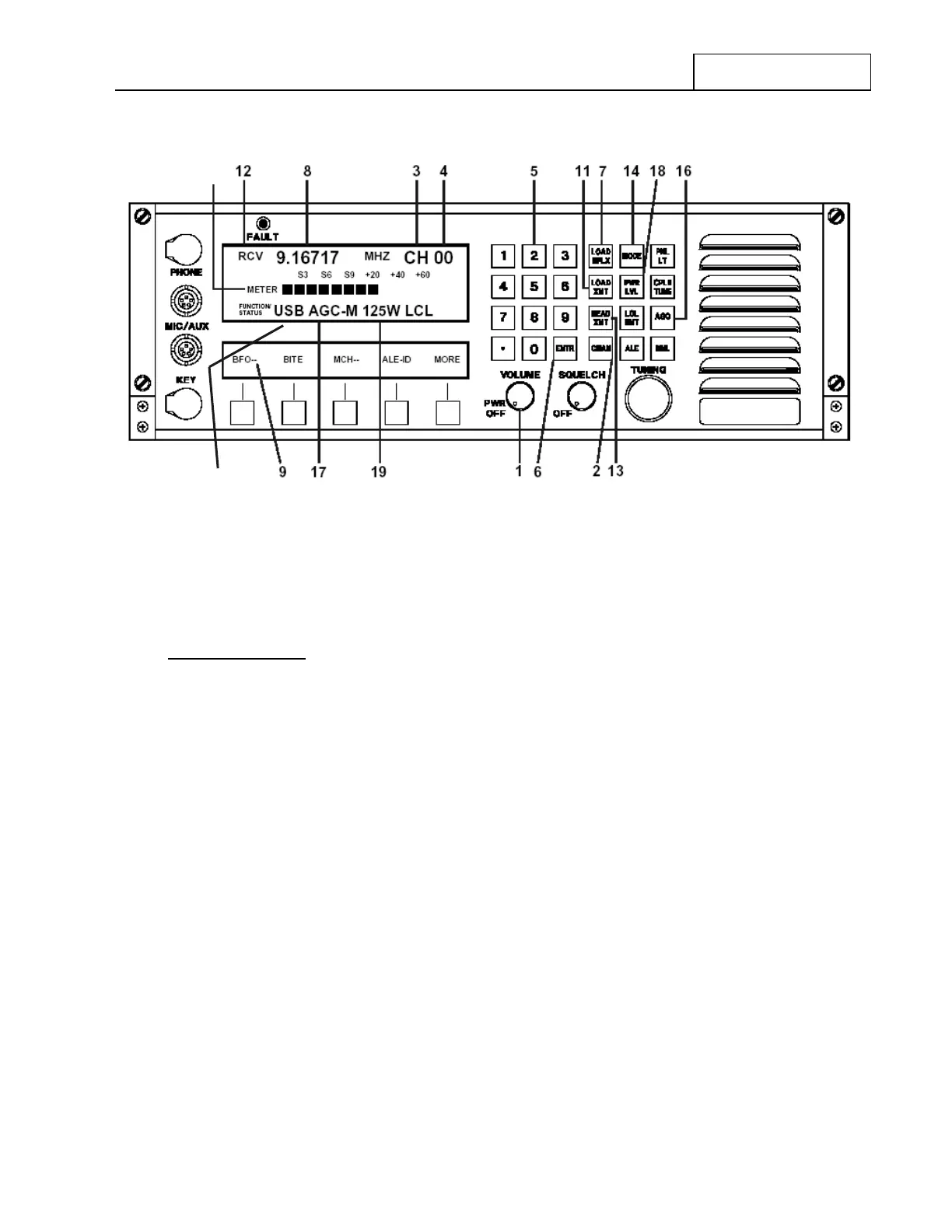
Figure 7.3.2.7 Pre-set Channel Entry Controls
7.3.2.9.2 Operating Frequency Entry
Simplex Operation
Depress the Load Simplex (‘LOAD SPLX’) key at 7. The frequency display at 8 will go blank and
the “Receive/Transmit” mode designator at 12 will continue to display the Receive ‘RCV’ indication.
Using the Numeric Keypad at 5, key in the desired Operating Frequency (between 100 kHz and
29.99999 MHz). As each digit is keyed in, it will appear in the Operational Display at 8 in order of
entry (left to right).
After the Operating Frequency has been completely keyed in, depress the Enter (‘ENTR’) key at 6 to
store it in the currently selected Channel Number. Immediately after depressing the ‘ENTR’ key, the
frequency display in the Operational Display will momentarily blink but remain on the entered
frequency.
NOTE: After the ‘LOAD SPLX’ key is depressed, the Feature Menu Display
shown in Figure 7.3.2.8 will appear and provide an Erase (‘ERASE’)
choice at 10 . This allows the user to erase a frequency just entered, one
digit at a time, beginning with the last digit entered (most right-hand).
After the desired digit(s) are erased, simply resume the frequency entry
process using the Numeric Keypad. DO NOT depress the End (‘END’)
key at 20.
The ‘END’ key aborts the frequency entry process and causes the
currently selected Pre-Channel to revert to its original settings.
RT-9000 B
15


 To Next Page
 Loading...
