13
Marinate Mode
Vacuum sealing opens the pores in foods such as meats, poultry and seafood absorbing
marinades much faster than traditional marinating methods. The Marinate Mode is a 10
minute cycle. The vacuum motor will ‘hold’ the vacuum for several minutes then release
the vacuum allowing the food to ‘rest’ for 30 seconds. This process will then repeat two
more times. This “Pulsing” action of “vacuuming and resting” will allow for quicker
marinating. When the Quick Marinate Cycle is completed the appliance will beep.
Accessory
VS8000
FoodSaver
®
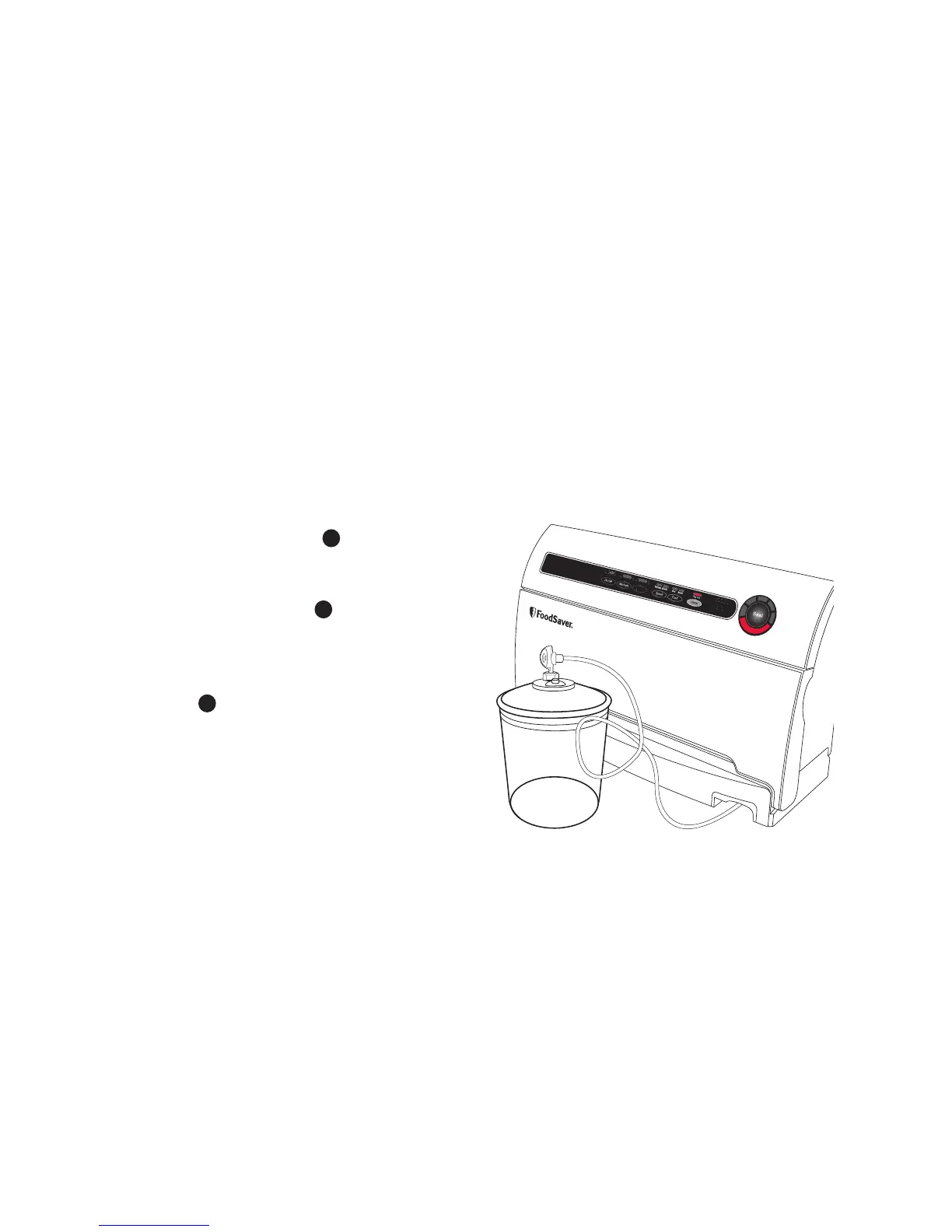
Canisters are the perfect
FoodSaver
®
Accessory for marinating foods.
1. Place food and marinade inside a
FoodSaver
®
canister. Leave at least 2cm
space between contents and top of rim.
2. Make sure lid is correctly fitted and free
from food materials.
3. Extend Accessory Hose
F
and securely
insert into port on the FoodSaver
®
canister lid.
4. Press Marinate button
3
on the control
panel to begin the 10 minute marinade
cycle.
5. While Marinating, the Vacuum Progress
Display
9
will blink during the ‘Vacuum
Hold’ or ‘Rest’ cycle.
6. To preserve food safely, after completing
the marinating cycle, the appliance will
signal with short beeps to indicate your
Marinate Cycle is completed. Press any
button to silence the signal. You may
now cook or refrigerate your marinated
food.


 To Next Page