10
Using your FoodSaver
®
appliance
- How to make a bag
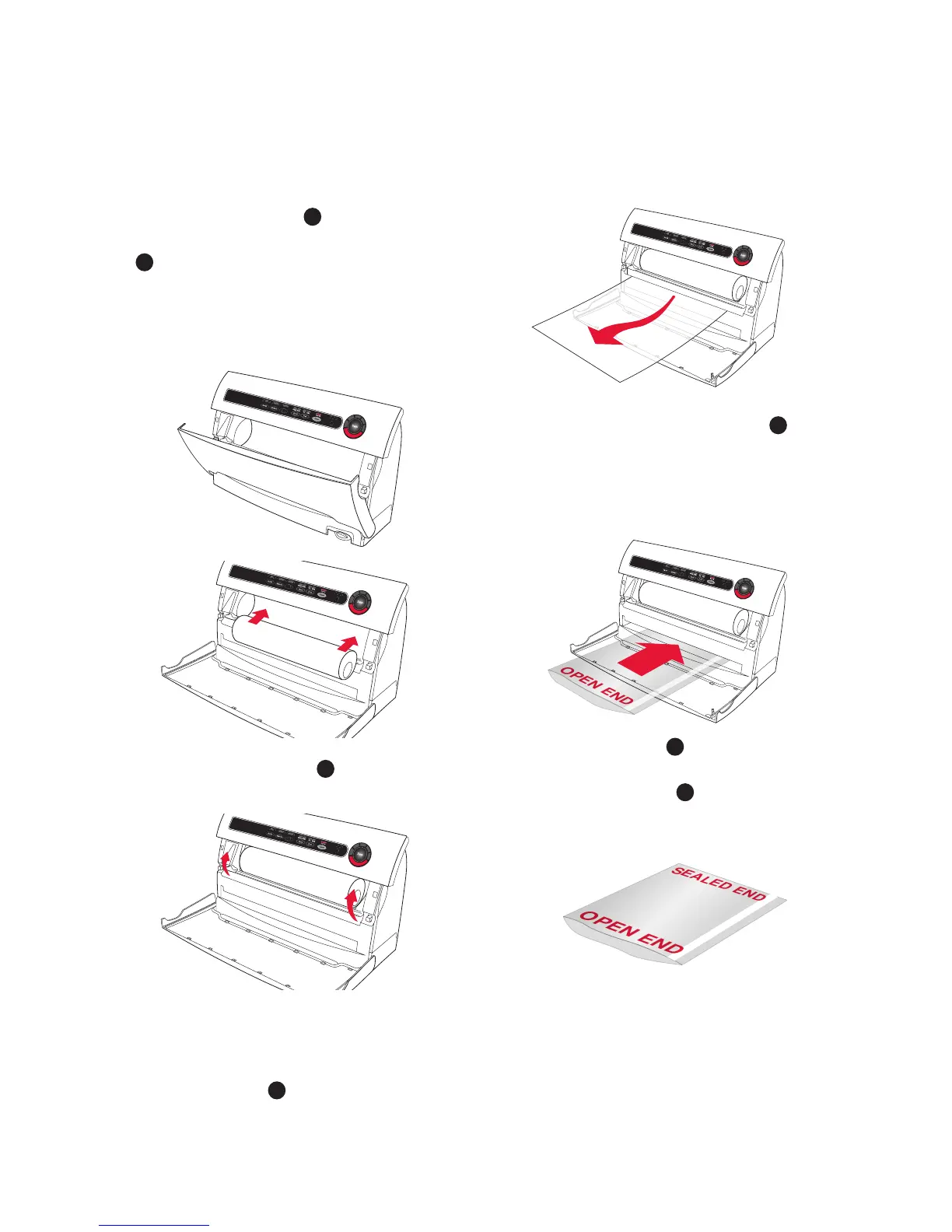
1. Open appliance door
D
(Fig. 1) and
place roll into Roll Storage Compartment
H
(Fig. 2).
For best results, insert roll with material
flap down.
Note: Bags can be sealed with appliance
door either open or closed.
2. Lift up Bag Cutter Bar
I
and place bag
material beneath the cutter bar (Fig. 3).
3. Pull out enough bag material to hold
item being vacuum packed, plus an extra
10 centimetres Lower the Cutter Bar and
slide Bag Cutter
I
across the Cutter Bar
(Fig. 4).
4. Using two hands, insert open end of bag,
curl down, into Vacuum Channel
E
until
clamp motor starts (Fig. 5). Bag must
be centred between arrows. (Vacuum
Channel can operate with door opened or
closed).
5. When red seal light
10
turns off, sealing
is complete. You may remove bag from
the Vacuum Channel
E
.
6. You now have one sealed end. (Fig. 6).
8. Now you are ready to vacuum seal with
your new bag.
Accessory
VS8000
Figure 1
Accessory
VS8000
Figure 2
Accessory
VS8000
Figure 3
Accessory
VS8000
Figure 4
Accessory
VS8000


 To Next Page